
ratwolf
Bronze Coder
Why don’t you take Alcubierre's warp drive!
In short: You’re not moving through space—space is moving around you! But to make it happen, we’ll need to unlock the secrets of energy and matter.
Warp Drive in a Nutshell
The concept of a warp drive—a theoretical propulsion system that allows faster-than-light travel—was first mathematically formalized by physicist Miguel Alcubierre in 1994. Inspired by the idea of bending space-time, Alcubierre proposed a solution within the framework of Einstein's general relativity that could, in theory, enable interstellar travel without violating the laws of physics. Here's how it works:- Space Contracts in Front:
- In front of the bubble, space squeezes together, bringing distant stars and planets closer to you. It’s like scrunching up a piece of paper to bring two points closer.
- Space Expands Behind:
- Behind the bubble, space stretches out, pushing your starting point farther away. It’s like stretching a rubber band to make one end move away.
- You Stay Still:
- Inside the bubble, space-time is flat, so you feel no acceleration or forces. You’re just chilling while space itself does all the work.
- Faster-Than-Light Travel:
- Because space is moving around you, you can effectively travel faster than light without breaking any laws of physics (locally). From the outside, it looks like you’re zooming past stars at incredible speeds, but from your perspective, you’re just sitting still.
The Energy Challenge
Creating a warp bubble requires huge amounts of energy, thanks to Einstein’s famous equation, E=mc^2 This tells us that energy and mass are interchangeable, and warping space-time would need energy equivalent to the mass of entire planets or even stars!- Exotic Matter:
- Scientists speculate that something called exotic matter (with negative mass or energy) might be needed to create the warp bubble. This exotic matter would bend space-time in the right way, but we haven’t found any yet.
- Potential Energy Sources:
- If we could harness the energy of antimatter, black holes, or even dark energy, we might one day power a warp drive. For now, these are just ideas, but they inspire us to push the boundaries of science and technology.
What the Simulation Shows
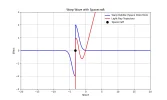
- The blue curve represents the warp bubble, showing how space contracts in front and expands behind.
- The black dot is your spacecraft, sitting safely inside the bubble.
- The red curve shows how light rays bend as they pass through the warped space-time.
Why It’s Cool
- This isn’t science fiction—it’s based on real physics (Einstein’s general relativity)!
- While we don’t yet have the technology to build a warp drive, the idea inspires scientists to explore the boundaries of space, time, and the universe.
In short: You’re not moving through space—space is moving around you! But to make it happen, we’ll need to unlock the secrets of energy and matter.
Python:
import numpy as np
import matplotlib.pyplot as plt
from matplotlib.animation import FuncAnimation

# Define the warp bubble function with space contraction and expansion
def warp_bubble(x, x0, sigma, contraction_strength=1.0, expansion_strength=1.0):
    """
    x: Position in space
    x0: Center of the warp bubble
    sigma: Width of the warp bubble
    contraction_strength: Strength of space contraction in front of the bubble
    expansion_strength: Strength of space expansion behind the bubble
    """
    # Gaussian-shaped warp bubble
    bubble = np.exp(-((x - x0) ** 2) / (2 * sigma ** 2))

    # Space contraction in front of the bubble (x < x0)
    contraction = -contraction_strength * bubble * (x < x0)

    # Space expansion behind the bubble (x > x0)
    expansion = expansion_strength * bubble * (x > x0)

    # Combine contraction and expansion
    return contraction + expansion

# Simulate light rays passing through the warp bubble
def light_ray_trajectory(x, warp_field, bending_strength=1.0):
    """
    Simulate light rays bending due to the warp bubble.
    bending_strength: Controls how much the light rays bend.
    """
    return x + bending_strength * warp_field  # Adjust bending strength

# Initialize the animation
def init_animation():
    """
    Initialize the animation with empty data.
    """
    line_warp.set_data([], [])
    line_light.set_data([], [])
    spacecraft.set_data([], [])
    return line_warp, line_light, spacecraft

# Update function for the animation
def update_animation(frame):
    """
    Update the animation for each frame.
    """
    x0 = x0_values[frame]  # Current position of the warp bubble
    warp_field = warp_bubble(x, x0, sigma, contraction_strength, expansion_strength)  # Calculate the warp bubble
    light_rays = light_ray_trajectory(x, warp_field, bending_strength)  # Calculate light ray trajectories

    # Update the plot
    line_warp.set_data(x, warp_field)
    line_light.set_data(x, light_rays)
    spacecraft.set_data([x0], [0])  # Spacecraft is at the center of the warp bubble
    return line_warp, line_light, spacecraft

# Main function to run the simulation
def main():
    """
    Main function to set up and run the warp drive simulation.
    """
    global x, sigma, contraction_strength, expansion_strength, bending_strength, num_frames, x0_values
    global line_warp, line_light, spacecraft

    # Parameters
    x = np.linspace(-20, 20, 1000)  # Space coordinates (extended range)
    sigma = 1  # Width of the warp bubble
    contraction_strength = 2.0  # Strength of space contraction
    expansion_strength = 2.0  # Strength of space expansion
    bending_strength = 2.0  # Increase bending effect for better visibility
    num_frames = 100  # Number of animation frames
    x0_values = np.linspace(-15, 15, num_frames)  # Move the warp bubble from x = -15 to x = 15

    # Set up the plot
    fig, ax = plt.subplots(figsize=(10, 6))
    line_warp, = ax.plot([], [], label="Warp Bubble (Space Distortion)", color="blue", linewidth=2)
    line_light, = ax.plot([], [], label="Light Ray Trajectory", color="red", linewidth=2)
    spacecraft, = ax.plot([], [], 'ko', markersize=10, label="Spacecraft")  # Spacecraft marker
    ax.set_xlim(-20, 20)
    ax.set_ylim(-3, 3)
    ax.set_xlabel("Space")
    ax.set_ylabel("Effect")
    ax.set_title("Warp Wave with Spacecraft")
    ax.legend()
    ax.grid()

    # Create the animation
    ani = FuncAnimation(fig, update_animation, frames=num_frames, init_func=init_animation, blit=True, interval=50)

    # Show the animation
    plt.show()

# Run the simulation
if __name__ == "__main__":
    main()
Last edited:





