Welcome to Code Forum!

Join a community that supports you and your coding journey from day one. We strive to be a friendly, supportive community that empowers everyone to be better developers. By registering with us, you'll be able to discuss, share and private message with other members of our community.

SignUp Now!

Android Studio says "The Flutter SDK is incomplete".

RAH S

Coder
When I try to create a new flutter project in Android Studio, it says that "The Flutter SDK is incomplete" after I specify the SDK.
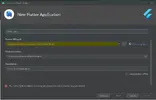
error flutter.webp

The Next button is also greyed out so I can't continue either. I have followed all the instructions on the flutter.dev website and installed the Flutter and Dart plug-ins.
 
Hi there,

Welcome to Code Forum!

You may have already done this but try redownloading the Sdk. Move it to a different location and try it again.
 
It is said that executing the command flutter doctor from the directory of Flutter will tell you the state of its installation.
 
It is said that executing the command flutter doctor from the directory of Flutter will tell you the state of its installation.
Thank you very much.
I have been trying for ages and it did not work but your fix was perfect.
👍
 
  1. Download "flutter_windows_1.22.6-stable.zip" from https://storage.googleapis.com/flut...ble/windows/flutter_windows_1.22.6-stable.zip.
  2. Extract files.
  3. Turn on a VPN (ex: Hotspot Shield).
  4. Click right-click on "Extracted files: flutter\bin\dart.bat > Run as administrator.
  5. Wait for downloading.
  6. Go to edit variables (This PC > properties > Advanced system settings > Advanced > Environment Variables).
  7. Edit (create if not exist) Path variable to "Extracted files: flutter\bin" then click ok.
  8. Download and install Git from https://git-scm.com/download/win.
  9. Open cmd, write "flutter", wait to download.
  10. Write "flutter doctor" in cmd, and solve all the problems they pose.
 

Buy us a coffee!

Buy me a coffee.
Back
Top Bottom


