Hi All...
I am a total newbie to Python & Kivy...
I am actually a VBA Developer and am now needing to convert my Excel App to an Android App...
Demo Here
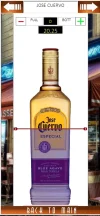
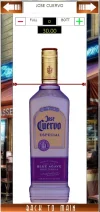
As per my demo...and images posted below - before | after...I am needing a method to bind my vertical slider to an image overlaying another duplicate image - different shade so that as the slider moves down the underneath image is revealed creating the liquid level measurement effect...
This is the 2nd last snippet I need to complete my app...
Can anyone offer any advice as how to do this or point me to a site...
Here is my code that produces this...
String snippet...
Python File...
Thanks in advance...
Steven...
I am a total newbie to Python & Kivy...
I am actually a VBA Developer and am now needing to convert my Excel App to an Android App...
Demo Here
As per my demo...and images posted below - before | after...I am needing a method to bind my vertical slider to an image overlaying another duplicate image - different shade so that as the slider moves down the underneath image is revealed creating the liquid level measurement effect...
This is the 2nd last snippet I need to complete my app...
Can anyone offer any advice as how to do this or point me to a site...
Here is my code that produces this...
String snippet...
Code:
Code = """
ScreenManager:
    EzLaunchScreen:
# Coding for Launch Screen...
<EzLaunchScreen>:
    name: 'EzLaunch'
    BoxLayout:
        # This is the slider control for alcohol levels...
        Slider:
            background_color: 0, 0, 0, 0
            id: slider_widget
            min: 0
            max: 30
            step: .25
            value: 30
            cursor_image: 'Images\slider.png'
            cursor_width: 238
            cursor_height: 15
            orientation: 'vertical'
            size_hint: None, None
            size: '320dp', '500dp'
            pos_hint: {'x': 0,'y': 0.011}

"""
Python File...
Python:
class EzLaunchScreen(Screen):

    image1 = StringProperty("")

    def __init__(self, **kwargs):
        super().__init__(**kwargs)

        img_path =  r'D:\Steven\Desktop\Python App\Images\Carousel\\'

        # Funtion get images int carousel...
        layout = FloatLayout()
        self.background_image = Image(source=r'Images\launchScreen.png')
        self.carousel_widget = Carousel(direction ='right')

        # Load images into carousel from path...
        for img_file in os.listdir(img_path):
            if img_file.endswith(('.png', '.jpg', '.jpeg')):
                if not self.image1:
                    self.image1 = img_file.split('.')[0].upper()

                img = Image(source=os.path.join(img_path, img_file))
                print(f"Adding image: {img_file}")
                self.carousel_widget.add_widget(img)

        layout.add_widget(self.background_image)
        layout.add_widget(self.carousel_widget)

        overlay_layout = FloatLayout(size_hint=(1, 1))
        overlay_layout.opacity = 1

        rectangle_size = (320, 680)

        with overlay_layout.canvas.before:
            Color(0, 0, 0, 0)
            self.rect = Rectangle(pos=(0, 0), size=rectangle_size, border=[(2, (0, 0, 0))])

        self.overlay_image = Image(source='Images\\CarouselF\\Jose CuervoF.png',
                                    size_hint=(None, None), size=rectangle_size,
                                    pos_hint={'center_x': 0.5, 'center_y': 0.5})


        overlay_layout.add_widget(self.overlay_image)
        layout.add_widget(overlay_layout)
        self.add_widget(layout)
Thanks in advance...
Steven...
Attachments
Last edited:





