
Welcome to Code Forum!

Join a community that supports you and your coding journey from day one. We strive to be a friendly, supportive community that empowers everyone to be better developers. By registering with us, you'll be able to discuss, share and private message with other members of our community.

SignUp Now!
  • Guest, before posting your code please take these rules into consideration:
    • It is required to use our BBCode feature to display your code. While within the editor click < / > or >_ and place your code within the BB Code prompt. This helps others with finding a solution by making it easier to read and easier to copy.
    • You can also use markdown to share your code. When using markdown your code will be automatically converted to BBCode. For help with markdown check out the markdown guide.
    • Don't share a wall of code. All we want is the problem area, the code related to your issue.

    GIF shows where to locate </> in the thread and or post editor toolbar.
    To learn more about how to use our BBCode feature, review our "How to post your code into threads" here.

    Thank you, Code Forum.

Can the position of controls and indicators be adjusted in a bootstrap Carousel?

Hello,

I'm using Bootstrap Studio 5.3 and wondering if the position of controls and indicators be adjusted in a Carousel.

I’ve tried using the “Move” tool, but I can’t get either to move from their positions. I’m assuming because the controls are locked?
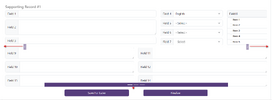
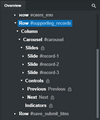
Screenshot 2024-03-05 161658.png

Screenshot 2024-03-05 162056.png

I’m thinking that my form inputs are in the space that a carousel would typically have a “background” image take up (overlapping past the prev and next controls).

How to move the controls and indicators out more to where the red pointers are showing? Basically, just outside the “Slide” divs?

If that’s not possible because of some BSS constraint, how then to make the form input fields closer together so that they all fall inside of were the immovable controls and indicators are located?

Thank you.
 
Hello,

I'm using Bootstrap Studio 5.3 and wondering if the position of controls and indicators be adjusted in a Carousel.

I’ve tried using the “Move” tool, but I can’t get either to move from their positions. I’m assuming because the controls are locked?

View attachment 2535

View attachment 2536

I’m thinking that my form inputs are in the space that a carousel would typically have a “background” image take up (overlapping past the prev and next controls).

How to move the controls and indicators out more to where the red pointers are showing? Basically, just outside the “Slide” divs?

If that’s not possible because of some BSS constraint, how then to make the form input fields closer together so that they all fall inside of were the immovable controls and indicators are located?

Thank you.

Tough one. Without seeing code, I'd guess as long as you can implement overrides you can pad the sides of your form and absolutely position the arrows in that padding. Same with the bottom and slide indicators.

I've never used Bootstrap.
 

Latest posts

Buy us a coffee!

Buy me a coffee.
Back
Top Bottom


