

Ghost Rider
New Coder
Does anyone know how to fix this issue I am having with reading 'width'? Just started using JavaScript today and need help. I have included a screen shot and the files I currently have setup (excluding | .gitignore | .vscode | package.json | package-lock.json | node_mdules(folder*) | ).
At the end of this message I have another screen shot of multiple package.json and package-lock.json and wondering if I accidentally duplicated those and need to delete 1 of each.
Screenshot:
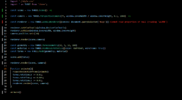
main.js:
index.html:
style.css:
favicon.svg:
2nd Screen Shot: Multiple packages.json:

At the end of this message I have another screen shot of multiple package.json and package-lock.json and wondering if I accidentally duplicated those and need to delete 1 of each.
Screenshot:
main.js:
JavaScript:
import './style.css'
import * as THREE from 'three';
const scene = new THREE.Scene()
const camera = new THREE.PerspectiveCamera(75, window.innerWidth / window.innerHeight, 0.1, 1000)
const renderer = new THREE.WebGL1Renderer({canvas: document.querySelector("app")})
renderer.setPixelRatio(window.devicePixelRatio)
renderer.setSize(window.innerWidth, window.innerHeight)
camera.position.setZ(30)
renderer.render(scene.camera)
const geometry = new THREE.TorusGeometry(10, 3, 16, 100)
const material = new THREE.MeshBasicMaterial({color: 0xFF6347, wireframe: true})
const torus = new THREE.Mesh(geometry, material)
scene.add(torus)
renderer.render(scene, camera)
function animate(){
  requestAnimationFrame(animate)
  torus.rotation.x += 0.01;
  torus.rotation.y += 0.005;
  torus.rotation.z += 0.01;
  renderer.render(scene, camera)
}
animate()
index.html:
HTML:
<!DOCTYPE html>
<html lang="en">
  <head>
    <meta charset="UTF-8" />
    <link rel="icon" type="image/svg+xml" href="favicon.svg" />
    <meta name="viewport" content="width=device-width, initial-scale=1.0" />
    <title>Vite App</title>
  </head>
  <body>
    <canvas id="app"></canvas>
    <script type="module" src="/main.js"></script>
  </body>
</html>
style.css:
CSS:
canvas{
  position: fixed;
  top: 0;
  left: 0;
}
favicon.svg:
SVG:
<svg width="410" height="404" viewBox="0 0 410 404" fill="none" xmlns="http://www.w3.org/2000/svg">
<path d="M399.641 59.5246L215.643 388.545C211.844 395.338 202.084 395.378 198.228 388.618L10.5817 59.5563C6.38087 52.1896 12.6802 43.2665 21.0281 44.7586L205.223 77.6824C206.398 77.8924 207.601 77.8904 208.776 77.6763L389.119 44.8058C397.439 43.2894 403.768 52.1434 399.641 59.5246Z" fill="url(#paint0_linear)"/>
<path d="M292.965 1.5744L156.801 28.2552C154.563 28.6937 152.906 30.5903 152.771 32.8664L144.395 174.33C144.198 177.662 147.258 180.248 150.51 179.498L188.42 170.749C191.967 169.931 195.172 173.055 194.443 176.622L183.18 231.775C182.422 235.487 185.907 238.661 189.532 237.56L212.947 230.446C216.577 229.344 220.065 232.527 219.297 236.242L201.398 322.875C200.278 328.294 207.486 331.249 210.492 326.603L212.5 323.5L323.454 102.072C325.312 98.3645 322.108 94.137 318.036 94.9228L279.014 102.454C275.347 103.161 272.227 99.746 273.262 96.1583L298.731 7.86689C299.767 4.27314 296.636 0.855181 292.965 1.5744Z" fill="url(#paint1_linear)"/>
<defs>
<linearGradient id="paint0_linear" x1="6.00017" y1="32.9999" x2="235" y2="344" gradientUnits="userSpaceOnUse">
<stop stop-color="#41D1FF"/>
<stop offset="1" stop-color="#BD34FE"/>
</linearGradient>
<linearGradient id="paint1_linear" x1="194.651" y1="8.81818" x2="236.076" y2="292.989" gradientUnits="userSpaceOnUse">
<stop stop-color="#FFEA83"/>
<stop offset="0.0833333" stop-color="#FFDD35"/>
<stop offset="1" stop-color="#FFA800"/>
</linearGradient>
</defs>
</svg>
2nd Screen Shot: Multiple packages.json:





