Welcome to Code Forum!

Join a community that supports you and your coding journey from day one. We strive to be a friendly, supportive community that empowers everyone to be better developers. By registering with us, you'll be able to discuss, share and private message with other members of our community.

SignUp Now!
  • Guest, before posting your code please take these rules into consideration:
    • It is required to use our BBCode feature to display your code. While within the editor click < / > or >_ and place your code within the BB Code prompt. This helps others with finding a solution by making it easier to read and easier to copy.
    • You can also use markdown to share your code. When using markdown your code will be automatically converted to BBCode. For help with markdown check out the markdown guide.
    • Don't share a wall of code. All we want is the problem area, the code related to your issue.

    GIF shows where to locate </> in the thread and or post editor toolbar.
    To learn more about how to use our BBCode feature, review our "How to post your code into threads" here.

    Thank you, Code Forum.

Can't find black box to remove

LKinneyX23

Active Coder
It's gotta be something extremely easy, but I cannot find the code doing it.

I need to remove the black box on the menu items that appear when you click on them (ex: "Shop") on
this website

I used bootstrap code for this way back in the day.

Thanks!
 
Solution
I added the code below to my "style.css" and the box remains. If you could just give me the code I need to put in, I would very much appreciate it as I've crossed into the "ready to throw the computer out the window" level days ago.

CSS:
.navbar-inverse{background-color:#222;border-color:transparent !important}
.navbar-inverse .navbar-brand:focus,.navbar-inverse .navbar-brand:hover{color:#fff;background-color:transparent !important}
.navbar-inverse .navbar-nav>li>a:focus,.navbar-inverse .navbar-nav>li>a:hover{color:#fff;background-color:transparent !important}
.navbar-inverse .navbar-nav>.active>a,.navbar-inverse .navbar-nav>.active>a:focus,.navbar-inverse .navbar-nav>.active>a:hover{color:#fff;background-color:transparent...
THANK YOU. I don't know why I couldn't find it when I did a search by "#000"

Okay, so I deleted the line from the bootstrap.min sheet and then added the following to my "style"

CSS:
.navbar-inverse .navbar-nav>.open>a:hover{color:#fff;background-color:transparent !important;}

But the stupid black box remains!
 
THANK YOU. I don't know why I couldn't find it when I did a search by "#000"

Okay, so I deleted the line from the bootstrap.min sheet and then added the following to my "style"

CSS:
.navbar-inverse .navbar-nav>.open>a:hover{color:#fff;background-color:transparent !important;}

But the stupid black box remains!
rather than transparent, change it to none and keep the !important flag
 
CSS:
.navbar-inverse .navbar-nav>.open>a:hover{color:#fff;background-color:#080808}

This bit (hard for me to tell exactly from your images as it's just a wall of text in Dreamweaver on my end, which is part of the problem of me trying to find things)? I deleted that and still black. At this point I am tempted to just delete anything with "#080808" :laugh:

May I ask what program you are using? I've been using Dreamweaver forever as I pay for Adobe, but I'm told it sucks now since it's never updated. Whatever you are using looks much more helpful in, you know, FINDING the code that does a thing! :laugh:
 
CSS:
.navbar-inverse .navbar-nav>.open>a:hover{color:#fff;background-color:#080808}

This bit (hard for me to tell exactly from your images as it's just a wall of text in Dreamweaver on my end, which is part of the problem of me trying to find things)? I deleted that and still black. At this point I am tempted to just delete anything with "#080808" :laugh:

May I ask what program you are using? I've been using Dreamweaver forever as I pay for Adobe, but I'm told it sucks now since it's never updated. Whatever you are using looks much more helpful in, you know, FINDING the code that does a thing! :laugh:
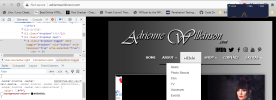
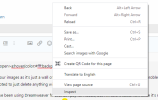
None actually... it's actually in the browser itself... if you right click anywhere on the page, you'll get a menu pop up, just click on "inspect"
1692509922417.png
 
None actually... it's actually in the browser itself... if you right click anywhere on the page, you'll get a menu pop up, just click on "inspect"
View attachment 2259
also... you might not want to look for it in the actual file itself...given the fact it's minified (.min.css).. that means it's been condensed so that it improves performance, all you're going to see is a wall of WTF lol... best advice I can give you is to use the inspector on the browser to find the rules, and create your own rules to override those and don't forget to add the !important flag
 
As I noted, I already did:

CSS:
.navbar-inverse .navbar-nav>.open>a:hover{color:#fff;background-color:transparent !important;}

And nothing changed. I cannot get rid of the black box.

What am I missing?
 
I added the code below to my "style.css" and the box remains. If you could just give me the code I need to put in, I would very much appreciate it as I've crossed into the "ready to throw the computer out the window" level days ago.

CSS:
.navbar-inverse{background-color:#222;border-color:transparent !important}
.navbar-inverse .navbar-brand:focus,.navbar-inverse .navbar-brand:hover{color:#fff;background-color:transparent !important}
.navbar-inverse .navbar-nav>li>a:focus,.navbar-inverse .navbar-nav>li>a:hover{color:#fff;background-color:transparent !important}
.navbar-inverse .navbar-nav>.active>a,.navbar-inverse .navbar-nav>.active>a:focus,.navbar-inverse .navbar-nav>.active>a:hover{color:#fff;background-color:transparent !important}
.navbar-inverse .navbar-nav>.disabled>a,.navbar-inverse .navbar-nav>.disabled>a:focus,.navbar-inverse .navbar-nav>.disabled>a:hover{color:#444;background-color:transparent}
.navbar-inverse .navbar-toggle{border-color:transparent !important}
.navbar-inverse .navbar-toggle:focus,.navbar-inverse .navbar-toggle:hover{background-color:transparent !important}
.navbar-inverse .navbar-collapse,.navbar-inverse .navbar-form{border-color:transparent !important}
.navbar-inverse .navbar-nav>.open>a,.navbar-inverse .navbar-nav>.open>a:focus,.navbar-inverse .navbar-nav>.open>a:hover{color:#fff;background-color:transparent !important}
.navbar-inverse .navbar-nav .open .dropdown-menu>.dropdown-header{border-color:transparent !important}
.navbar-inverse .navbar-nav .open .dropdown-menu .divider{background-color:transparent !important}
.navbar-inverse .navbar-nav .open .dropdown-menu>li>a:focus,.navbar-inverse .navbar-nav .open .dropdown-menu>li>a:hover{color:#fff;background-color:transparent !important}
.navbar-inverse .navbar-nav .open .dropdown-menu>.active>a,.navbar-inverse .navbar-nav .open .dropdown-menu>.active>a:focus,.navbar-inverse .navbar-nav .open .dropdown-menu>.active>a:hover{color:#fff;background-color:transparent !important}

 
I added the code below to my "style.css" and the box remains. If you could just give me the code I need to put in, I would very much appreciate it as I've crossed into the "ready to throw the computer out the window" level days ago.

CSS:
.navbar-inverse{background-color:#222;border-color:transparent !important}
.navbar-inverse .navbar-brand:focus,.navbar-inverse .navbar-brand:hover{color:#fff;background-color:transparent !important}
.navbar-inverse .navbar-nav>li>a:focus,.navbar-inverse .navbar-nav>li>a:hover{color:#fff;background-color:transparent !important}
.navbar-inverse .navbar-nav>.active>a,.navbar-inverse .navbar-nav>.active>a:focus,.navbar-inverse .navbar-nav>.active>a:hover{color:#fff;background-color:transparent !important}
.navbar-inverse .navbar-nav>.disabled>a,.navbar-inverse .navbar-nav>.disabled>a:focus,.navbar-inverse .navbar-nav>.disabled>a:hover{color:#444;background-color:transparent}
.navbar-inverse .navbar-toggle{border-color:transparent !important}
.navbar-inverse .navbar-toggle:focus,.navbar-inverse .navbar-toggle:hover{background-color:transparent !important}
.navbar-inverse .navbar-collapse,.navbar-inverse .navbar-form{border-color:transparent !important}
.navbar-inverse .navbar-nav>.open>a,.navbar-inverse .navbar-nav>.open>a:focus,.navbar-inverse .navbar-nav>.open>a:hover{color:#fff;background-color:transparent !important}
.navbar-inverse .navbar-nav .open .dropdown-menu>.dropdown-header{border-color:transparent !important}
.navbar-inverse .navbar-nav .open .dropdown-menu .divider{background-color:transparent !important}
.navbar-inverse .navbar-nav .open .dropdown-menu>li>a:focus,.navbar-inverse .navbar-nav .open .dropdown-menu>li>a:hover{color:#fff;background-color:transparent !important}
.navbar-inverse .navbar-nav .open .dropdown-menu>.active>a,.navbar-inverse .navbar-nav .open .dropdown-menu>.active>a:focus,.navbar-inverse .navbar-nav .open .dropdown-menu>.active>a:hover{color:#fff;background-color:transparent !important}
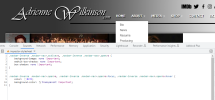
I think you should be fine with these few lines
1692591218882.png
 
Solution

Latest posts

Buy us a coffee!

Buy me a coffee.
Back
Top Bottom