
kirsten123456
Coder
Hi there!
I've added the following code to try and have checkboxes for customers to select a ribbon colour.
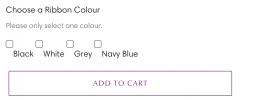
However I want the labels to sit in line with the boxes. I initially wanted a dropdown, but I just can't seem to get that to work - alas I've settled with the radio buttons.
This is the code I've used to get this to show like above. How can I change it so the text lines up with the box?
Also is there code I can add to ensure the customer only selects one?
Thank you so much! 😎
I've added the following code to try and have checkboxes for customers to select a ribbon colour.
However I want the labels to sit in line with the boxes. I initially wanted a dropdown, but I just can't seem to get that to work - alas I've settled with the radio buttons.
This is the code I've used to get this to show like above. How can I change it so the text lines up with the box?
Code:
 <p class="line-item-property__field">
  <label>Choose a Ribbon Colour</label> <font size="2em"; color="#808080";>Please only select one colour.</font>
      <br>
  <input required class="required" type="checkbox" name="properties[Choose a Ribbon Colour]" value="Black" <span>Black</span>
  <input required class="required" type="checkbox" name="properties[Choose a Ribbon Colour]" value="White" <span>White</span>
    <input required class="required" type="checkbox" name="properties[Choose a Ribbon Colour]" value="Grey" <span>Grey</span>
      <input required class="required" type="checkbox" name="properties[Choose a Ribbon Colour]" value="Navy Blue" <span>Navy Blue</span>
  <p>
</p>
Also is there code I can add to ensure the customer only selects one?
Thank you so much! 😎







