
Hi guys n gals,
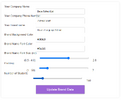
As you can see from the image the labels and the input boxes are not properly aligned horizontally.
Would very much appreciate it if anyone can take a look at the html and css below to help me get this looking better.
Here is the HTML:
And this is the css :
I have tried to only include the relevant code.
Many thanks
As you can see from the image the labels and the input boxes are not properly aligned horizontally.
Would very much appreciate it if anyone can take a look at the html and css below to help me get this looking better.
Here is the HTML:
Code:
<br><br>
                <div id="eduProfileUpdateContainer" style="display: none;">
                    <label for="company_name" id="labelCompany_name"></label>
                    <input type="text" id="company_name"><br>

                    <label for="company_phone" id="labelCompany_phone"></label>
                    <input type="text" id="company_phone"><br>

                    <label for="brand_name" id="labelBrand_name"></label>
                    <input type="text" id="brand_name"><br>

                    <label for="head_bg_color" id="labelBrand_bg_color"></label>
                    <input type="text" id="brand_bg_color"><br>

                    <label for="head_tx_color" id="labelBrand_tx_color"></label>
                    <input type="text" id="brand_tx_color"><br>

                    <label for="head_tx_size" id="labelBrand_tx_size"></label>
                    <span>(0.5 - 4.0)</span>
                    <input type="range" id="brand_tx_size" min="0.5" max="4" step="0.1" value="2.5" oninput="updateTxSizeValue(this.value)">
                    <span id="brand_tx_size_value">2.5</span> <!-- Display the current value of the slider -->

                    <label for="padding" id="labelPadding">Padding</label>
                    <span>(1 - 50)</span>
                    <input type="range" id="padding" min="1" max="50" step="1" value="4" oninput="updatePaddingValue(this.value)">
                    <span id="padding_value">25</span> <!-- Display the current value of the slider -->

                   <label for="student_num" id="labelStudent_num"></label>
                    <input type="range" id="student_num" min="0" max="1000" step="10" value="0" oninput="updateStudentNumValue(this.value)">
                    <span id="student_num_value">0</span> <!-- Display the current value of the slider -->

                    <br><br>
                    <button type="button" id="btnUpdateBrand"></button>
                </div>
And this is the css :
Code:
#progressContainer,#settingsSection, #myprofile, #locationUpdateContainer, #progress, #eduProfileUpdateContainer, #advertContainer {
    width: 100%; /* Set the width to 100% so it doesn't exceed the parent container */
    max-width: 800px; /* Ensure it doesn't grow too large */
    min-width: 300px; /* Optionally set a minimum width for smaller screens */
    margin: 0 auto; /* Center the container */
    text-align: center; /* Center the text inside the container */
    padding: 20px; /* Add padding inside the container */
    box-sizing: border-box; /* Ensure padding doesn't affect width */
    background-color: white;
    border-radius: 8px;
    box-shadow: 0 0 10px rgba(0, 0, 0, 0.1);
    overflow: hidden; /* Prevent overflowing content */
}


/* Container styling */
.container {
    width: 100%;
    max-width: 800px; /* Set a maximum width to limit the size of the container */
    padding: 20px;
    box-sizing: border-box;
    margin: 20px auto; /* Add margin at the top */
    background-color: white;
    border-radius: 8px;
    box-shadow: 0 0 10px rgba(0, 0, 0, 0.1);
}

/* Form styling */
form {
    display: flex;
    flex-direction: column;
    align-items: center;
    text-align: left;
    max-width: 400px;
    width: 100%;
    margin: 0 auto;
}

label {
    display: flex; /* Use flexbox to align items horizontally */
    justify-content: flex-start;
    align-items: flex-start; /* Vertically center the radio button and text */
    margin: 0 0 2px 0; /* Add some space between label blocks */
    white-space: nowrap; /* Prevent text from wrapping */
    width: 100%; /* Ensure the label spans the full width of the form */
    text-align: left; /* Explicitly left-align the text */
}

input {
    padding: 10px;
    width: 100%;
    max-width: 300px;
    margin:0 20px 0 20px;
    border-radius: 5px;
    border: 1px solid #ccc;
}
I have tried to only include the relevant code.
Many thanks





