
Welcome to Code Forum!

Join a community that supports you and your coding journey from day one. We strive to be a friendly, supportive community that empowers everyone to be better developers. By registering with us, you'll be able to discuss, share and private message with other members of our community.

SignUp Now!
  • Guest, before posting your code please take these rules into consideration:
    • It is required to use our BBCode feature to display your code. While within the editor click < / > or >_ and place your code within the BB Code prompt. This helps others with finding a solution by making it easier to read and easier to copy.
    • You can also use markdown to share your code. When using markdown your code will be automatically converted to BBCode. For help with markdown check out the markdown guide.
    • Don't share a wall of code. All we want is the problem area, the code related to your issue.

    GIF shows where to locate </> in the thread and or post editor toolbar.
    To learn more about how to use our BBCode feature, review our "How to post your code into threads" here.

    Thank you, Code Forum.

JavaScript How would I write this code if then GEO location for woocommerce website?

Stefanos

New Coder
I am currently using woocommerce I am trying to see If i could write a if then snippet that can be added to my woocommerce website,

so if you’re not in xxxx country and you visit the website, you won’t be able to see the add to cart button, you will just see the add to quote button(plugin)
If you're in xxxx country you will see the add to cart button however won't see add to quote button(plugin)

The plugin is called YITH Request a Quote for WooCommerce

Currently how it is displayed
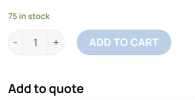
1692527976307.png


Thank you
 
I am currently using woocommerce I am trying to see If i could write a if then snippet that can be added to my woocommerce website,

so if you’re not in xxxx country and you visit the website, you won’t be able to see the add to cart button, you will just see the add to quote button(plugin)
If you're in xxxx country you will see the add to cart button however won't see add to quote button(plugin)

The plugin is called YITH Request a Quote for WooCommerce

Currently how it is displayed
View attachment 2260


Thank you
Hi there,
Unfortunately, it's not going to be as straight forward as you may be thinking. First you would have to look at the html code for the button, and create a mutation observer to check when the button is loaded in. Once loaded in, you would have to get the geo location of the user, whether by user-agent location, or via ip address. Then you can add the if-else logic to hide the button. It is possible though 🙂 if you can get the html code for the button, and share it here, the community can get you started
 
Hi there,
Unfortunately, it's not going to be as straight forward as you may be thinking. First you would have to look at the html code for the button, and create a mutation observer to check when the button is loaded in. Once loaded in, you would have to get the geo location of the user, whether by user-agent location, or via ip address. Then you can add the if-else logic to hide the button. It is possible though 🙂 if you can get the html code for the button, and share it here, the community can get you started
So as of right now my code is working like if you're in US it prevents you from seeing add to cart however i need it the opposite. If youre not in the US then you dont see the add to cart button.
Code:
<?php
// Updated: check for the defined country codes based over user IP geolocation country code
function country_geo_ip_check(){
    // ==> HERE define the countries codes in the array
    $non_allowed_countries = array('US');

    // Get an instance of the WC_Geolocation object class
    $geolocation_instance = new WC_Geolocation();
    // Get user IP
    $user_ip_address = $geolocation_instance->get_ip_address();
    // Get geolocated user IP country code.
    $user_geolocation = $geolocation_instance->geolocate_ip( $user_ip_address );

    return in_array( $user_geolocation['country'], $non_allowed_countries ) ? false : true;
}


// Shop and other archives pages (replacing add to cart by a linked button to the product)
add_filter( 'woocommerce_loop_add_to_cart_link', 'replace_loop_add_to_cart_button', 10, 2 );
function replace_loop_add_to_cart_button( $button, $product  ) {
    if ( country_geo_ip_check() ) return $button;  // Exit for non defined countries

    if ( $product->is_type( 'variable' ) ) return $button; // Excluding variable products

    $button_text = __( "View product", "woocommerce" );
    $button_link = $product->get_permalink();
    return '<a class="button" href="' . $button_link . '">' . $button_text . '</a>';;
}

// Single producct pages
add_action( 'woocommerce_single_product_summary', 'replace_single_add_to_cart_button', 1 );
function replace_single_add_to_cart_button() {
    global $product;

    if ( country_geo_ip_check() ) return;  // Exit for non defined countries

    // For variable product types (keeping attribute select fields)
    if( $product->is_type( 'variable' ) ) {
        remove_action( 'woocommerce_single_variation', 'woocommerce_single_variation_add_to_cart_button', 20 );
    }
    // For all other product types
    else {
        remove_action( 'woocommerce_single_product_summary', 'woocommerce_template_single_add_to_cart', 30 );
    }
}
 
Screw it, i just manually added all the other countries lol
Code:
'AF','AX','AL','DZ','AS','AS','AD','AO','AI','AQ','AG','AR','AM','AW','AU','AT','AZ','BS','BH','BD','BB','BY','BE','BZ','BJ','BM','BT','BO','BA','BW','BV','BR','VG',IO','BN','BG','BF','BI','KH','CM','CA','CV',KY','CF','TD','CL','CN','HK','MO','CX','CC','CO','KM','CG','CD','CK','CR','CI','HR','CU','CY','CZ','DK','DJ','DM','DO','EC','EG','SV','GQ','ER','EE','ET','FK','FO','FJ','FI',FR','GF','PF','TF','GA','GM','GE','DE','GH','GI','GR','GL','GD','GP','GU','GT','GG','GN','GW','GY','HM','VA','HN','HU','IS','IN','ID','IR','IQ','IE','IM','IL','IT','JM','JP','JE','JO','KZ','KE','KI','KP','KR','KW','KG',LA','LV','LB','LS','LR','LY',LI','LT','LU','MK','MG','MW','MY','MV','ML','MT','MH','MQ','MR','MU','YT','MX','FM','MD','MC','MN','ME','MS','MA','MZ','MM','NA','NR','NP','NL','AN','NC','NZ','NI','NE','NG','NU',NF','MP','NO','OM','PK','PW','PS','PA','PG','PY','PE','PH',PN','PL','PT','PR','QA','RE','RO','RU','RW','BL',SH','KN','LC','MF','PM','VC','WS','SM','ST','SA','SN','RS','SC','SL',SG','SK','SI','SB','SO','ZA','GS','SS',ES','LK','SD','SR','SJ',SZ','SE','CH','SY','TW','TJ',TZ','TH','TL','TG','TK','TO','TT',TN','TR','TM','TC',
 
So as of right now my code is working like if you're in US it prevents you from seeing add to cart however i need it the opposite. If youre not in the US then you dont see the add to cart button.
Code:
<?php
// Updated: check for the defined country codes based over user IP geolocation country code
function country_geo_ip_check(){
    // ==> HERE define the countries codes in the array
    $non_allowed_countries = array('US');

    // Get an instance of the WC_Geolocation object class
    $geolocation_instance = new WC_Geolocation();
    // Get user IP
    $user_ip_address = $geolocation_instance->get_ip_address();
    // Get geolocated user IP country code.
    $user_geolocation = $geolocation_instance->geolocate_ip( $user_ip_address );

    return in_array( $user_geolocation['country'], $non_allowed_countries ) ? false : true;
}


// Shop and other archives pages (replacing add to cart by a linked button to the product)
add_filter( 'woocommerce_loop_add_to_cart_link', 'replace_loop_add_to_cart_button', 10, 2 );
function replace_loop_add_to_cart_button( $button, $product  ) {
    if ( country_geo_ip_check() ) return $button;  // Exit for non defined countries

    if ( $product->is_type( 'variable' ) ) return $button; // Excluding variable products

    $button_text = __( "View product", "woocommerce" );
    $button_link = $product->get_permalink();
    return '<a class="button" href="' . $button_link . '">' . $button_text . '</a>';;
}

// Single producct pages
add_action( 'woocommerce_single_product_summary', 'replace_single_add_to_cart_button', 1 );
function replace_single_add_to_cart_button() {
    global $product;

    if ( country_geo_ip_check() ) return;  // Exit for non defined countries

    // For variable product types (keeping attribute select fields)
    if( $product->is_type( 'variable' ) ) {
        remove_action( 'woocommerce_single_variation', 'woocommerce_single_variation_add_to_cart_button', 20 );
    }
    // For all other product types
    else {
        remove_action( 'woocommerce_single_product_summary', 'woocommerce_template_single_add_to_cart', 30 );
    }
}
Might want to avoid manual input lol... remember, some countries, actually I think most if not all, countries also have three letter abbreviations...
United States has 'US' and 'USA'.. might want to just look for a premade list and save that to a json file, and just read that in
 

Buy us a coffee!

Buy me a coffee.
Back
Top Bottom


