kimhauglid
New Coder
Hi. We have a webshop from a big company, and have some access te tweak the layout using a custom CSS and javascript file. Before I'm ordering a new function from our supplier, I wanted to check if I can fix something myself. On for instance https://www.stofflykke.no/categories/monstret-jersey I want to add a mouseover effect showing how many items of each product that are available. If you look in the source code the stock number is already available in the variable "data-quantity";
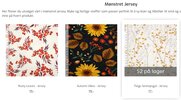
Example attached of how I'm picturing this in real life, third product box has the desired text overlay box.
If I add this to my custom CSS file, the images becomes some transparent on mouseover;
I am some familiar with coding, but haven't got access to add something to the source itself, only editing the layout and function of already defined classes and div's. Let me know if you have any ideas.
Code:
<div class="product in_stock_product" data-quantity="80" id="prod-19749">Example attached of how I'm picturing this in real life, third product box has the desired text overlay box.
If I add this to my custom CSS file, the images becomes some transparent on mouseover;
Code:
/* TEST of image hover tweak */
.image.equal_state:hover {
  opacity: 0.9;
}
I am some familiar with coding, but haven't got access to add something to the source itself, only editing the layout and function of already defined classes and div's. Let me know if you have any ideas.