Welcome to Code Forum!

Join a community that supports you and your coding journey from day one. We strive to be a friendly, supportive community that empowers everyone to be better developers. By registering with us, you'll be able to discuss, share and private message with other members of our community.

SignUp Now!
  • Guest, before posting your code please take these rules into consideration:
    • It is required to use our BBCode feature to display your code. While within the editor click < / > or >_ and place your code within the BB Code prompt. This helps others with finding a solution by making it easier to read and easier to copy.
    • You can also use markdown to share your code. When using markdown your code will be automatically converted to BBCode. For help with markdown check out the markdown guide.
    • Don't share a wall of code. All we want is the problem area, the code related to your issue.

    GIF shows where to locate </> in the thread and or post editor toolbar.
    To learn more about how to use our BBCode feature, review our "How to post your code into threads" here.

    Thank you, Code Forum.

Python Pygame text error

User8574

Active Coder
I enter this code but all that appears is a black rectangle. What do I do to make it output the player_score variable in text?

Code:
font = pygame.font.Font("LEMONMILK-Regular.otf", 30)

player_score = 0
player_score_text = font.render(str(player_score), True, pygame.Color("black"), pygame.Color("white"))

player_score_rect = player_score_text.get_rect()
player_score_rect.center = (200,200)

pygame.draw.rect(screen, black, player_score_rect)
 
You are only drawing the rectangle. Which isn't really necessary unless you want a border of background to your text.
What you really need to do is blit the image to the screen :

Python:
screen.blit(player_score_text, (200, 200))

Personally I would rename that variable. It's not a text, it's an image.
HTH
 
Quick example of text.

Python:
import pygame
pygame.init()

pygame.font.init()

clock = pygame.time.Clock()
fps = 60

screen = pygame.display.set_mode((800,600))

font = pygame.font.SysFont(None, 24)
sysfont = pygame.font.get_default_font()


running = True
while running:
    screen.fill('lightgray')
    event = pygame.event.poll()
    if event.type == pygame.QUIT:
        running = False

    
    text_surface = font.render('Hello World!', True, (0,0,0))
    screen.blit(text_surface, (350, 50))

    text_surface2 = font.render('Hello World!', True, pygame.Color(20,255,20))

    box = pygame.draw.rect(screen, (0,200,0), (300,100,200,40))
    box_rect = text_surface2.get_rect(topleft=(350,115))
    
    screen.blit(text_surface2, box_rect)


    pygame.display.update()
    clock.tick(fps)
 
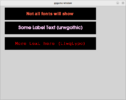
Here is a class example of drawing labels and text
Python:
# Do the imports
import pygame
from random import choice, randint
# Initiate pygame
pygame.init()
# Initiate pygame fonts
pygame.font.init()
# Pygame clock
clock = pygame.time.Clock()
# Frames per second
fps = 60
# Setup the screen display
screen = pygame.display.set_mode((800,600))
# Create the random font from list
def rndfont():
    return choice(pygame.font.get_fonts())
def rndcolor():
    return randint(0, 255), randint(0, 255), randint(0, 255)
# Create the label class
class MyLabel:
    '''
        MyLabel class needs x pos, y pos, width of label, height of label, text for label, and color of label
    '''
    def __init__(self, x, y, width, height, text, textcolor=(0,0,0), default_font=False):
        self.x = x
        self.y = y
        self.width = width
        self.height = height
        self.text = text
        # Check if default is set to True or False
        if default_font:
            self.font = None
            size = 40
        else:
            self.font = rndfont()
            size = 30
        self.sysfont = pygame.font.SysFont(self.font, size)
        # Conditional statement to bot show if default_font is set to True
        show = '' if default_font else f'({self.font})'
        
        # Create label surface and label rect. Add text to label
        self.label_surface = pygame.Surface((self.width, self.height))
        self.label_rect = pygame.Rect(self.x, self.y, self.width, self.height)
        self.label_surf = self.sysfont.render(f'{self.text} {show}', True, textcolor)
        # center text on label
        self.text_rect = self.label_surf.get_rect(center=(self.width/2, self.height/2))
    # draw blits text to label and label to screen
    def draw(self):
        self.label_surface.blit(self.label_surf, self.text_rect)
        screen.blit(self.label_surface, (self.x, self.y))

# Create labels
label = MyLabel(30,10,580,80, 'Not all fonts will show correct', textcolor='tomato', default_font=True)
label1 = MyLabel(30, 110, 580, 80, 'Some Label Text', rndcolor())
label2 = MyLabel(30, 210, 580, 80, 'More text here', rndcolor())
running = True
while running:
    screen.fill('lightgray')
    event = pygame.event.poll()
    if event.type == pygame.QUIT:
        running = False
    # Draw labels to screen
    label.draw()
    label1.draw()
    label2.draw()
    pygame.display.update()
    clock.tick(fps)

1671651455441.png
 
Last edited:
You've been given a solution and two excellent examples. Is there anything else you're expecting ? Why not acknowledge the replies and mark the thread solved ?
 

Buy us a coffee!

Buy me a coffee.
Back
Top Bottom