
I am using jQuery (jui) date picker extension in Yii 2 form. I have a table in the database which stores the StartYear and EndYear. StartYear and EndYear are having varchar datatype.
For example: StartYear : June 2023 and EndYear : April 2024
I have configured the datepicker to show only months and year. Data is correctly getting saved in create action. But in the update action, incorrect values are getting displayed in StartYear and EndYear fields.
Below is the _form.php
Below is the screenshot which shows the Start Year and End Year field values on the update page
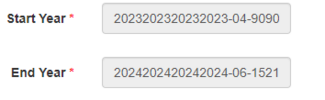
For example: StartYear : June 2023 and EndYear : April 2024
I have configured the datepicker to show only months and year. Data is correctly getting saved in create action. But in the update action, incorrect values are getting displayed in StartYear and EndYear fields.
Below is the _form.php
PHP:
<?php

use yii\helpers\Html;

use yii\bootstrap\ActiveForm;
use yii\jui\DatePicker;
use yii\helpers\ArrayHelper;

/* @var $this yii\web\View */
/* @var $model app\models\Academicyear */
/* @var $form yii\widgets\ActiveForm */
?>

<style type="text/css">
.ui-datepicker-calendar {
        display: none;
    }
</style>


<script>

$(document).ready(function() {
    $('.picker').datepicker({
     changeMonth: true,
     changeYear: true,
     dateFormat: 'MM yy',

         onClose: function() {
        var iMonth = $("#ui-datepicker-div .ui-datepicker-month :selected").val();
        var iYear = $("#ui-datepicker-div .ui-datepicker-year :selected").val();
        $(this).datepicker('setDate', new Date(iYear, iMonth, 1));
     },


});
});
</script>
  <?php $form = ActiveForm::begin()?>
<div class="row">
<div class="col-sm-5">
 <?php
if($model->isNewRecord)
{
    echo $form->field($model, 'StartYear')->widget(DatePicker::classname(), [
                                            //'language' => 'ru',

                                            'options' => ['class' => 'form-control picker','readOnly'=>'readOnly'],
                                            'clientOptions'=>['changeMonth'=>true,
                                            'changeYear'=>true,
                                            'dateFormat' => 'MM yy',
                                            'readOnly'=>true]

]);
}
?>
<?php
// When model is opened in update action
if(!$model->isNewRecord)
{
$a=explode(' ',$model->StartYear);
$month=$a[0];
$year=$a[1];
 echo $form->field($model, 'StartYear')->widget(DatePicker::classname(), [
                                            //'language' => 'ru',

                                            'options' => ['class' => 'form-control picker','readOnly'=>'readOnly'],
                                            'clientOptions'=>['changeMonth'=>true,
                                            'changeYear'=>true,
                                            'dateFormat' => 'MM yy',
                                             'onClose'=>' function() {

        $(this).datepicker("setDate", new Date("<?php echo $year;?>", "<?php echo $month;?>", 1));
     }',]

]);
}
?>
</div>
</div>
<div class="row">
<div class="col-sm-5">
<?php
if($model->isNewRecord)
{
    echo $form->field($model, 'EndYear')->widget(DatePicker::classname(), [
                                            //'language' => 'ru',
                                            'options' => ['class' => 'form-control picker','readOnly'=>'readOnly'],
                                            'clientOptions'=>['changeMonth'=>true,
                                            'changeYear'=>true,
                                            'dateFormat' => 'MM yy',
                                            'readOnly'=>true]
]);
}
?>
<div class="row">
<div class="col-sm-5">
<?php
// When model is opened in update action
if(!$model->isNewRecord)
{
    echo $form->field($model, 'EndYear')->widget(DatePicker::classname(), [
                                            //'language' => 'ru',
                                            'options' => ['class' => 'form-control picker','readOnly'=>'readOnly'],
                                            'clientOptions'=>['changeMonth'=>true,
                                            'changeYear'=>true,
                                            'dateFormat' => 'MM yy',
                                            'readOnly'=>true]
]);
}
?>
</div>
</div>
        <?= Html::submitButton($model->isNewRecord ? 'Create' : 'Update', ['class' => $model->isNewRecord ? 'btn btn-success' : 'btn btn-primary']) ?>
  <?php ActiveForm::end(); ?>
Below is the screenshot which shows the Start Year and End Year field values on the update page




