
Welcome to Code Forum!

Join a community that supports you and your coding journey from day one. We strive to be a friendly, supportive community that empowers everyone to be better developers. By registering with us, you'll be able to discuss, share and private message with other members of our community.

SignUp Now!
  • Guest, before posting your code please take these rules into consideration:
    • It is required to use our BBCode feature to display your code. While within the editor click < / > or >_ and place your code within the BB Code prompt. This helps others with finding a solution by making it easier to read and easier to copy.
    • You can also use markdown to share your code. When using markdown your code will be automatically converted to BBCode. For help with markdown check out the markdown guide.
    • Don't share a wall of code. All we want is the problem area, the code related to your issue.

    GIF shows where to locate </> in the thread and or post editor toolbar.
    To learn more about how to use our BBCode feature, review our "How to post your code into threads" here.

    Thank you, Code Forum.

JavaScript Think this is JS related- Cookies warning

Edrol97

Silver Coder
Hi all,

I've managed to make the attached cookie box, but can't seem to get it to work. I think I got the beginner code from W3Schools. Here's the JS. How do I make this work? It should appear on the homepage of my site, and when closed stay on that page. How would I do this?

JavaScript:
const consentBox = document.getElementById("consentBox");
const acceptBtn = document.querySelector(".consentButton");
const rejectBtn = document.querySelector(".rejectButton");
acceptBtn.onclick = () => {
  document.cookie = "CookieBy=HouseofLord; max-age=" + 60 * 60 * 24;
  if (document.cookie) {
    consentBox.classList.add("hide");
  } else {
    alert(
      "Cookie can't be set! Please" +
        " unblock this site from the cookie" +
        " setting of your browser."
    );
  }
};
rejectBtn.onclick = () => {
  alert("Cookies rejected. Some functionality may be limited.");
  consentBox.classList.add("hide");
};
let checkCookie = document.cookie.indexOf("CookieBy=HouseofLord");
checkCookie !== -1
  ? consentBox.classList.add("hide")
  : consentBox.classList.remove("hide");
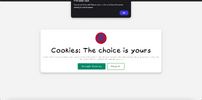
 

Attachments

  • Screenshot 2024-11-19 at 19.53.52.png
    Screenshot 2024-11-19 at 19.53.52.png
    286.8 KB · Views: 5
It looks like your browser either doesn't support cookies, or your settings disable cookies by default. Is this correct?
Right, I've managed to get it to work on another browser, where cookies are enabled. How would I link the accept button to show the index.html page or make it so that the cookies notification appears over the index.html file?
 
Last edited:
How would I link the accept button to show the index.html page
You mean after clicking accept, it takes you to index.html? Then you can add window.location = "/index.html"; to the if (document.cookie) conditional.

or make it so that the cookies notification appears over the index.html file?
You could try placing the cookies notification in the index.html and give it position: absolute; and a z-index high enough to be in front of all elements on the page.
 

Buy us a coffee!

Buy me a coffee.
Back
Top Bottom


