
htmlcssjavascript28
Silver Coder
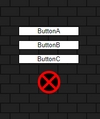
First click the exit button where you get up to the screen where it says:
ButtonA
ButtonB
ButtonC
Code 1) https://jsfiddle.net/fw061qkL/2/
Uses this:
To see:
Follow Steps:
Click buttonA, click the X button
Do that a 2nd time:
Then you see in console log:
To fix that I did this:
Code 2) Edit fiddle - JSFiddle - Code Playground
Now,
To see error:
Follow Steps:
Click buttonA, then click the X button
Do that a 2nd time, and then click play on the youtube video:
To fix that I tried: Code 3)
Did not work.
Code 3) Edit fiddle - JSFiddle - Code Playground
Code 4) Attempt
Code: Edit fiddle - JSFiddle - Code Playground
This did not work.
Code 5) Attempt Did not work. Edit fiddle - JSFiddle - Code Playground
Follow Steps:
Click ButtonA, then click the X button
Do that a 2nd time, and then click play on the youtube video:
ButtonA
ButtonB
ButtonC
Code 1) https://jsfiddle.net/fw061qkL/2/
Uses this:
JavaScript:
function removePlayer() {
  videoPlayer.players.forEach(function(player) {
    // Check if the player is currently playing a video
    const isPlaying = player.getPlayerState() === 1;

    if (isPlaying) {
      player.destroy();
      console.log("playerRemoved"); // Log a message when a player is destroyed
    }
  });
}
To see:
player.getPlayerState is not a functionFollow Steps:
Click buttonA, click the X button
Do that a 2nd time:
Then you see in console log:
player.getPlayerState is not a functionTo fix that I did this:
Code 2) Edit fiddle - JSFiddle - Code Playground
JavaScript:
function removePlayer() {
  videoPlayer.players.forEach(function(player) {
    // Check if the player has getPlayerState method
    if (player && typeof player.getPlayerState === 'function') {
      // Check if the player is currently playing a video
      const isPlaying = player.getPlayerState() === 1;

      if (isPlaying) {
        player.destroy();
        console.log("playerRemoved"); // Log a message when a player is destroyed
      }
    }
  });
}
Now,
To see error:
player.getPlayerState is not a functionFollow Steps:
Click buttonA, then click the X button
Do that a 2nd time, and then click play on the youtube video:
player.getPlayerState is not a function error comes up in console log:To fix that I tried: Code 3)
Did not work.
Code 3) Edit fiddle - JSFiddle - Code Playground
JavaScript:
function removePlayer() {
  videoPlayer.players = videoPlayer.players.filter(function(player) {
    // Check if the player is currently playing a video
    if (player && typeof player.getPlayerState === 'function') {
      const isPlaying = player.getPlayerState() === 1;

      if (isPlaying) {
        player.destroy();
        console.log("playerRemoved"); // Log a message when a player is destroyed
        return false; // Remove the player from the array
      }
    }
    return true; // Keep the player in the array
  });
}
Code 4) Attempt
Code: Edit fiddle - JSFiddle - Code Playground
This did not work.
JavaScript:
function removePlayer() {
    videoPlayer.players = videoPlayer.players.filter(function(player) {
      // Check if the player object and its method getPlayerState exist
      if (player && typeof player.getPlayerState === 'function') {
        const isPlaying = player.getPlayerState() === 1;
        if (isPlaying) {
          player.destroy();
          console.log("playerRemoved"); // Log a message when a player is destroyed
        }
        // If the player is not playing, keep it in the array
        return !isPlaying;
      }
      // If the player object or its method getPlayerState doesn't exist, remove it from the array
      return false;
    });
  }
Code 5) Attempt Did not work. Edit fiddle - JSFiddle - Code Playground
JavaScript:
function removePlayer() {
  videoPlayer.players = videoPlayer.players.filter(function(player) {
    // Check if the player is currently playing a video
    const isPlaying = player.getPlayerState() === 1;
    if (!isPlaying) {
      player.destroy();
      console.log("playerRemoved"); // Log a message when a player is destroyed
      return false; // Remove the player from the array
    }
    return true; // Keep the player in the array
  });
}
Follow Steps:
Click ButtonA, then click the X button
Do that a 2nd time, and then click play on the youtube video:
player.getPlayerState is not a function error comes up in console log:
Last edited:





