I'm trying to put together a simple web page but.....
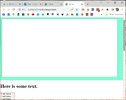
My sticky isn't hiding my select list and I can't work out why.
And while I'm here I should also ask.....
1 - What is the correct name for this select list (it appears to be only "select")?
2 - Why is there a gap at the top of the page between the browser window and the sticky?
3 - When I scroll down my page the sticky actually moves, and hides the gap that I just mentioned, so is this normal?
Thanks for any help 🙂
My sticky isn't hiding my select list and I can't work out why.
And while I'm here I should also ask.....
1 - What is the correct name for this select list (it appears to be only "select")?
2 - Why is there a gap at the top of the page between the browser window and the sticky?
3 - When I scroll down my page the sticky actually moves, and hides the gap that I just mentioned, so is this normal?
Thanks for any help 🙂
Code:
<!DOCTYPE html>
<html>
  <head>
    <title>???</title>
    <style>
      div.sticky {
        position: -webkit-sticky;
        position: sticky;
        top: 0;
        background-color: aquamarine;
        padding: 10px;
        font-size: 50px;
      }
    </style>
  </head>
  <body>
    <div class="sticky">
        <form>
            <textarea class="txt" cols="100" rows="25">
            </textarea>
        </form>
    </div>

    <h1>Here is some text.</h1>

    <select name="nothing" size="50">
    <option value="ran1">A sentence.</option>
    <option value="ran1">A sentence.</option>
    <option value="ran1">A sentence.</option>
    <option value="ran1">A sentence.</option>
    <option value="ran1">A sentence.</option>
    </select>

  </body>
</html>