Welcome to Code Forum!

Join a community that supports you and your coding journey from day one. We strive to be a friendly, supportive community that empowers everyone to be better developers. By registering with us, you'll be able to discuss, share and private message with other members of our community.

SignUp Now!
  • Guest, before posting your code please take these rules into consideration:
    • It is required to use our BBCode feature to display your code. While within the editor click < / > or >_ and place your code within the BB Code prompt. This helps others with finding a solution by making it easier to read and easier to copy.
    • You can also use markdown to share your code. When using markdown your code will be automatically converted to BBCode. For help with markdown check out the markdown guide.
    • Don't share a wall of code. All we want is the problem area, the code related to your issue.

    GIF shows where to locate </> in the thread and or post editor toolbar.
    To learn more about how to use our BBCode feature, review our "How to post your code into threads" here.

    Thank you, Code Forum.

what is the best way to debug java script?

renny

Coder
Hi I am working on a game of sort. I have a html file and a java script file.
When I run the html file in firefox I get what is in the html file, but not a thing in the js file.
So I put a onload something log (see code below) in the js file. that show up when I raned the html.
I know it is seeing the js file. Is their a way to de bug js or do I just have to go line by line
with the tutorial and see where I messed up.

here is what I ran in the js file and it did show up, but funny looking

Code:
window.addEventListener('load', (event) => {
  console.log('this is the java script file');
});

I am using visual studio code a and editor. window 7
I most likely will have to go line by line, I know that
Thank
Renny

P.S. I could not find a place that had html, css and java script so I put it here.
 
Solution
I at last found I think what I was doing wrong. I am not sure yet, but it works in this game.
1. I made a folder to hold all of my java scripts.
2. I made a footer just above the html tag.
3. I put the link in the footer( see low)

Code:
<footer>
    <script src="js/script.js"></script>
</footer>

It worked every time so far.
Yes, I know it is 3:30 A.M.

Code:
let canvas = document.getElementById('canvas');
        //width of canvas
        canvas.width = 1000;
        //height of canvas
        canvas.heigth = 1000;
        //make canvas a 2D canvas
        let ctx = canvas.getContext('2d')
;
the code above I been playing around with, seeing I can't get any of it to work
I can change the width and height and only the width change. The height stay the same.
why is that?
 
Ok, I been playing with this for about 14 hours now.
I am 100% sure the problem is that html file is not
finding the js file.
I made 3 folder I saved the same html file and a js file in each folder from visual studio code, atom and notepad.
They all did the same thing.
The script is very simple.
Here is the html file.

Code:
<!DOCTYPE html>
<html lang="en">
<head>
    <meta charset="UTF-8">
    <meta http-equiv="X-UA-Compatible" content="IE=edge">
    <meta name="viewport" content="width=device-width, initial-scale=1.0">
    <title>canvas</title>
    <style>
        #canvas{
            outline: 1px solid;
        }
    </style>
</head>
<body>
    <canvas id = "canvas"></canvas>
    <script scr="script.js"></script>

    <script>
        let canvas = document.getElementById("canvas")
        canvas.width = 600;
        canvas.height = 600;
        var c = document.getElementById("canvas");
        var ctx = c.getContext("2d");
        ctx.font = "30px Arial";
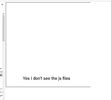
        ctx.fillText("Yes I don't see the js files", 120, 550);

    </script>
</body>
</html>

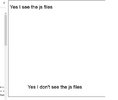
I am printing out on the canvas at the bottom.

Here is the js file

Code:
var c = document.getElementById("canvas");
        var ctx = c.getContext("2d");
        ctx.font = "30px Arial";
        ctx.fillText("Yes I see the js files", 10, 50);
As you can see I am print a statement out on the canvas at the top.

in the attach files I have one of the folder showing the files how the are saved.
the next attach file show the out put from that html file.

I try the same files on one of my other computers and the same thing happen.
Is html and java script this on stable? Or am I doing something wrong?
I am sorry I am a pain in the ass
Thank you all
Renny
 

Attachments

  • file.png
    file.png
    4.6 KB · Views: 1
  • bad_js.png
    bad_js.png
    8.9 KB · Views: 1
I at last found I think what I was doing wrong. I am not sure yet, but it works in this game.
1. I made a folder to hold all of my java scripts.
2. I made a footer just above the html tag.
3. I put the link in the footer( see low)

Code:
<footer>
    <script src="js/script.js"></script>
</footer>

It worked every time so far.
 

Attachments

  • Good_js.png
    Good_js.png
    11.2 KB · Views: 1
Solution
I at last found I think what I was doing wrong. I am not sure yet, but it works in this game.
1. I made a folder to hold all of my java scripts.
2. I made a footer just above the html tag.
3. I put the link in the footer( see low)

Code:
<footer>
    <script src="js/script.js"></script>
</footer>

It worked every time so far.
You don't have to put the script in the footer, it just has to be after the body.
 
Thank, I been working none stop for about 14 hours on until I found how to do it on a you tube video.
I must have watch a 100 of them. I works fine when thwy do it, I could never make it work. One mor thing, is this the right place to put a post like this one, or should I put it i java script?
Thank you Johna
Renny
 

Buy us a coffee!

Buy me a coffee.
Back
Top Bottom