Welcome to Code Forum!

Join a community that supports you and your coding journey from day one. We strive to be a friendly, supportive community that empowers everyone to be better developers. By registering with us, you'll be able to discuss, share and private message with other members of our community.

SignUp Now!
  • Guest, before posting your code please take these rules into consideration:
    • It is required to use our BBCode feature to display your code. While within the editor click < / > or >_ and place your code within the BB Code prompt. This helps others with finding a solution by making it easier to read and easier to copy.
    • You can also use markdown to share your code. When using markdown your code will be automatically converted to BBCode. For help with markdown check out the markdown guide.
    • Don't share a wall of code. All we want is the problem area, the code related to your issue.

    GIF shows where to locate </> in the thread and or post editor toolbar.
    To learn more about how to use our BBCode feature, review our "How to post your code into threads" here.

    Thank you, Code Forum.

JavaScript How to get event.target.id ?

vmars316

Well-Known Coder
Hello
I am having trouble getting "event.target.id" .
https://vmars.us/Guitar/Drag-Drop-Working-Multiple-28x28-Elements-K-CLONE-NOT-Working.html
Here is the script :
Code:
<script>
var elemNumber = 0;
var element = "";
var elem = "" ;
var hold_this_id = "" ;
// =================================================

    document.addEventListener('contextmenu', fireContextMenu);
    
// This function will be called whenever contextmenu event occurs
function fireContextMenu(event) {
    event.preventDefault();
hold_this_id = event.target.id;  // Get ID of Clicked Element

/* 
for(var i of document.querySelectorAll('img')){
i.addEventListener('contextmenu', function(event) {
    return false;
}, false);
}
*/

// Get the element
var elem = hold_this_id ;
    console.log("02 hold_this_id = " + hold_this_id);
//console.log(elem);


// Create a copy of it
var clone = elem.cloneNode(true);    // statement 134
clone.addEventListener("dragstart", (event) => { drag(event); });

// Update the ID and add a class
clone.id = 'elem1' + elemNumber;
clone.draggable = 'true';
clone.onclick = "helloConsole()"
clone.zIndex = elemNumber;
elemNumber = elemNumber + 1

// Inject it into the DOM
hr01.after(clone);
  //function cloneElem1()
}
// =================================================

  </script>

What am I doing wrong ?

Thanks for your Help...
 
Solution
D
When you right mouse click on one of the 4 images, the event target is that image. None of these 4 images has an id, because you added the id's to the enclosing div's instead of to the img elements. Were you maybe thinking that id's are inherited by child elements ? They are not, of course.

Now if you fix that, you will still get the error because of your really strange logic:

JavaScript:
hold_this_id = event.target.id;  // Get ID of Clicked Element
var elem = hold_this_id ;
var clone = elem.cloneNode(true);    // 138

You cannot call elem.cloneNode(true) because elem is not a node but a string with value "one", "two", etc. What is the purpose of thisvariable hold_this_id anyway ? You are not even...
Hello
I am having trouble getting "event.target.id" .
https://vmars.us/Guitar/Drag-Drop-Working-Multiple-28x28-Elements-K-CLONE-NOT-Working.html
Here is the script :
Code:
<script>
var elemNumber = 0;
var element = "";
var elem = "" ;
var hold_this_id = "" ;
// =================================================

    document.addEventListener('contextmenu', fireContextMenu);
   
// This function will be called whenever contextmenu event occurs
function fireContextMenu(event) {
    event.preventDefault();
hold_this_id = event.target.id;  // Get ID of Clicked Element

/*
for(var i of document.querySelectorAll('img')){
i.addEventListener('contextmenu', function(event) {
    return false;
}, false);
}
*/

// Get the element
var elem = hold_this_id ;
    console.log("02 hold_this_id = " + hold_this_id);
//console.log(elem);


// Create a copy of it
var clone = elem.cloneNode(true);    // statement 134
clone.addEventListener("dragstart", (event) => { drag(event); });

// Update the ID and add a class
clone.id = 'elem1' + elemNumber;
clone.draggable = 'true';
clone.onclick = "helloConsole()"
clone.zIndex = elemNumber;
elemNumber = elemNumber + 1

// Inject it into the DOM
hr01.after(clone);
  //function cloneElem1()
}
// =================================================

  </script>

What am I doing wrong ?

Thanks for your Help...
Hey there,
Are you sure that the elements have an id on them? 😉 I would start there
 
Thanks Antero360
Ugh! Good point .
Unfortunately I still can't get event.target.id .
And I think that is why I am getting Errors :
[CODE
Uncaught TypeError: elem.cloneNode is not a function
at HTMLDocument.fireContextMenu (Drag-Drop-Working-Multiple-28x28-Elements-K-CLONE-NOT-Working-Antero360.html:131:18)[/CODE]
Code:
<script>

file:///C:/2023-Drag-Drop-AnyWhere/Drag-Drop-Working-Multiple-28x28-Elements-K-CLONE-NOT-Working-Antero360.html

var elemNumber = 0;
var element = "";
var elem = "" ;
var hold_this_id = "" ;
// =============================================

    document.addEventListener('contextmenu', fireContextMenu);
  
// This function will be called whenever contextmenu event occurs
function fireContextMenu(event) {
    event.preventDefault();
hold_this_id = event.target.id;  // Get ID of Clicked Element


// Get the element
var elem = hold_this_id ;
    console.log("02 hold_this_id = " + hold_this_id);
//console.log(elem);


// Create a copy of it
var clone = elem.cloneNode(true);    // statement 134
clone.addEventListener("dragstart", (event) => { drag(event); });

// Update the ID and add a class
clone.id = 'elem1' + elemNumber;
clone.draggable = 'true';
clone.onclick = "helloConsole()"
clone.zIndex = elemNumber;
elemNumber = elemNumber + 1

// Inject it into the DOM
hr01.after(clone);
  //function cloneElem1()
}
// =================================================

  </script>
 
Thanks Antero360
Ugh! Good point .
Unfortunately I still can't get event.target.id .
And I think that is why I am getting Errors :
[CODE
Uncaught TypeError: elem.cloneNode is not a function
at HTMLDocument.fireContextMenu (Drag-Drop-Working-Multiple-28x28-Elements-K-CLONE-NOT-Working-Antero360.html:131:18)[/CODE]
Code:
<script>

file:///C:/2023-Drag-Drop-AnyWhere/Drag-Drop-Working-Multiple-28x28-Elements-K-CLONE-NOT-Working-Antero360.html

var elemNumber = 0;
var element = "";
var elem = "" ;
var hold_this_id = "" ;
// =============================================

    document.addEventListener('contextmenu', fireContextMenu);
 
// This function will be called whenever contextmenu event occurs
function fireContextMenu(event) {
    event.preventDefault();
hold_this_id = event.target.id;  // Get ID of Clicked Element


// Get the element
var elem = hold_this_id ;
    console.log("02 hold_this_id = " + hold_this_id);
//console.log(elem);


// Create a copy of it
var clone = elem.cloneNode(true);    // statement 134
clone.addEventListener("dragstart", (event) => { drag(event); });

// Update the ID and add a class
clone.id = 'elem1' + elemNumber;
clone.draggable = 'true';
clone.onclick = "helloConsole()"
clone.zIndex = elemNumber;
elemNumber = elemNumber + 1

// Inject it into the DOM
hr01.after(clone);
  //function cloneElem1()
}
// =================================================

  </script>
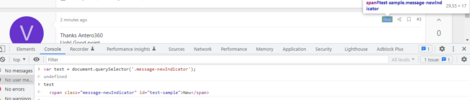
so just for education purposes, I went ahead and I temporarily added an id to the "new" tag, via the DOM.
1673238682253.png

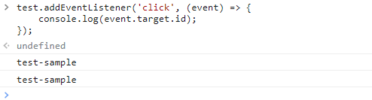
Also went ahead and added in the event listener.
1673238771122.png
As you can see, when the element does exist, and when the element does indeed have the attribute you are looking for, it will print out
 
Thanks
I fixed the id , but still not working:

https://vmars.us/Guitar/Drag-Drop-Working-Multiple-28x28-Elements-K-CLONE-NOT-Working.html

Code:
<!DOCTYPE html>
<html>
<head>
<meta name="viewport" content="width=device-width, initial-scale=1.0, user-scalable=no" />
<title>
file:///C:/2023-Drag-Drop-AnyWhere/Drag-Drop-Working-Multiple-28x28-Elements-K-CLONE-NOT-Working.html
</title>
<style>
    body {
      margin: 20px;
    }
  
    #outerContainer {
    }
  
    #container {
      width: 1420px;
      height: 430px;
      background-color: #EEE;
      display: flex;
      align-items: center;
      justify-content: center;
      overflow: hidden;
      border-radius: 7px;
      touch-action: none;
    }

    .item {
      touch-action: none;
      user-select: none;
      position: relative;
    }
  
    .item img {
      pointer-events: auto;
    }

.item , .one , #one {
      width: 32px;
      height: 32px;
//      top: 0px;
//      left: 0px;
//      stroke-opacity:0;
      z-index:800;
    }

.item ,    .two  , #two {
      width: 28px;
      height: 28px;
//      top: 30%;
//      left: 10%;
      z-index:500;
    }

.item ,    .three  , #three {
      width: 28px;
      height: 28px;
//      top: -40%;
//      left: -10%;
      z-index:500;
    }

.item ,    .four  , #four {
      width: 28px;
      height: 28px;
//      top: -10%;
//      left: 5%;
      z-index:500;
    }

    .item:active {
      opacity: .75;
    }

    .item:hover {
      cursor: pointer;
    }
  
/*    h1 {
      margin-bottom: 10px;
    }
*/
  </style>
</head>
<body>
<h3>https://vmars.us/Guitar/Drag-Drop-Working-Multiple-28x28-Elements-K-CLONE-NOT-Working.html
</h3>
<div id="outerContainer">
<div id="container">

<div class="item one" id="one" >
<img draggable="true" src="https://vmars.us/Guitar/1-Red-Circle-Transp-32x32.png" >
</div>
<div class="item two" id="two"  >
<img draggable="true" src="https://vmars.us/Guitar/flatAccidental-Grey-28x28.png">
</div>
<div class="item three"  id="three"  >
<img draggable="true" src="https://vmars.us/Guitar/naturalAccidental-Grey-28x28.png">
</div>
<div class="item four"  id="four" >
<img  draggable="true" src="https://vmars.us/Guitar/sharpAccidental-Grey-28x28.png">
</div>
</div>  <!--  id="container"  -->

</div>  <!--  id="outerContainer"  -->

<hr id="hr01">

<script>
var elemNumber = 0;
var element = "";
var elem = "" ;
var hold_this_id = "" ;
// =================================================

    document.addEventListener('contextmenu', fireContextMenu);
  
// This function will be called whenever contextmenu event occurs
function fireContextMenu(event) {
    event.preventDefault();
hold_this_id = event.target.id;  // Get ID of Clicked Element

/*
for(var i of document.querySelectorAll('img')){
i.addEventListener('contextmenu', function(event) {
    return false;
}, false);
}
*/

// Get the element
var elem = hold_this_id ;
    console.log("02 hold_this_id = " + hold_this_id);
//console.log(elem);


// Create a copy of it
var clone = elem.cloneNode(true);    // 138
clone.addEventListener("dragstart", (event) => { drag(event); });

// Update the ID and add a class
clone.id = 'elem1' + elemNumber;
clone.draggable = 'true';
clone.onclick = "helloConsole()"
clone.zIndex = elemNumber;
elemNumber = elemNumber + 1

// Inject it into the DOM
hr01.after(clone);
  //function cloneElem1()
}
// =================================================

  </script>

<script>
    var container = document.querySelector("#container");
    var activeItem = null;

    var active = false;

    container.addEventListener("touchstart", dragStart, false);
    container.addEventListener("touchend", dragEnd, false);
    container.addEventListener("touchmove", drag, false);

    container.addEventListener("mousedown", dragStart, false);
    container.addEventListener("mouseup", dragEnd, false);
    container.addEventListener("mousemove", drag, false);

    function dragStart(e) {

      if (e.target !== e.currentTarget) {
        active = true;

        // this is the item we are interacting with
        activeItem = e.target;
console.log("activeItem = " + activeItem);

        if (activeItem !== null) {
          if (!activeItem.xOffset) {
            activeItem.xOffset = 0;
          }

          if (!activeItem.yOffset) {
            activeItem.yOffset = 0;
          }

          if (e.type === "touchstart") {
            activeItem.initialX = e.touches[0].clientX - activeItem.xOffset;
            activeItem.initialY = e.touches[0].clientY - activeItem.yOffset;
          } else {
            console.log("doing something!");
            activeItem.initialX = e.clientX - activeItem.xOffset;
            activeItem.initialY = e.clientY - activeItem.yOffset;
          }
        }
      }
    }

    function dragEnd(e) {
      if (activeItem !== null) {
        activeItem.initialX = activeItem.currentX;
        activeItem.initialY = activeItem.currentY;
      }

      active = false;
      activeItem = null;
    }

    function drag(e) {
          e.preventDefault();
      if (active) {
        if (e.type === "touchmove") {

          activeItem.currentX = e.touches[0].clientX - activeItem.initialX;
          activeItem.currentY = e.touches[0].clientY - activeItem.initialY;
        } else {
          activeItem.currentX = e.clientX - activeItem.initialX;
          activeItem.currentY = e.clientY - activeItem.initialY;
        }

        activeItem.xOffset = activeItem.currentX;
        activeItem.yOffset = activeItem.currentY;

        setTranslate(activeItem.currentX, activeItem.currentY, activeItem);
      }
    }

    function setTranslate(xPos, yPos, el) {
      el.style.transform = "translate3d(" + xPos + "px, " + yPos + "px, 0)";
    }
  </script>
 
</body>
 
Last edited:
When you right mouse click on one of the 4 images, the event target is that image. None of these 4 images has an id, because you added the id's to the enclosing div's instead of to the img elements. Were you maybe thinking that id's are inherited by child elements ? They are not, of course.

Now if you fix that, you will still get the error because of your really strange logic:

JavaScript:
hold_this_id = event.target.id;  // Get ID of Clicked Element
var elem = hold_this_id ;
var clone = elem.cloneNode(true);    // 138

You cannot call elem.cloneNode(true) because elem is not a node but a string with value "one", "two", etc. What is the purpose of thisvariable hold_this_id anyway ? You are not even using it except for (wrongly) assigning its value to elem. You don't use the variable elem any further either (and the variable element not at all). Don't define all manner of variables without using them in any (meaningful) way !

The above code could simply be replaced by

JavaScript:
var clone = event.target.cloneNode(true);

and you may see something start to work.
 
Solution
JavaScript:
var clone = event.target.cloneNode(true);

and you may see something start to work.
Thank you very much cbreemer !
And for explaining what was happening & why .
The code below is evidence that it really works .
The next thing is to find out why the Clones can't be Drag & Dropped .


Code:
<!DOCTYPE html>
<!-- saved from url=(0101)file:///C:/2023-Drag-Drop-AnyWhere/Drag-Drop-Working-Multiple-28x28-Elements-K-CLONE-NOT-Working.html -->
<html><head><meta http-equiv="Content-Type" content="text/html; charset=windows-1252">
<meta name="viewport" content="width=device-width, initial-scale=1.0, user-scalable=no">
<title>
file:///C:/2023-Drag-Drop-AnyWhere/Drag-Drop-Working-Multiple-28x28-Elements-K-CLONE-NOW-Working.html
</title>
<style>
    body {
      margin: 20px;
    }
   
    #outerContainer {
    }
   
    #container {
      width: 1420px;
      height: 430px;
      background-color: #EEE;
      display: flex;
      align-items: center;
      justify-content: center;
      overflow: hidden;
      border-radius: 7px;
      touch-action: none;
    }

    .item {
      touch-action: none;
      user-select: none;
      position: relative;
    }
   
    .item img {
      pointer-events: auto;
    }

.item , .one , #one {
      width: 32px;
      height: 32px;
//      top: 0px;
//      left: 0px;
//      stroke-opacity:0;
      z-index:800;
    }

.item ,    .two  , #two {
      width: 28px;
      height: 28px;
//      top: 30%;
//      left: 10%;
      z-index:500;
    }

.item ,    .three  , #three {
      width: 28px;
      height: 28px;
//      top: -40%;
//      left: -10%;
      z-index:500;
    }

.item ,    .four  , #four {
      width: 28px;
      height: 28px;
//      top: -10%;
//      left: 5%;
      z-index:500;
    }

    .item:active {
      opacity: .75;
    }

    .item:hover {
      cursor: pointer;
    }
   
/*    h1 {
      margin-bottom: 10px;
    }
*/
  </style>
</head>
<body>
<h3>https://vmars.us/Guitar/Drag-Drop-Working-Multiple-28x28-Elements-K-CLONE-NOT-Working.html
</h3>
<div id="outerContainer">
<div id="container">

<div>
<img class="item one" id="one" draggable="true" src="./Drag-Drop-Working-Multiple-28x28-Elements-K-CLONE-NOT-Working_files/1-Red-Circle-Transp-32x32.png" style="transform: translate3d(-291px, -84px, 0px);">
</div>
<div>
<img class="item two" id="two" draggable="true" src="./Drag-Drop-Working-Multiple-28x28-Elements-K-CLONE-NOT-Working_files/flatAccidental-Grey-28x28.png">
</div>
<div>
<img class="item three" id="three" draggable="true" src="./Drag-Drop-Working-Multiple-28x28-Elements-K-CLONE-NOT-Working_files/naturalAccidental-Grey-28x28.png" style="transform: translate3d(1px, 0px, 0px);">
</div>
<div>
<img class="item four" id="four" draggable="true" src="./Drag-Drop-Working-Multiple-28x28-Elements-K-CLONE-NOT-Working_files/sharpAccidental-Grey-28x28.png">
</div>
</div>  <!--  id="container"  -->

</div>  <!--  id="outerContainer"  -->

<hr id="hr01">

<img class="item four" id="elem13" draggable="true" src="./Drag-Drop-Working-Multiple-28x28-Elements-K-CLONE-NOT-Working_files/sharpAccidental-Grey-28x28.png">

<img class="item three" id="elem12" draggable="true" src="./Drag-Drop-Working-Multiple-28x28-Elements-K-CLONE-NOT-Working_files/naturalAccidental-Grey-28x28.png" style="transform: translate3d(1px, 0px, 0px);">

<img class="item two" id="elem11" draggable="true" src="./Drag-Drop-Working-Multiple-28x28-Elements-K-CLONE-NOT-Working_files/flatAccidental-Grey-28x28.png">

<img class="item one" id="elem10" draggable="true" src="./Drag-Drop-Working-Multiple-28x28-Elements-K-CLONE-NOT-Working_files/1-Red-Circle-Transp-32x32.png">

<script>
var elemNumber = 0;
var element = "";
var elem = "" ;
var hold_this_id = "" ;
// =================================================

    document.addEventListener('contextmenu', fireContextMenu);
   
// This function will be called whenever contextmenu event occurs
function fireContextMenu(event) {
    event.preventDefault();
hold_this_id = event.target;  // Get ID of Clicked Element

/*
for(var i of document.querySelectorAll('img')){
i.addEventListener('contextmenu', function(event) {
    return false;
}, false);
}
*/

// Get the element
var elem = hold_this_id ;
    console.log("02 hold_this_id = " + hold_this_id);
//console.log(elem);


// Create a copy of it
var clone = event.target.cloneNode(true);    // 138
clone.addEventListener("dragstart", (event) => { drag(event); });

// Update the ID and add a class
clone.id = 'elem1' + elemNumber;
clone.draggable = 'true';
clone.onclick = "helloConsole()"
clone.zIndex = elemNumber;
elemNumber = elemNumber + 1

// Inject it into the DOM
hr01.after(clone);
  //function cloneElem1()
}
// =================================================

  </script>

<script>
    var container = document.querySelector("#container");
    var activeItem = null;

    var active = false;

    container.addEventListener("touchstart", dragStart, false);
    container.addEventListener("touchend", dragEnd, false);
    container.addEventListener("touchmove", drag, false);

    container.addEventListener("mousedown", dragStart, false);
    container.addEventListener("mouseup", dragEnd, false);
    container.addEventListener("mousemove", drag, false);

    function dragStart(e) {

      if (e.target !== e.currentTarget) {
        active = true;

        // this is the item we are interacting with
        activeItem = e.target;
console.log("activeItem = " + activeItem);

        if (activeItem !== null) {
          if (!activeItem.xOffset) {
            activeItem.xOffset = 0;
          }

          if (!activeItem.yOffset) {
            activeItem.yOffset = 0;
          }

          if (e.type === "touchstart") {
            activeItem.initialX = e.touches[0].clientX - activeItem.xOffset;
            activeItem.initialY = e.touches[0].clientY - activeItem.yOffset;
          } else {
            console.log("doing something!");
            activeItem.initialX = e.clientX - activeItem.xOffset;
            activeItem.initialY = e.clientY - activeItem.yOffset;
          }
        }
      }
    }

    function dragEnd(e) {
      if (activeItem !== null) {
        activeItem.initialX = activeItem.currentX;
        activeItem.initialY = activeItem.currentY;
      }

      active = false;
      activeItem = null;
    }

    function drag(e) {
          e.preventDefault();
      if (active) {
        if (e.type === "touchmove") {

          activeItem.currentX = e.touches[0].clientX - activeItem.initialX;
          activeItem.currentY = e.touches[0].clientY - activeItem.initialY;
        } else {
          activeItem.currentX = e.clientX - activeItem.initialX;
          activeItem.currentY = e.clientY - activeItem.initialY;
        }

        activeItem.xOffset = activeItem.currentX;
        activeItem.yOffset = activeItem.currentY;

        setTranslate(activeItem.currentX, activeItem.currentY, activeItem);
      }
    }

    function setTranslate(xPos, yPos, el) {
      el.style.transform = "translate3d(" + xPos + "px, " + yPos + "px, 0)";
    }
  </script>
 

</body></html>

Thanks again...
 

Buy us a coffee!

Buy me a coffee.
Back
Top Bottom