
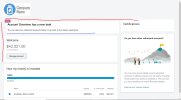
I’m trying to get the table underlined in the image below to line up with the ‘Notifications’ table that is to the right of it and also line up with the ‘Welcome’ table below up. So it basically aligns pushed over to the left with ‘Welcome’ and top and bottom line up with 'Notifications to the right of it. Sorry the lines aren’t drawn perfectly but you can see how I want it aligned. Basically I want to move the outlined ‘Account Overview’ table up and over to the left. Drew lines to show in the image.
html
css
html
HTML:
<div class="sdps-is-relative badge-example-outline sdps-p-around_medium sdps-m-
   around_medium">
   <sdps-badge
     sdps-id="spdb-promotional-beta-overlay"
      type="promotional"
      status-text="Beta"
      promotional-type="beta"
      sr-label-prefix="You have got"
      sr-label-suffix="notifications"
      is-overlay
   >
 </sdps-badge>
<div class="ao-text-header">Account Overview has a new look</div>
  You can view your retirement accounts below, or go back to the classic experience.
</div>
<sdps-panel sdps-id="account-overview-panel-personalperformance">
 <div class="SSOManageAccount modalInject">
  <div slot="modal-body" appModalContent>
     <div>We want to let you know you’ll be accessing schwabdeferredcompensation.com, a
 third-party website. By clicking continue below, you are requesting to open a new page.
 </div>
</div>
<div slot="modal-footer" appModalFooter>
    <div class="rps__d-flex rps__align-items-center SSOManageAccountFooter">
        <div class="rps__flex-grow-1 rps__align-self-end">(0823-3U5E)</div>
        <sdps-button class="sdps-m-left_medium no-margin" variation="secondary"
            sdps-id="btn-manage-external-account"
    (sdpsClick)="modalContent.actions.secondary.action()"
            [sdpsAriaLabel]="modalContent.actions.secondary.ariaLabel">
   {{modalContent.actions.secondary.label}}</sdps-button>
        <sdps-button class="sdps-m-left_medium no-margin" variation="primary"
            sdps-id="btn-manage-external-account"
     (sdpsClick)="modalContent.actions.primary.action()"
            [sdpsAriaLabel]="modalContent.actions.primary.ariaLabel">
    {{modalContent.actions.primary.label}}</sdps-button>
    </div>
  </div>
 </div>
<div #loadable>
 <app-welcome></app-welcome>
 <div class="sdps-row">
    <app-balance></app-balance>
</div>
<sdps-button class="sdps-m-left_medium no-margin top-margin" variation="secondary" sdps-
   id="btn-manage-external-account"
    (sdpsClick)="openModal()"
    [sdpsAriaLabel]="modalContent.actions.primary.ariaLabel">{{displayText}}</sdps-
button>
  </div>
</sdps-panel>
css
CSS:
@import "lib/scss/variables.scss";

.rps__balance-graph {
  &.loading {
     min-height: 274px;
 }
}
.no-margin {
 margin-left: 0!important;
 }

.top-margin {
 margin-top: 20px!important;
 }

.SSOManageAccountFooter {
& sdps-button:not(:last-child) {
   margin-right: 20px;
 }

 & *:nth-child(1) {
   order: 1;
 }

& *:nth-child(2) {
 order: 2;
 }

& *:nth-child(3) {
   order: 3;
  }
 }

@media (max-width: $tablet-portrait-min) {
 .SSOManageAccountFooter {
  flex-wrap: wrap;

  & > *:not(:last-child) {
    margin-top: 24px;
 }

& *:nth-child(1) {
    order: 3;
}

& *:nth-child(2) {
    order: 2;
}

& *:nth-child(3) {
    order: 1;
}

& sdps-button {
    width: 100%;
    justify-content: center;

    &::ng-deep > button {
        width: 100%;
        justify-content: center;
    }

    &:not(:last-child) {
        margin-right: 0;
       }
     }
   }
  }

.badge-example-outline {
  border-radius: 2px;
  border: 1px solid #cbd1d6;
  background-color: #fff;
  -webkit-box-shadow: 0 0 0 rgba(0,0,0,0);
  box-shadow: 0 0 0 rgba(0,0,0,0);
  position: relative;
 }

.ao-text-header {
 font-size: 18px;
  font-size: 1.5rem;
 font-family: CharlesModern-Medium,CharlesModern-Regular,Arial,Helvetica,sans-serif;
 font-weight: 400;
}





