
Welcome to Code Forum!

Join a community that supports you and your coding journey from day one. We strive to be a friendly, supportive community that empowers everyone to be better developers. By registering with us, you'll be able to discuss, share and private message with other members of our community.

SignUp Now!
  • Guest, before posting your code please take these rules into consideration:
    • It is required to use our BBCode feature to display your code. While within the editor click < / > or >_ and place your code within the BB Code prompt. This helps others with finding a solution by making it easier to read and easier to copy.
    • You can also use markdown to share your code. When using markdown your code will be automatically converted to BBCode. For help with markdown check out the markdown guide.
    • Don't share a wall of code. All we want is the problem area, the code related to your issue.

    GIF shows where to locate </> in the thread and or post editor toolbar.
    To learn more about how to use our BBCode feature, review our "How to post your code into threads" here.

    Thank you, Code Forum.

Answered How to wrap <td> content .

vmars316

Well-Known Coder
TIA ;
TIA ,
I trying to code <td> so that content wraps , so far no-go .
Code:
<!DOCTYPE html>
<head>
<title>
file:///C:/PureBasic-myApps/vmProjects/BUTTONS/Line-By-Line/Line-By-Line-Folder/Create-INDEX/Table-Para-Verticle-Align-Top.html
</title>
</head>
<body>
<table contenteditable style="text-align: left; width: 100%;" border="1">
<tbody>
<tr>
<td style="vertical-align: top; width: 49%; word-wrap: break-word;">
1
</td>
<td style="vertical-align: top; width: 49%; word-wrap: break-word;">
2
</td>
</tr>
<tr>
<td style="vertical-align: top; width: 49%; word-wrap: break-word;">
3
</td>
<td style="vertical-align: top; width: 49%; word-wrap: break-word;">

4</td>
</tr>
<tr>
<td style="vertical-align: top; width: 49%; word-wrap: break-word;">
5
</td>
<td style="vertical-align: top; width: 49%; word-wrap: break-word;">
6
</td>
</tr>
</tbody>
</table>
<br>
</body>
</html>
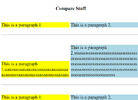
 

Attachments

  • Compare-Columns.png
    Compare-Columns.png
    49.5 KB · Views: 4
In the images you posted, the text seems to be wrapped. What exactly do you mean by content wrapping?


Also, just a little tip, rather than having inline styling for each td element, you can use a CSS selector:
HTML:
<style>
  td {
    vertical-align: top;
    width: 49%;
    word-wrap: break-word;
  }
</style>
 
Thanks Johna ,
Oops wrong pic .


I have solved the align-top problem .

Still need to know how to Horizontal Text WRAP


Code:
<!DOCTYPE html>

<head>

<title>

https://vmars.us/ShowMe/Table-Para-Verticle-Horz-Align.html

</title>

</head>

<body>

<table contenteditable style="text-align: left; width: 100%;" border="1">

<tbody>

<tr>

<td style="vertical-align: top; width: 49%; word-wrap: break-word;">

1

1

111111111111111111111111111111111111111111111111111111111111111111111111111111111111111111111111

1

1

</td>

<td style="vertical-align: top; width: 49%; word-wrap: break-word;">

2

222222222222222222222222222222222222222222222222222222222222222222222222222222222222222

</td>

</tr>

<tr>

<td style="vertical-align: top; width: 49%; word-wrap: break-word;">

3

3

3

</td>

<td style="vertical-align: top; width: 49%; word-wrap: break-word;">

4

4

4

4

</td>

</tr>

<tr>

<td style="vertical-align: top; width: 49%; word-wrap: break-word;">

5

</td>

<td style="vertical-align: top; width: 49%; word-wrap: break-word;">

6

</td>

</tr>

</tbody>

</table>

<br>

</body>

</html>

 
* Thanks ;
Ok I update css table stuff :
https://vmars.us/ShowMe/CompareStuff_Copy(1).html
HTML:
table {
  width: 800px; /* 800px, 1000px - it's up to you - instead of 100% */
  font: 400 .8rem/1.1 system-ui, monospace;
  text-align: left;
  border-collapse: collapse;
  margin-bottom: 1rem;
  margin-inline: auto; /* table centered horizontally */
and
file:///C:/PureBasic-myApps/vmProjects/BUTTONS/Line-By-Line/Line-By-Line-Folder/Create-INDEX/CompareStuff_Copy(2).html

https://vmars.us/ShowMe/CompareStuff_Copy(2).html
Code:
      table {
  width: 100%; /* 800px, 1000px - it's up to you - instead of 100% */
  font: 400 .8rem/1.1 system-ui, monospace;
  text-align: left;
  border-collapse: collapse;
  margin-bottom: 1rem;
  margin-inline: auto; /* table centered horizontally */
      }
But <td> left & right still stretch to fit Pasted text .

To test it copy this:
into here:
file:///C:/PureBasic-myApps/vmProjects/BUTTONS/Line-By-Line/Line-By-Line-Folder/Create-INDEX/CompareStuff_Copy(1).html

https://vmars.us/ShowMe/CompareStuff_Copy(1).html

and here:
file:///C:/PureBasic-myApps/vmProjects/BUTTONS/Line-By-Line/Line-By-Line-Folder/Create-INDEX/CompareStuff_Copy(2).html

https://vmars.us/ShowMe/CompareStuff_Copy(2).html


Pls , how to fix this , Thanks
 
Last edited:
* Thanks ;
Ok I update css table stuff :
https://vmars.us/ShowMe/CompareStuff_Copy(1).html
HTML:
table {
  width: 800px; /* 800px, 1000px - it's up to you - instead of 100% */
  font: 400 .8rem/1.1 system-ui, monospace;
  text-align: left;
  border-collapse: collapse;
  margin-bottom: 1rem;
  margin-inline: auto; /* table centered horizontally */
and
file:///C:/PureBasic-myApps/vmProjects/BUTTONS/Line-By-Line/Line-By-Line-Folder/Create-INDEX/CompareStuff_Copy(2).html

https://vmars.us/ShowMe/CompareStuff_Copy(2).html
Code:
      table {
  width: 100%; /* 800px, 1000px - it's up to you - instead of 100% */
  font: 400 .8rem/1.1 system-ui, monospace;
  text-align: left;
  border-collapse: collapse;
  margin-bottom: 1rem;
  margin-inline: auto; /* table centered horizontally */
      }
But <td> left & right still stretch to fit Pasted text .

To test it copy this:
into here:
file:///C:/PureBasic-myApps/vmProjects/BUTTONS/Line-By-Line/Line-By-Line-Folder/Create-INDEX/CompareStuff_Copy(1).html

https://vmars.us/ShowMe/CompareStuff_Copy(1).html

and here
file:///C:/PureBasic-myApps/vmProjects/BUTTONS/Line-By-Line/Line-By-Line-Folder/Create-INDEX/CompareStuff_Copy(2).html

https://vmars.us/ShowMe/CompareStuff_Copy(2).html


Pls , how to fix this , Thanks
Hey there,
So what issues are you running into now?
 
Hmm...
Well this seems to give me what I need.
HTML:
<!DOCTYPE html>
<html>
<head>
  <style>
    .container {
      display: flex; /* Use flexbox to create a row layout */
    }

    .box {
      flex: 1; /* Make the boxes stretch equally within the container */
      min-width: 200px; /* Set a fixed minimum width for the boxes */
      border: 1px solid black;
      padding: 10px;
    }
  </style>
</head>
<body>
  <div class="container">
    <div class="box" contenteditable="true">
      <!-- Content of the first div -->
    </div>
    <div class="box" contenteditable="true">
      <!-- Content of the second div -->
    </div>
  </div>
</body>
</html>

Thanks All...
 

Buy us a coffee!

Buy me a coffee.
Back
Top Bottom


