

Welcome to Code Forum!

Join a community that supports you and your coding journey from day one. We strive to be a friendly, supportive community that empowers everyone to be better developers. By registering with us, you'll be able to discuss, share and private message with other members of our community.

SignUp Now!
  • Guest, before posting your code please take these rules into consideration:
    • It is required to use our BBCode feature to display your code. While within the editor click < / > or >_ and place your code within the BB Code prompt. This helps others with finding a solution by making it easier to read and easier to copy.
    • You can also use markdown to share your code. When using markdown your code will be automatically converted to BBCode. For help with markdown check out the markdown guide.
    • Don't share a wall of code. All we want is the problem area, the code related to your issue.

    GIF shows where to locate </> in the thread and or post editor toolbar.
    To learn more about how to use our BBCode feature, review our "How to post your code into threads" here.

    Thank you, Code Forum.

SetTimeout() not working

15.webp
The screen looks like the above and the background bogs up and down. A lightning flash can happen and tests successfully.
However, the SetTimeout() timer that has lightning flash every now and then is not working.
13.webp
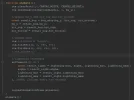
Here is where the animate() function happens and where the timeout is called and it doesn't work.
14.webp
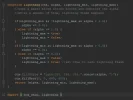
Here is where the lightning effect is coded and it works successfully if there is no timeout.
 
View attachment 2922
The screen looks like the above and the background bogs up and down. A lightning flash can happen and tests successfully.
However, the SetTimeout() timer that has lightning flash every now and then is not working.

View attachment 2923
Here is where the animate() function happens and where the timeout is called and it doesn't work.

View attachment 2924
Here is where the lightning effect is coded and it works successfully if there is no timeout.
Hi there,
So one thing to keep in mind:
setTimeout only fires once. after the given delay amount.

What you are looking for is setInterval
 
If I use SetTimeout or SetInterval, and I put a console.log('Hello world!')
Then I notice in the console that the message in fact appears after set number of seconds, and then a number on the left of 'Hello world!' keeps increasing rapidly with no end.

Except if I use a doOnce variable, then it only fires once.
However, the lightning effect still doesn't happen.
Interestingly, it enters and exits the function but just doesn't do the stuff.
Now it seems that it does in fact enter all parts of the lightning function but I can't see the alpha updating visually.
So all of the variables are updating but I just can't see the changes visually.
I got it working. I simply moved the ctx.fillStyle and ctx.fillRect in front of the setInterval function.

Okay, so the problem now is that the lightning flash code repeats over and over again. That might be internal to the lightning_flash function though. Maybe what I need is a doOnce of some sort?

Perhaps I should leave it alone for now and have just one lightning flash.
 
Last edited:
Back
Top Bottom


