Welcome to Code Forum!

Join a community that supports you and your coding journey from day one. We strive to be a friendly, supportive community that empowers everyone to be better developers. By registering with us, you'll be able to discuss, share and private message with other members of our community.

SignUp Now!
  • Guest, before posting your code please take these rules into consideration:
    • It is required to use our BBCode feature to display your code. While within the editor click < / > or >_ and place your code within the BB Code prompt. This helps others with finding a solution by making it easier to read and easier to copy.
    • You can also use markdown to share your code. When using markdown your code will be automatically converted to BBCode. For help with markdown check out the markdown guide.
    • Don't share a wall of code. All we want is the problem area, the code related to your issue.

    GIF shows where to locate </> in the thread and or post editor toolbar.
    To learn more about how to use our BBCode feature, review our "How to post your code into threads" here.

    Thank you, Code Forum.

HTML & CSS Help with Positioning

LanceBPC

Coder
Hi,

I' was working on my website trying to add links at the bottom to my social media pages and it wouldn't show up on the mobile version of my website. Would I have to use some sort of media query for this?

Code:
HTML:
<div class="Twitter">
  <a href="https://twitter.com/bobmyers" target="blank">
  <img src="twitter.png" alt="Twitter" style="width: 50px; height: 52px; position: relative; top: 9px; left: 770px;">
</div>
 
Last edited by a moderator:
Welcome to CodeForum LanceBPC!

Could it be because the the link is displayed outside the window? The property 'left: 770px;' may be problematic if the screen size is small (Like a mobile).
 
Also, why do not you simply write:
HTML:
<a class="Twitter" href="https://twitter.com/bobmyers" target="blank">

   <img src="twitter.png" alt="Twitter" style="width: 50px; height: 52px; position: relative; top: 9px; left: 770px;">

</a>
?

*** Also, do not forget to put your code inside code tags, by clicking on the button </>, when you post it ***
 
Welcome to CodeForum LanceBPC!

Could it be because the the link is displayed outside the window? The property 'left: 770px;' may be problematic if the screen size is small (Like a mobile).
The issue is that I want the Twitter icon to be shown when someone views my website on a mobile device, but it's not showing because I think the position is set at 770px, and a mobile device doesn't't have 770px so I think that's why it's not showing.
 
The issue is that I want the Twitter icon to be shown when someone views my website on a mobile device, but it's not showing because I think the position is set at 770px, and a mobile device doesn't't have 770px so I think that's why it's not showing.
Yeah, this is what I said 😉. You should use an other approach to positionate your link. Like using 'display: flex' or align it to the left by giving it the property 'margin-left: auto;' instead of using 'left: 770px;'.
 
No problem!
How much experience do you have with HTML/CSS? Do you know how margin/padding works?
In your case, you must give the property 'margin-left: auto;' to the <div> element:
HTML:
<div class="Twitter" style="margin-left: auto;">
<a href="https://twitter.com/bobmyers" target="blank">
<img src="twitter.png" alt="Twitter" style="width: 50px; height: 52px;">
</div>
 
And you must put the image inside the <a> element:
HTML:
<div class="Twitter" style="margin-left: auto;">
    <a href="https://twitter.com/bobmyers" target="blank">
        <img src="twitter.png" alt="Twitter" style="width: 50px; height: 52px;">
    </a>
</div>
 
And you must put the image inside the <a> element:
HTML:
<div class="Twitter" style="margin-left: auto;">
    <a href="https://twitter.com/bobmyers" target="blank">
        <img src="twitter.png" alt="Twitter" style="width: 50px; height: 52px;">
    </a>
</div>
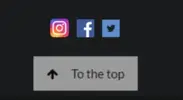
Quite new, I know the basics of margins and padding. I tried what you said by aligning it to the left using margin-left but now when I go back to desktop view, the Twitter icon is now at the left of the screen, and I want it at the center on the desktop view. I want the Twitter icon to be just right above the "To The Top" sign centered in both desktop and mobile view.
 

Attachments

  • 07d22f80117e315cc7456993b42ed65e.webp
    07d22f80117e315cc7456993b42ed65e.webp
    1.5 KB · Views: 2
If I were you, I would write something like:
HTML:
<div style="width:100%;">
    <a href="https://twitter.com/bobmyers" target="blank" class="Twitter" style="margin-left: auto;">
        <img src="twitter.png" alt="Twitter" style="width: 50px; height: 52px;">
    </a>
</div>
 
Did it work?
Yes, it worked that the item was now centered both in desktop and mobile view, but I wanted to add more social media platforms down there, and that doesn't work with the width being 100%. I'm tryna replicate something like the picture shown below.

Code:
<div class="Twitter" style="width: 100%;">
  <a href="https://twitter.com/bobmyers" target="blank" style="margin-left: 50%;">
      <img src="twitter.png" alt="Twitter" style="width: 50px; height: 52px;">
  </a>
</div>
 

Attachments

  • f9c61967591119770c0bb892f7c76cc2.webp
    f9c61967591119770c0bb892f7c76cc2.webp
    1.3 KB · Views: 0
Alternatively, you could learn about flex-boxes: Simply apply the style "display: flex; justify-content: flex-end;" to the div that contains the icons and it should work.
 
Alternatively, you could learn about flex-boxes: Simply apply the style "display: flex; justify-content: flex-end;" to the div that contains the icons and it should work.
It did work! Thanks. I got these lines showing up tho.
Code:
<div class="Twitter" style="width: 100%; margin-bottom: 20px;">
  <a href="https://twitter.com/bobmyers" target="blank" style="margin-left: 40%;">
      <img src="twitter.png" alt="Twitter" style="width: 52px; height: 52px;">
  </a>
  <a href="https://www.facebook.com/lance.ma" target="blank" style="margin-left: 5px;">
    <img src="fb.png" alt="Facebook" style="width: 50px; height: 50px">
    </a>
    <a href="https://www.instagram.com/1ance_ma/" target="blank" style="margin-left: 5px;">
      <img src="instagram.png" alt="Instagram" style="width: 50px; height: 50px;">
      </a>
      <a href="https://www.linkedin.com/in/lance-ma-1655081ba/" target="blank" style="margin-left: 5px;">
        <img src="linkden.png" alt="Linkden" style="width: 50px; height: 50px;">
      </a>
</div>
 

Attachments

  • a03dd2fd42510cd9e319b7cb94b37227.webp
    a03dd2fd42510cd9e319b7cb94b37227.webp
    2.8 KB · Views: 2

Buy us a coffee!

Buy me a coffee.
Back
Top Bottom