godspeed
New Coder
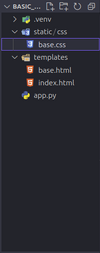
[app.py]
from flask import Flask, render_template, request,session,jsonify
import os
import psycopg2
from graphviz import Digraph
from contextlib import contextmanager
import traceback
import logging
from flask_cors import CORS
app = Flask(name)
# Enable CORS for all routes
CORS(app)
# Enable logging for Flask application
logging.basicConfig(level=logging.DEBUG) # You can change the level to INFO or ERROR if needed
# Database connection context manager
@contextmanager
def get_db_connection():
conn = None
try:
# Establish the database connection
conn = psycopg2.connect(
user='',
password='',
host='',
port='',
database='postgres'
)
# Provide a cursor
cur = conn.cursor()
yield cur
# Commit the transaction if needed
conn.commit()
except Exception as e:
print("An error occurred:", e)
if conn:
conn.rollback() # Roll back any changes if there's an error
finally:
# Close the cursor and connection
if cur:
cur.close()
if conn:
conn.close()
@app.route('/', methods=['GET', 'POST'])
def index():
db_connected = False
targets, data_points, tables, data_ids = [], [], [], []
layer5_data, layer1_data, layer2_data, layer3_data, layer4_data = [], [], [], [], []
filtered_primary_source_ids=[]
try:
with get_db_connection() as cur:
# Check database connection
cur.execute("SELECT 1")
db_connected = True
# For GET requests or to fetch options for dropdown menus
cur.execute("SELECT DISTINCT target_object_name FROM ly5")
targets = [row[0] for row in cur.fetchall()]
cur.execute("SELECT DISTINCT data_points_name FROM ly5")
data_points = [row[0] for row in cur.fetchall()]
cur.execute("SELECT DISTINCT table_name FROM ly2")
tables = [row[0] for row in cur.fetchall()]
cur.execute("SELECT DISTINCT primary_source_data_element_ID FROM ly2")
data_ids = [row[0] for row in cur.fetchall()]
if request.method == 'POST':
# Get form data
mode = request.form.get('mode')
selected_target = request.form.get('selected_target', 'all')
selected_table = request.form.get('selected_table', 'all')
# Mode-specific logic for fetching data
if mode == '1' and selected_target != 'all':
# Further refine layer5_data for Mode 1 with selected target
layer5_data = [
(id, target, data_point)
for (id, target, data_point) in layer5_data
if target == selected_target
]
elif mode == '2' and selected_table != 'all':
# Refine layer5_data based on selected table if needed
filtered_data_ids = set(data_ids) # Set of filtered data_ids for fast lookup
layer5_data = [
(id, target, data_point)
for (id, target, data_point) in layer5_data
if id in filtered_data_ids
]
# Extract filtered primary source IDs from Layer 5
filtered_primary_source_ids = {row[0] for row in layer5_data}
# Fetch Layer 1 and Layer 2 data based on filtered_primary_source_ids
cur.execute("""
SELECT l1.primary_source_data_element_ID, l1.iff_id, l1.source_name, l1.data_pipeline,
l2.field_name, l2.table_name
FROM ly1 l1
LEFT JOIN ly2 l2
ON l1.primary_source_data_element_ID = l2.primary_source_data_element_ID::bigint
""")
# Filter the data for Layer 1 and Layer 2 based on filtered_primary_source_ids
all_layer1_layer2_data = cur.fetchall()
# Layer 1 Data
layer1_data = [
(primary_source_data_element_ID, iff_id, source_name, data_pipeline)
for (primary_source_data_element_ID, iff_id, source_name, data_pipeline, _, _) in all_layer1_layer2_data
if primary_source_data_element_ID in filtered_primary_source_ids
]
# Layer 2 Data
layer2_data = [
(primary_source_data_element_ID, field_name, table_name, data_pipeline)
for (primary_source_data_element_ID, _, _, data_pipeline, field_name, table_name) in all_layer1_layer2_data
if primary_source_data_element_ID in filtered_primary_source_ids
]
# Fetch Layer 3 data
cur.execute("""
SELECT DISTINCT primary_source_data_element_ID, data_model, data_model_column, data_pipeline
FROM ly3
""")
layer3_data = [
(primary_source_data_element_ID, data_model, data_model_column, data_pipeline)
for (primary_source_data_element_ID, data_model, data_model_column, data_pipeline) in cur.fetchall()
if primary_source_data_element_ID in filtered_primary_source_ids
]
# Fetch Layer 4 data
cur.execute("""
SELECT DISTINCT primary_source_data_element_ID, working_tables, working_table_columns, data_pipeline, column_index
FROM ly4
""")
layer4_data = [
(primary_source_data_element_ID, working_tables, working_table_columns, data_pipeline, column_index)
for (primary_source_data_element_ID, working_tables, working_table_columns, data_pipeline, column_index) in cur.fetchall()
if primary_source_data_element_ID in filtered_primary_source_ids
]
except Exception as e:
print("Database connection failed:", e)
# Debug the final data to see what's being returned
app.logger.debug(f"Layer 1 Data: {layer1_data}")
app.logger.debug(f"Layer 2 Data: {layer2_data}")
app.logger.debug(f"Layer 3 Data: {layer3_data}")
app.logger.debug(f"Layer 4 Data: {layer4_data}")
app.logger.debug(f"Layer 5 Data: {layer5_data}")
app.logger.debug(f"Filtered Primary Source IDs: {filtered_primary_source_ids}")
print("Filtered Primary Source IDs:", filtered_primary_source_ids)
# Generate the graph image
graph_image_path = generate_graph(layer1_data, layer2_data, layer3_data, layer4_data, layer5_data, filtered_primary_source_ids)
# Render the template with the graph image path
return render_template(
'index.html',
db_connected=True,
targets=targets,
data_points=data_points,
tables=tables,
data_ids=data_ids,
layer1_data=layer1_data,
layer2_data=layer2_data,
layer3_data=layer3_data,
layer4_data=layer4_data,
layer5_data=layer5_data,
graph_image_path=graph_image_path # Pass the graph image path to the template
)
@app.route('/get_data_points', methods=['GET'])
def get_data_points():
data = [] # Initialize data variable to avoid UnboundLocalError
try:
# Fetch query parameters from the request
type_filter = request.args.get('type')
value_filter = request.args.get('value')
# Log the filters for debugging
print("Type filter:", type_filter)
print("Value filter:", value_filter)
# Validate query parameters
if not type_filter or not value_filter:
return jsonify(data) # Return an empty list if parameters are missing
# Define SQL queries based on the 'type' parameter
if type_filter == 'target':
# If 'value_filter' is 'all', fetch all data_points_name
if value_filter == 'all':
query = "SELECT DISTINCT data_points_name FROM ly5"
params = ()
else:
query = "SELECT DISTINCT data_points_name FROM ly5 WHERE target_object_name = %s"
params = (value_filter,)
elif type_filter == 'table':
# If 'value_filter' is 'all', fetch all primary_source_data_element_IDs
if value_filter == 'all':
query = "SELECT DISTINCT primary_source_data_element_ID FROM ly2"
params = ()
else:
query = "SELECT DISTINCT primary_source_data_element_ID FROM ly2 WHERE table_name = %s"
params = (value_filter,)
else:
# Return empty list if 'type' is invalid
return jsonify(data)
# Log the query and parameters for debugging
print("Executing query:", query, "with value:", value_filter)
# Use the context manager to handle the connection and cursor
with get_db_connection() as cur:
print("Executing query with cursor...")
cur.execute(query, params) # Execute the query with the provided filter value
data = [row[0] for row in cur.fetchall()] # Fetch results and extract the first column
# Log the fetched data for debugging
print("Data fetched:", data)
# Return the fetched data as JSON response
return jsonify(data)
except Exception as e:
# Log the full exception for better debugging
print("Error fetching data:", e)
traceback.print_exc() # Print stack trace for better insight into the error
# Return an empty list in case of an error
return jsonify(data) # Return the data, which will be an empty list if an error occurred
def generate_graph(layer1_data, layer2_data, layer3_data, layer4_data, layer5_data, filtered_primary_source_ids):
# ... (Your existing graph generation logic)
dot = Digraph(comment='Layer Mapping', graph_attr={'rankdir': 'RL'})
# Create node mappings for each layer
layer1_nodes = {}
layer2_nodes = {}
layer3_nodes = {}
layer4_nodes = {}
layer5_nodes = {}
# Create subgraph for Layer 1 (IFF IDs and Source Names)
with dot.subgraph(name='cluster_layer1') as layer1:
layer1.attr(label='Layer 1 (IFF IDs and Source Names)', style='filled', color='lightgreen')
# Ensure layer1_data has the structure (primary_source_data_element_ID, iff_id, source_name, data_pipeline)
for i, (primary_source_data_element_ID, iff_id, source_name, data_pipeline) in enumerate(layer1_data):
if iff_id and source_name: # Only add node if not empty
node_id = f'L1_{i}'
layer1_nodes[primary_source_data_element_ID] = node_id
# Create node for this data element
layer1.node(node_id, f'{iff_id}\n({source_name})',
shape='ellipse', style='filled', color='darkblue', fontcolor='white')
# Adjust Layer 2 node creation to match the fetched data structure
with dot.subgraph(name='cluster_layer2') as layer2:
layer2.attr(label='Layer 2 (Field Names and Table Names)', style='filled', color='lightyellow')
for i, (primary_source_data_element_ID, field_name, table_name, data_pipeline) in enumerate(layer2_data):
if field_name and primary_source_data_element_ID: # Only add node if not empty
node_id = f'L2_{i}'
layer2_nodes[primary_source_data_element_ID] = node_id
layer2.node(node_id, f'{field_name}\n({table_name})',
shape='ellipse', style='filled', color='darkblue', fontcolor='white')
# Create subgraph for Layer 3 (Data Models, Data Model Columns)
with dot.subgraph(name='cluster_layer3') as layer3:
layer3.attr(label='Layer 3 (Data Models)', style='filled', color='lightgrey')
# Group data by data model
data_model_groups = {}
for primary_source_data_element_ID, data_model, data_model_column, data_pipeline in layer3_data:
if data_model not in data_model_groups:
data_model_groups[data_model] = []
data_model_groups[data_model].append((data_model_column, primary_source_data_element_ID, data_pipeline))
# Create a subgraph for each data model, with the primary source ID and data model columns inside it
for i, (data_model, columns) in enumerate(data_model_groups.items()):
with dot.subgraph(name=f'cluster_{data_model}') as data_model_subgraph:
data_model_subgraph.attr(label=f'Data Model: {data_model}', style='filled', color='lightgrey')
# Add nodes for each data model column and primary source ID within it
for j, (data_model_column, primary_source_data_element_ID, data_pipeline) in enumerate(columns):
node_id = f'L3_{i}_{j}'
layer3_nodes[primary_source_data_element_ID] = node_id
data_model_subgraph.node(node_id, f'{data_model_column}\n(ID: {primary_source_data_element_ID})',
shape='ellipse', style='filled', color='darkblue', fontcolor='white')
# Create subgraph for Layer 4 (Working Tables)
with dot.subgraph(name='cluster_layer4') as layer4:
layer4.attr(label='Layer 4 (Working Tables)', style='filled', color='lightcoral')
# Group data by working table
working_table_groups = {}
for primary_source_data_element_ID, working_table, working_table_column, data_pipeline, column_index in layer4_data:
# Only add data to the group if it is in the filtered primary source IDs
if primary_source_data_element_ID in filtered_primary_source_ids:
if working_table not in working_table_groups:
working_table_groups[working_table] = []
working_table_groups[working_table].append((working_table_column, primary_source_data_element_ID, data_pipeline, column_index))
# Debug: Check if Layer 4 data exists before filtering
print("Filtered Layer 4 Data:")
print(working_table_groups)
# Create nodes for each working table, with the primary source ID and working table columns inside it
for i, (working_table, columns) in enumerate(working_table_groups.items()):
with dot.subgraph(name=f'cluster_{working_table}') as working_table_subgraph:
working_table_subgraph.attr(label=f'Working Table: {working_table}', style='filled', color='lightcoral')
# Add nodes for each working table column and primary source ID within it
for j, (working_table_column, primary_source_data_element_ID, data_pipeline, column_index) in enumerate(columns):
# Create a unique node identifier for the working table column
node_id = f'layer4_{primary_source_data_element_ID}_{column_index}'
# Store node in layer4_nodes for later linking
layer4_nodes[primary_source_data_element_ID] = node_id
# Add the node to the working table subgraph
working_table_subgraph.node(node_id, f'{working_table_column}\n(ID: {primary_source_data_element_ID})',
shape='ellipse', style='filled', color='darkblue', fontcolor='white')
# Link the node to Layer 5 (assuming layer5_nodes is populated earlier with Layer 5 data)
if primary_source_data_element_ID in layer5_nodes:
for layer5_node in layer5_nodes[primary_source_data_element_ID]:
dot.edge(node_id, layer5_node) # Create an edge between Layer 4 and Layer 5 nodes
# Debug: Confirm the node is being added
print(f"Node Added: {working_table_column} (ID: {primary_source_data_element_ID})")
# If no data found for Layer 4, print a message
if not working_table_groups:
print("No data available for Layer 4 after filtering based on selected primary source IDs.")
# Create subgraph for Layer 5 (Data Points)
with dot.subgraph(name='cluster_layer5') as layer5:
layer5.attr(label='Layer 5 (Data Points)', style='filled', color='lightblue')
target_object_groups = {}
# Assuming layer5_data contains the expected tuple structure with column_index included
for i, (primary_source_data_element_ID, target_object_name, data_point_name, data_pipeline, column_index) in enumerate(layer5_data):
# Use a unique key to prevent duplicate node IDs
unique_key = f'{primary_source_data_element_ID}_{i}'
if target_object_name not in target_object_groups:
target_object_groups[target_object_name] = []
target_object_groups[target_object_name].append({
'primary_source_data_element_ID': primary_source_data_element_ID,
'data_point_name': data_point_name,
'data_pipeline': data_pipeline,
'column_index': column_index,
'unique_key': unique_key
})
# Create nodes within each target object group
for target_object_name, data_points in target_object_groups.items():
with dot.subgraph(name=f'cluster_{target_object_name}') as target_object_subgraph:
target_object_subgraph.attr(label=f'Target Object: {target_object_name}', style='filled', color='lightblue')
for data_point in data_points:
unique_key = data_point['unique_key']
data_point_name = data_point['data_point_name']
primary_source_data_element_ID = data_point['primary_source_data_element_ID']
# Create node with unique identifier
node_id = f'L5_{unique_key}'
if primary_source_data_element_ID not in layer5_nodes:
layer5_nodes[primary_source_data_element_ID] = []
layer5_nodes[primary_source_data_element_ID].append(node_id)
# Add the node to the subgraph
target_object_subgraph.node(node_id, f'{data_point_name}',
shape='ellipse', style='filled', color='darkblue', fontcolor='white')
# Add edges between layers based on primary_source_data_element_ID
for primary_source_data_element_ID in layer1_nodes.keys():
layer1_node_id = layer1_nodes[primary_source_data_element_ID]
# Connect Layer 1 to Layer 2
if primary_source_data_element_ID in layer2_nodes:
layer2_node_id = layer2_nodes[primary_source_data_element_ID]
data_pipeline = next((dp for ps_id, _, _, dp in layer1_data if ps_id == primary_source_data_element_ID), None)
print(f"Linking Layer 1: {layer1_node_id} to Layer 2: {layer2_node_id} for Primary Source ID: {primary_source_data_element_ID} with DATA_PIPELINE: {data_pipeline}") # Use uppercase for data_pipeline
dot.edge(layer1_node_id, layer2_node_id, label=f'DATA_PIPELINE: {data_pipeline}') # Use uppercase for data_pipeline
else:
print(f"Warning: No match for Primary Source ID {primary_source_data_element_ID} in Layer 2")
# Connect Layer 2 (or previous layer) to Layer 3
if primary_source_data_element_ID in layer3_nodes:
layer3_node_id = layer3_nodes[primary_source_data_element_ID]
data_pipeline = next((dp for ps_id, _, _, dp in layer3_data if ps_id == primary_source_data_element_ID), None)
print(f"Linking Layer 2: {layer2_node_id} to Layer 3: {layer3_node_id} for Primary Source ID: {primary_source_data_element_ID} with DATA_PIPELINE: {data_pipeline}")
dot.edge(layer2_node_id, layer3_node_id, label=f'DATA_PIPELINE: {data_pipeline}') # Use uppercase for data_pipeline
else:
print(f"Warning: No match for Primary Source ID {primary_source_data_element_ID} in Layer 3")
# Connect Layer 3 to Layer 4
if primary_source_data_element_ID in layer4_nodes:
layer4_node_id = layer4_nodes[primary_source_data_element_ID]
data_pipeline = next((dp for ps_id, _, _, dp, _ in layer4_data if ps_id == primary_source_data_element_ID), None)
print(f"Linking Layer 3: {layer3_node_id} to Layer 4: {layer4_node_id} for Primary Source ID: {primary_source_data_element_ID} with DATA_PIPELINE: {data_pipeline}")
dot.edge(layer3_node_id, layer4_node_id, label=f'DATA_PIPELINE: {data_pipeline}')
else:
print(f"Warning: No match for Primary Source ID {primary_source_data_element_ID} in Layer 4")
# Connect Layer 4 to Layer 5
if primary_source_data_element_ID in layer5_nodes:
layer5_node_ids = layer5_nodes[primary_source_data_element_ID]
data_pipeline = next((dp for ps_id, _, _, dp, _ in layer4_data if ps_id == primary_source_data_element_ID), None)
# Iterate through each Layer 5 node ID and create an edge
for layer5_node_id in layer5_node_ids:
print(f"Linking Layer 4: {layer4_node_id} to Layer 5: {layer5_node_id} for Primary Source ID: {primary_source_data_element_ID} with DATA_PIPELINE: {data_pipeline}")
dot.edge(layer4_node_id, layer5_node_id, label=f'DATA_PIPELINE: {data_pipeline}')
else:
print(f"Warning: No match for Primary Source ID {primary_source_data_element_ID} in Layer 5")
# Render the graph to a PNG image
graph_filename = 'graph_output.png' # You can use any name for the image file
graph_path = os.path.join('static', graph_filename)
dot.render(graph_path, format='png')
if name == 'main':
app.run(debug=True)
[index.html]
<!DOCTYPE html>
<html lang="en">
<head>
<meta charset="UTF-8">
<meta name="viewport" content="width=device-width, initial-scale=1.0">
<link rel="stylesheet" href="https://cdnjs.cloudflare.com/ajax/libs/bootstrap/5.1.3/css/bootstrap.min.css">
</head>
<body>
<div class="container mt-5">
<h1>Data Lineage</h1>
{% if db_connected %}
<div class="alert alert-success">Connected to database!</div>
{% else %}
<div class="alert alert-warning">Connecting to database...</div>
{% endif %}
<form id="graphForm">
<div class="mb-3">
<label for="mode" class="form-label">Select Mode</label>
<select id="mode" name="mode" class="form-select" onchange="updateForm()" required>
<option value="1">Mode 1</option>
<option value="2">Mode 2</option>
</select>
</div>
<!-- Mode 1 Fields -->
<div id="mode1Fields">
<div class="mb-3">
<label for="selected_target" class="form-label">Select Target Object</label>
<select id="selected_target" name="selected_target" class="form-select" onchange="updateDataPoints('target')" required>
<option value="all">All</option>
{% for target in targets %}
<option value="{{ target }}">{{ target }}</option>
{% endfor %}
</select>
</div>
<div class="mb-3">
<label for="selected_data_point" class="form-label">Select Data Point</label>
<select id="selected_data_point" name="selected_data_point" class="form-select" required>
<option value="all">All</option>
{% for data_point in data_points %}
<option value="{{ data_point }}">{{ data_point }}</option>
{% endfor %}
</select>
</div>
</div>
<!-- Mode 2 Fields -->
<div id="mode2Fields" style="display: none;">
<div class="mb-3">
<label for="selected_table" class="form-label">Select Table</label>
<select id="selected_table" name="selected_table" class="form-select" onchange="updateDataPoints('table')" required>
<option value="all">All</option>
{% for table in tables %}
<option value="{{ table }}">{{ table }}</option>
{% endfor %}
</select>
</div>
<div class="mb-3">
<label for="selected_id" class="form-label">Select Data Element ID</label>
<select id="selected_id" name="selected_id" class="form-select" required>
<option value="all">All</option>
{% for data_id in data_ids %}
<option value="{{ data_id }}">{{ data_id }}</option>
{% endfor %}
</select>
</div>
</div>
<!-- Set form action to point to the route handling graph generation -->
<form id="graphForm" action="/generate_graph" method="POST">
<!-- Rest of your form fields here -->
<button type="submit" id="generate-graph-button" class="btn btn-primary">Generate Graph</button>
<img id="graph-image" src="" style="display: none;" alt="Generated Graph">
</form>
</form>
<!-- Display the generated graph if available -->
{% if graph_image_path %}
<div>
<h2>Generated Graph:</h2>
<img src="{{ url_for('static', filename=graph_image_path) }}" alt="Graph Image" style="max-width: 100%; height: auto;">
</div>
{% endif %}
</div>
<script>
// Function to update the form based on the selected mode
function updateForm() {
const mode = document.getElementById('mode').value;
document.getElementById('mode1Fields').style.display = mode === '1' ? 'block' : 'none';
document.getElementById('mode2Fields').style.display = mode === '2' ? 'block' : 'none';
}
// Initialize the form display based on selected mode
updateForm();
// Function to update Data Points or Data Element IDs based on selected Table or Target Object
function updateDataPoints(type) {
let selectedValue;
let url;
if (type === 'target') {
selectedValue = document.getElementById('selected_target').value;
url = '/get_data_points?type=target&value=' + selectedValue;
} else if (type === 'table') {
selectedValue = document.getElementById('selected_table').value;
url = '/get_data_points?type=table&value=' + selectedValue;
}
fetch(url)
.then(response => response.json())
.then(data => {
const dataPointsDropdown = document.getElementById(type === 'target' ? 'selected_data_point' : 'selected_id');
dataPointsDropdown.innerHTML = '<option value="all">All</option>';
data.forEach(item => {
const option = document.createElement('option');
option.value = item;
option.textContent = item;
dataPointsDropdown.appendChild(option);
});
})
.catch(error => console.error('Error:', error));
}
</script>
</body>
</html>
from flask import Flask, render_template, request,session,jsonify
import os
import psycopg2
from graphviz import Digraph
from contextlib import contextmanager
import traceback
import logging
from flask_cors import CORS
app = Flask(name)
# Enable CORS for all routes
CORS(app)
# Enable logging for Flask application
logging.basicConfig(level=logging.DEBUG) # You can change the level to INFO or ERROR if needed
# Database connection context manager
@contextmanager
def get_db_connection():
conn = None
try:
# Establish the database connection
conn = psycopg2.connect(
user='',
password='',
host='',
port='',
database='postgres'
)
# Provide a cursor
cur = conn.cursor()
yield cur
# Commit the transaction if needed
conn.commit()
except Exception as e:
print("An error occurred:", e)
if conn:
conn.rollback() # Roll back any changes if there's an error
finally:
# Close the cursor and connection
if cur:
cur.close()
if conn:
conn.close()
@app.route('/', methods=['GET', 'POST'])
def index():
db_connected = False
targets, data_points, tables, data_ids = [], [], [], []
layer5_data, layer1_data, layer2_data, layer3_data, layer4_data = [], [], [], [], []
filtered_primary_source_ids=[]
try:
with get_db_connection() as cur:
# Check database connection
cur.execute("SELECT 1")
db_connected = True
# For GET requests or to fetch options for dropdown menus
cur.execute("SELECT DISTINCT target_object_name FROM ly5")
targets = [row[0] for row in cur.fetchall()]
cur.execute("SELECT DISTINCT data_points_name FROM ly5")
data_points = [row[0] for row in cur.fetchall()]
cur.execute("SELECT DISTINCT table_name FROM ly2")
tables = [row[0] for row in cur.fetchall()]
cur.execute("SELECT DISTINCT primary_source_data_element_ID FROM ly2")
data_ids = [row[0] for row in cur.fetchall()]
if request.method == 'POST':
# Get form data
mode = request.form.get('mode')
selected_target = request.form.get('selected_target', 'all')
selected_table = request.form.get('selected_table', 'all')
# Mode-specific logic for fetching data
if mode == '1' and selected_target != 'all':
# Further refine layer5_data for Mode 1 with selected target
layer5_data = [
(id, target, data_point)
for (id, target, data_point) in layer5_data
if target == selected_target
]
elif mode == '2' and selected_table != 'all':
# Refine layer5_data based on selected table if needed
filtered_data_ids = set(data_ids) # Set of filtered data_ids for fast lookup
layer5_data = [
(id, target, data_point)
for (id, target, data_point) in layer5_data
if id in filtered_data_ids
]
# Extract filtered primary source IDs from Layer 5
filtered_primary_source_ids = {row[0] for row in layer5_data}
# Fetch Layer 1 and Layer 2 data based on filtered_primary_source_ids
cur.execute("""
SELECT l1.primary_source_data_element_ID, l1.iff_id, l1.source_name, l1.data_pipeline,
l2.field_name, l2.table_name
FROM ly1 l1
LEFT JOIN ly2 l2
ON l1.primary_source_data_element_ID = l2.primary_source_data_element_ID::bigint
""")
# Filter the data for Layer 1 and Layer 2 based on filtered_primary_source_ids
all_layer1_layer2_data = cur.fetchall()
# Layer 1 Data
layer1_data = [
(primary_source_data_element_ID, iff_id, source_name, data_pipeline)
for (primary_source_data_element_ID, iff_id, source_name, data_pipeline, _, _) in all_layer1_layer2_data
if primary_source_data_element_ID in filtered_primary_source_ids
]
# Layer 2 Data
layer2_data = [
(primary_source_data_element_ID, field_name, table_name, data_pipeline)
for (primary_source_data_element_ID, _, _, data_pipeline, field_name, table_name) in all_layer1_layer2_data
if primary_source_data_element_ID in filtered_primary_source_ids
]
# Fetch Layer 3 data
cur.execute("""
SELECT DISTINCT primary_source_data_element_ID, data_model, data_model_column, data_pipeline
FROM ly3
""")
layer3_data = [
(primary_source_data_element_ID, data_model, data_model_column, data_pipeline)
for (primary_source_data_element_ID, data_model, data_model_column, data_pipeline) in cur.fetchall()
if primary_source_data_element_ID in filtered_primary_source_ids
]
# Fetch Layer 4 data
cur.execute("""
SELECT DISTINCT primary_source_data_element_ID, working_tables, working_table_columns, data_pipeline, column_index
FROM ly4
""")
layer4_data = [
(primary_source_data_element_ID, working_tables, working_table_columns, data_pipeline, column_index)
for (primary_source_data_element_ID, working_tables, working_table_columns, data_pipeline, column_index) in cur.fetchall()
if primary_source_data_element_ID in filtered_primary_source_ids
]
except Exception as e:
print("Database connection failed:", e)
# Debug the final data to see what's being returned
app.logger.debug(f"Layer 1 Data: {layer1_data}")
app.logger.debug(f"Layer 2 Data: {layer2_data}")
app.logger.debug(f"Layer 3 Data: {layer3_data}")
app.logger.debug(f"Layer 4 Data: {layer4_data}")
app.logger.debug(f"Layer 5 Data: {layer5_data}")
app.logger.debug(f"Filtered Primary Source IDs: {filtered_primary_source_ids}")
print("Filtered Primary Source IDs:", filtered_primary_source_ids)
# Generate the graph image
graph_image_path = generate_graph(layer1_data, layer2_data, layer3_data, layer4_data, layer5_data, filtered_primary_source_ids)
# Render the template with the graph image path
return render_template(
'index.html',
db_connected=True,
targets=targets,
data_points=data_points,
tables=tables,
data_ids=data_ids,
layer1_data=layer1_data,
layer2_data=layer2_data,
layer3_data=layer3_data,
layer4_data=layer4_data,
layer5_data=layer5_data,
graph_image_path=graph_image_path # Pass the graph image path to the template
)
@app.route('/get_data_points', methods=['GET'])
def get_data_points():
data = [] # Initialize data variable to avoid UnboundLocalError
try:
# Fetch query parameters from the request
type_filter = request.args.get('type')
value_filter = request.args.get('value')
# Log the filters for debugging
print("Type filter:", type_filter)
print("Value filter:", value_filter)
# Validate query parameters
if not type_filter or not value_filter:
return jsonify(data) # Return an empty list if parameters are missing
# Define SQL queries based on the 'type' parameter
if type_filter == 'target':
# If 'value_filter' is 'all', fetch all data_points_name
if value_filter == 'all':
query = "SELECT DISTINCT data_points_name FROM ly5"
params = ()
else:
query = "SELECT DISTINCT data_points_name FROM ly5 WHERE target_object_name = %s"
params = (value_filter,)
elif type_filter == 'table':
# If 'value_filter' is 'all', fetch all primary_source_data_element_IDs
if value_filter == 'all':
query = "SELECT DISTINCT primary_source_data_element_ID FROM ly2"
params = ()
else:
query = "SELECT DISTINCT primary_source_data_element_ID FROM ly2 WHERE table_name = %s"
params = (value_filter,)
else:
# Return empty list if 'type' is invalid
return jsonify(data)
# Log the query and parameters for debugging
print("Executing query:", query, "with value:", value_filter)
# Use the context manager to handle the connection and cursor
with get_db_connection() as cur:
print("Executing query with cursor...")
cur.execute(query, params) # Execute the query with the provided filter value
data = [row[0] for row in cur.fetchall()] # Fetch results and extract the first column
# Log the fetched data for debugging
print("Data fetched:", data)
# Return the fetched data as JSON response
return jsonify(data)
except Exception as e:
# Log the full exception for better debugging
print("Error fetching data:", e)
traceback.print_exc() # Print stack trace for better insight into the error
# Return an empty list in case of an error
return jsonify(data) # Return the data, which will be an empty list if an error occurred
def generate_graph(layer1_data, layer2_data, layer3_data, layer4_data, layer5_data, filtered_primary_source_ids):
# ... (Your existing graph generation logic)
dot = Digraph(comment='Layer Mapping', graph_attr={'rankdir': 'RL'})
# Create node mappings for each layer
layer1_nodes = {}
layer2_nodes = {}
layer3_nodes = {}
layer4_nodes = {}
layer5_nodes = {}
# Create subgraph for Layer 1 (IFF IDs and Source Names)
with dot.subgraph(name='cluster_layer1') as layer1:
layer1.attr(label='Layer 1 (IFF IDs and Source Names)', style='filled', color='lightgreen')
# Ensure layer1_data has the structure (primary_source_data_element_ID, iff_id, source_name, data_pipeline)
for i, (primary_source_data_element_ID, iff_id, source_name, data_pipeline) in enumerate(layer1_data):
if iff_id and source_name: # Only add node if not empty
node_id = f'L1_{i}'
layer1_nodes[primary_source_data_element_ID] = node_id
# Create node for this data element
layer1.node(node_id, f'{iff_id}\n({source_name})',
shape='ellipse', style='filled', color='darkblue', fontcolor='white')
# Adjust Layer 2 node creation to match the fetched data structure
with dot.subgraph(name='cluster_layer2') as layer2:
layer2.attr(label='Layer 2 (Field Names and Table Names)', style='filled', color='lightyellow')
for i, (primary_source_data_element_ID, field_name, table_name, data_pipeline) in enumerate(layer2_data):
if field_name and primary_source_data_element_ID: # Only add node if not empty
node_id = f'L2_{i}'
layer2_nodes[primary_source_data_element_ID] = node_id
layer2.node(node_id, f'{field_name}\n({table_name})',
shape='ellipse', style='filled', color='darkblue', fontcolor='white')
# Create subgraph for Layer 3 (Data Models, Data Model Columns)
with dot.subgraph(name='cluster_layer3') as layer3:
layer3.attr(label='Layer 3 (Data Models)', style='filled', color='lightgrey')
# Group data by data model
data_model_groups = {}
for primary_source_data_element_ID, data_model, data_model_column, data_pipeline in layer3_data:
if data_model not in data_model_groups:
data_model_groups[data_model] = []
data_model_groups[data_model].append((data_model_column, primary_source_data_element_ID, data_pipeline))
# Create a subgraph for each data model, with the primary source ID and data model columns inside it
for i, (data_model, columns) in enumerate(data_model_groups.items()):
with dot.subgraph(name=f'cluster_{data_model}') as data_model_subgraph:
data_model_subgraph.attr(label=f'Data Model: {data_model}', style='filled', color='lightgrey')
# Add nodes for each data model column and primary source ID within it
for j, (data_model_column, primary_source_data_element_ID, data_pipeline) in enumerate(columns):
node_id = f'L3_{i}_{j}'
layer3_nodes[primary_source_data_element_ID] = node_id
data_model_subgraph.node(node_id, f'{data_model_column}\n(ID: {primary_source_data_element_ID})',
shape='ellipse', style='filled', color='darkblue', fontcolor='white')
# Create subgraph for Layer 4 (Working Tables)
with dot.subgraph(name='cluster_layer4') as layer4:
layer4.attr(label='Layer 4 (Working Tables)', style='filled', color='lightcoral')
# Group data by working table
working_table_groups = {}
for primary_source_data_element_ID, working_table, working_table_column, data_pipeline, column_index in layer4_data:
# Only add data to the group if it is in the filtered primary source IDs
if primary_source_data_element_ID in filtered_primary_source_ids:
if working_table not in working_table_groups:
working_table_groups[working_table] = []
working_table_groups[working_table].append((working_table_column, primary_source_data_element_ID, data_pipeline, column_index))
# Debug: Check if Layer 4 data exists before filtering
print("Filtered Layer 4 Data:")
print(working_table_groups)
# Create nodes for each working table, with the primary source ID and working table columns inside it
for i, (working_table, columns) in enumerate(working_table_groups.items()):
with dot.subgraph(name=f'cluster_{working_table}') as working_table_subgraph:
working_table_subgraph.attr(label=f'Working Table: {working_table}', style='filled', color='lightcoral')
# Add nodes for each working table column and primary source ID within it
for j, (working_table_column, primary_source_data_element_ID, data_pipeline, column_index) in enumerate(columns):
# Create a unique node identifier for the working table column
node_id = f'layer4_{primary_source_data_element_ID}_{column_index}'
# Store node in layer4_nodes for later linking
layer4_nodes[primary_source_data_element_ID] = node_id
# Add the node to the working table subgraph
working_table_subgraph.node(node_id, f'{working_table_column}\n(ID: {primary_source_data_element_ID})',
shape='ellipse', style='filled', color='darkblue', fontcolor='white')
# Link the node to Layer 5 (assuming layer5_nodes is populated earlier with Layer 5 data)
if primary_source_data_element_ID in layer5_nodes:
for layer5_node in layer5_nodes[primary_source_data_element_ID]:
dot.edge(node_id, layer5_node) # Create an edge between Layer 4 and Layer 5 nodes
# Debug: Confirm the node is being added
print(f"Node Added: {working_table_column} (ID: {primary_source_data_element_ID})")
# If no data found for Layer 4, print a message
if not working_table_groups:
print("No data available for Layer 4 after filtering based on selected primary source IDs.")
# Create subgraph for Layer 5 (Data Points)
with dot.subgraph(name='cluster_layer5') as layer5:
layer5.attr(label='Layer 5 (Data Points)', style='filled', color='lightblue')
target_object_groups = {}
# Assuming layer5_data contains the expected tuple structure with column_index included
for i, (primary_source_data_element_ID, target_object_name, data_point_name, data_pipeline, column_index) in enumerate(layer5_data):
# Use a unique key to prevent duplicate node IDs
unique_key = f'{primary_source_data_element_ID}_{i}'
if target_object_name not in target_object_groups:
target_object_groups[target_object_name] = []
target_object_groups[target_object_name].append({
'primary_source_data_element_ID': primary_source_data_element_ID,
'data_point_name': data_point_name,
'data_pipeline': data_pipeline,
'column_index': column_index,
'unique_key': unique_key
})
# Create nodes within each target object group
for target_object_name, data_points in target_object_groups.items():
with dot.subgraph(name=f'cluster_{target_object_name}') as target_object_subgraph:
target_object_subgraph.attr(label=f'Target Object: {target_object_name}', style='filled', color='lightblue')
for data_point in data_points:
unique_key = data_point['unique_key']
data_point_name = data_point['data_point_name']
primary_source_data_element_ID = data_point['primary_source_data_element_ID']
# Create node with unique identifier
node_id = f'L5_{unique_key}'
if primary_source_data_element_ID not in layer5_nodes:
layer5_nodes[primary_source_data_element_ID] = []
layer5_nodes[primary_source_data_element_ID].append(node_id)
# Add the node to the subgraph
target_object_subgraph.node(node_id, f'{data_point_name}',
shape='ellipse', style='filled', color='darkblue', fontcolor='white')
# Add edges between layers based on primary_source_data_element_ID
for primary_source_data_element_ID in layer1_nodes.keys():
layer1_node_id = layer1_nodes[primary_source_data_element_ID]
# Connect Layer 1 to Layer 2
if primary_source_data_element_ID in layer2_nodes:
layer2_node_id = layer2_nodes[primary_source_data_element_ID]
data_pipeline = next((dp for ps_id, _, _, dp in layer1_data if ps_id == primary_source_data_element_ID), None)
print(f"Linking Layer 1: {layer1_node_id} to Layer 2: {layer2_node_id} for Primary Source ID: {primary_source_data_element_ID} with DATA_PIPELINE: {data_pipeline}") # Use uppercase for data_pipeline
dot.edge(layer1_node_id, layer2_node_id, label=f'DATA_PIPELINE: {data_pipeline}') # Use uppercase for data_pipeline
else:
print(f"Warning: No match for Primary Source ID {primary_source_data_element_ID} in Layer 2")
# Connect Layer 2 (or previous layer) to Layer 3
if primary_source_data_element_ID in layer3_nodes:
layer3_node_id = layer3_nodes[primary_source_data_element_ID]
data_pipeline = next((dp for ps_id, _, _, dp in layer3_data if ps_id == primary_source_data_element_ID), None)
print(f"Linking Layer 2: {layer2_node_id} to Layer 3: {layer3_node_id} for Primary Source ID: {primary_source_data_element_ID} with DATA_PIPELINE: {data_pipeline}")
dot.edge(layer2_node_id, layer3_node_id, label=f'DATA_PIPELINE: {data_pipeline}') # Use uppercase for data_pipeline
else:
print(f"Warning: No match for Primary Source ID {primary_source_data_element_ID} in Layer 3")
# Connect Layer 3 to Layer 4
if primary_source_data_element_ID in layer4_nodes:
layer4_node_id = layer4_nodes[primary_source_data_element_ID]
data_pipeline = next((dp for ps_id, _, _, dp, _ in layer4_data if ps_id == primary_source_data_element_ID), None)
print(f"Linking Layer 3: {layer3_node_id} to Layer 4: {layer4_node_id} for Primary Source ID: {primary_source_data_element_ID} with DATA_PIPELINE: {data_pipeline}")
dot.edge(layer3_node_id, layer4_node_id, label=f'DATA_PIPELINE: {data_pipeline}')
else:
print(f"Warning: No match for Primary Source ID {primary_source_data_element_ID} in Layer 4")
# Connect Layer 4 to Layer 5
if primary_source_data_element_ID in layer5_nodes:
layer5_node_ids = layer5_nodes[primary_source_data_element_ID]
data_pipeline = next((dp for ps_id, _, _, dp, _ in layer4_data if ps_id == primary_source_data_element_ID), None)
# Iterate through each Layer 5 node ID and create an edge
for layer5_node_id in layer5_node_ids:
print(f"Linking Layer 4: {layer4_node_id} to Layer 5: {layer5_node_id} for Primary Source ID: {primary_source_data_element_ID} with DATA_PIPELINE: {data_pipeline}")
dot.edge(layer4_node_id, layer5_node_id, label=f'DATA_PIPELINE: {data_pipeline}')
else:
print(f"Warning: No match for Primary Source ID {primary_source_data_element_ID} in Layer 5")
# Render the graph to a PNG image
graph_filename = 'graph_output.png' # You can use any name for the image file
graph_path = os.path.join('static', graph_filename)
dot.render(graph_path, format='png')
if name == 'main':
app.run(debug=True)
[index.html]
<!DOCTYPE html>
<html lang="en">
<head>
<meta charset="UTF-8">
<meta name="viewport" content="width=device-width, initial-scale=1.0">
<link rel="stylesheet" href="https://cdnjs.cloudflare.com/ajax/libs/bootstrap/5.1.3/css/bootstrap.min.css">
</head>
<body>
<div class="container mt-5">
<h1>Data Lineage</h1>
{% if db_connected %}
<div class="alert alert-success">Connected to database!</div>
{% else %}
<div class="alert alert-warning">Connecting to database...</div>
{% endif %}
<form id="graphForm">
<div class="mb-3">
<label for="mode" class="form-label">Select Mode</label>
<select id="mode" name="mode" class="form-select" onchange="updateForm()" required>
<option value="1">Mode 1</option>
<option value="2">Mode 2</option>
</select>
</div>
<!-- Mode 1 Fields -->
<div id="mode1Fields">
<div class="mb-3">
<label for="selected_target" class="form-label">Select Target Object</label>
<select id="selected_target" name="selected_target" class="form-select" onchange="updateDataPoints('target')" required>
<option value="all">All</option>
{% for target in targets %}
<option value="{{ target }}">{{ target }}</option>
{% endfor %}
</select>
</div>
<div class="mb-3">
<label for="selected_data_point" class="form-label">Select Data Point</label>
<select id="selected_data_point" name="selected_data_point" class="form-select" required>
<option value="all">All</option>
{% for data_point in data_points %}
<option value="{{ data_point }}">{{ data_point }}</option>
{% endfor %}
</select>
</div>
</div>
<!-- Mode 2 Fields -->
<div id="mode2Fields" style="display: none;">
<div class="mb-3">
<label for="selected_table" class="form-label">Select Table</label>
<select id="selected_table" name="selected_table" class="form-select" onchange="updateDataPoints('table')" required>
<option value="all">All</option>
{% for table in tables %}
<option value="{{ table }}">{{ table }}</option>
{% endfor %}
</select>
</div>
<div class="mb-3">
<label for="selected_id" class="form-label">Select Data Element ID</label>
<select id="selected_id" name="selected_id" class="form-select" required>
<option value="all">All</option>
{% for data_id in data_ids %}
<option value="{{ data_id }}">{{ data_id }}</option>
{% endfor %}
</select>
</div>
</div>
<!-- Set form action to point to the route handling graph generation -->
<form id="graphForm" action="/generate_graph" method="POST">
<!-- Rest of your form fields here -->
<button type="submit" id="generate-graph-button" class="btn btn-primary">Generate Graph</button>
<img id="graph-image" src="" style="display: none;" alt="Generated Graph">
</form>
</form>
<!-- Display the generated graph if available -->
{% if graph_image_path %}
<div>
<h2>Generated Graph:</h2>
<img src="{{ url_for('static', filename=graph_image_path) }}" alt="Graph Image" style="max-width: 100%; height: auto;">
</div>
{% endif %}
</div>
<script>
// Function to update the form based on the selected mode
function updateForm() {
const mode = document.getElementById('mode').value;
document.getElementById('mode1Fields').style.display = mode === '1' ? 'block' : 'none';
document.getElementById('mode2Fields').style.display = mode === '2' ? 'block' : 'none';
}
// Initialize the form display based on selected mode
updateForm();
// Function to update Data Points or Data Element IDs based on selected Table or Target Object
function updateDataPoints(type) {
let selectedValue;
let url;
if (type === 'target') {
selectedValue = document.getElementById('selected_target').value;
url = '/get_data_points?type=target&value=' + selectedValue;
} else if (type === 'table') {
selectedValue = document.getElementById('selected_table').value;
url = '/get_data_points?type=table&value=' + selectedValue;
}
fetch(url)
.then(response => response.json())
.then(data => {
const dataPointsDropdown = document.getElementById(type === 'target' ? 'selected_data_point' : 'selected_id');
dataPointsDropdown.innerHTML = '<option value="all">All</option>';
data.forEach(item => {
const option = document.createElement('option');
option.value = item;
option.textContent = item;
dataPointsDropdown.appendChild(option);
});
})
.catch(error => console.error('Error:', error));
}
</script>
</body>
</html>