

accol
Coder
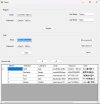
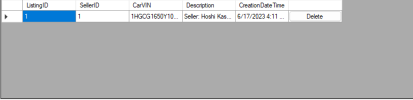
We are making a form where a user can log in and in turn upload listings for cars to sell, however, the data grid view for the listings isn't showing every entry even though it is in the database when it is being first loaded. I also notice too that updating the data grid view and refreshing it doesn't work after uploading an entry to it, only after you close the form and reopen it again does it actually update with the new listing (but only for those of seller ID 1 still).

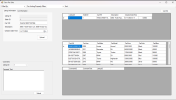
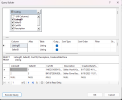
I have been trying to figure this out and I don't know what to do anymore. From what I notice and have tested, it only shows the listings for SellerID 1 even though no one in the group has specified to filter out the listings by seller ID then populating the data grid view based on that. The query builder shows that
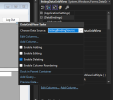
Below is the code that I reference the data grid view in some form.
I have linked the entire frmCarsForSale code if needed (the names are the hyperlinks). There is a method that handled filtering but it isn't called on load, but when a button is clicked so that shouldn't be impacting anything. Also the frmUsers as well, which is the parent form that houses the login screen.
I have tried calling
I forgot to mention: the data set was set up via the Data Source Configuration Wizard with an already existing connection string. In
SQL:
/* the table's properties in the query that was used to create it*/
CREATE TABLE [dbo].[Listing](
    [ListingID] [int] IDENTITY(1,1) NOT NULL,
    [SellerID] [int] NOT NULL,
    [CarVIN] [varchar](50) NOT NULL,
    [Description] [varchar](500) NULL,
    [CreationDateTime] [smalldatetime] NOT NULL,
PRIMARY KEY CLUSTERED
(
    [ListingID] ASC
)WITH (PAD_INDEX = OFF, STATISTICS_NORECOMPUTE = OFF, IGNORE_DUP_KEY = OFF, ALLOW_ROW_LOCKS = ON, ALLOW_PAGE_LOCKS = ON, OPTIMIZE_FOR_SEQUENTIAL_KEY = OFF) ON [PRIMARY]
) ON [PRIMARY]

/**/
I have been trying to figure this out and I don't know what to do anymore. From what I notice and have tested, it only shows the listings for SellerID 1 even though no one in the group has specified to filter out the listings by seller ID then populating the data grid view based on that. The query builder shows that
Fill() for the adapter is working and the data grid view is clearly bound otherwise it wouldn't be showing anything.Below is the code that I reference the data grid view in some form.
C#:
private void frmCarsForSale_Load(object sender, EventArgs e)
    {
        // TODO: This line of code loads data into the 'groupFinal266DataSet.Listing' table. You can move, or remove it, as needed.
        this.listingTableAdapter.Fill(this.groupFinal266DataSet.Listing);
    }

// this is for filtering but it shouldn't be impacting how the data grid view is being loaded when the form's just being loaded?
private void viewAllToolStripButton_Click(object sender, EventArgs e)
        {
            /*...*/
           this.groupFinal266DataSet.Listing.Rows.Clear();

            /*...*/
            List<Listing> listings = ListingDB.GetAllListings(Program.sqlConnection);

            string carVINs = String.Join("|", cars.Select(x => x.carVIN).ToArray());
            carVINs = carVINs.Trim(new Char[] { '|' });

            listings.RemoveAll(l => l.carVIN.Any(c => !Regex.IsMatch(l.carVIN, carVINs)));

            foreach (Listing listing in listings)
                this.groupFinal266DataSet.Listing.Rows.Add(listing.listingID, listing.sellerID, listing.carVIN, listing.description, listing.creationDateTime);
        }

// all of the code that references the data grid view itself asides the _Load() function only happens if you click something, so I don't think the code is the problem?
private void btnUpload_Click(object sender, EventArgs e)
        {
            modifyingCarComponents |= ModifyingCarComponents.IS_MODIFYING_LISTING;

            AssignBusinessObjectDataToUpload();

            if (!ValidateBusinessObjectData())
                return;

            if (!listingDB.Upload(listing, Program.sqlConnection)) {
                MessageBox.Show(listingDB.MsgText, listingDB.MsgCaption);
                return;
            }

            // Why don't these work? That's also been an issue?
            listingDataGridView.Update();
            listingDataGridView.Refresh();
        }

        public void AssignBusinessObjectDataToDelete(int rowIndex)
        {
            if (modifyingCarComponents == ModifyingCarComponents.IS_MODIFYING_LISTING)
            {
                listing.listingID = Convert.ToInt32(listingDataGridView.Rows[rowIndex].Cells[0].Value);
                listing.sellerID = Convert.ToInt32(listingDataGridView.Rows[rowIndex].Cells[1].Value);
                listing.carVIN = Convert.ToString(listingDataGridView.Rows[rowIndex].Cells[2].Value);
                listing.description = Convert.ToString(listingDataGridView.Rows[rowIndex].Cells[3].Value);
                listing.creationDateTime = Convert.ToDateTime(listingDataGridView.Rows[rowIndex].Cells[4].Value);
            }
        }

private void listingDataGridView_CellContentClick(object sender, DataGridViewCellEventArgs e)
        {
            if (e.ColumnIndex == 5)
            {
                modifyingCarComponents = ModifyingCarComponents.IS_MODIFYING_LISTING;

                AssignBusinessObjectDataToDelete(e.RowIndex);

                if (!ValidateBusinessObjectData())
                    return;

                if (!listingDB.Delete(listing, Program.sqlConnection)) {
                    MessageBox.Show(listingDB.MsgText, listingDB.MsgCaption);
                    return;
                }

                listingDataGridView.Rows.RemoveAt(e.RowIndex);
            }
        }
I have linked the entire frmCarsForSale code if needed (the names are the hyperlinks). There is a method that handled filtering but it isn't called on load, but when a button is clicked so that shouldn't be impacting anything. Also the frmUsers as well, which is the parent form that houses the login screen.
I have tried calling
listingBindingSource.ResetBindings(true); to update the data grid view inside the cars for sale form automatically after adding a record for instance and that didn't work, tried setting it to false too (I think there's something wrong with how the listingDataGridView is loading in general. Sorry for the code by the way, I know that there's a lot of redundancies and probably better optimisation and refactoring could be done, but we're on a short time limit. Thank you for any response. I really have no clue what's going on anymore and my brain is tired.I forgot to mention: the data set was set up via the Data Source Configuration Wizard with an already existing connection string. In
frmUsers I've tried commenting out the entirety of the pagination code because it does clear the dataset, tested that and that didn't fix the issue.Attachments
Last edited:




