
Welcome to Code Forum!

Join a community that supports you and your coding journey from day one. We strive to be a friendly, supportive community that empowers everyone to be better developers. By registering with us, you'll be able to discuss, share and private message with other members of our community.

SignUp Now!
  • Guest, before posting your code please take these rules into consideration:
    • It is required to use our BBCode feature to display your code. While within the editor click < / > or >_ and place your code within the BB Code prompt. This helps others with finding a solution by making it easier to read and easier to copy.
    • You can also use markdown to share your code. When using markdown your code will be automatically converted to BBCode. For help with markdown check out the markdown guide.
    • Don't share a wall of code. All we want is the problem area, the code related to your issue.

    GIF shows where to locate </> in the thread and or post editor toolbar.
    To learn more about how to use our BBCode feature, review our "How to post your code into threads" here.

    Thank you, Code Forum.

JavaScript Click on instance of image to trigger event

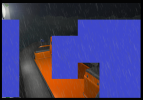
Hello I'm trying to make a Point & Click adventure game so I have multiple boxes derived from a PNG image file like so:
gamedev4.png

When the player clicks on a particular box, a particular event should happen. Being a PNG the image can later be made transparent. In any case, here is the code I have so far:

Code:
class Layer {
    constructor(game, width, height, image) {
        this.game = game;
        this.width = width;
        this.height = height;
        this.image = image;
        this.x = 0;
        this.y = 0;
    }
    update() {
    }
    draw(context) {
        context.drawImage(this.image, this.x, this.y, this.width, this.height);
    }
}

export class Background {
    constructor(game) {
        this.game = game;
        this.width = 640;
        this.height = 480;
        this.backgroundImage = document.getElementById('background');
        this.eventRect = document.getElementById('eventRect');


        this.background = new Layer(this.game, this.width, this.height, this.backgroundImage);
        this.ladder = new Layer(this.game, 80, 360, this.eventRect);
        this.ladder.x = 0;
        this.ladder.y = 100;
        this.steering = new Layer(this.game, 120, 200, this.eventRect);
        this.steering.x = 230;
        this.steering.y = 175;
        this.propellor = new Layer(this.game, 200, 200, this.eventRect);
        this.propellor.x = 450;
        this.propellor.y = 300;
        this.outAtSea = new Layer(this.game, 300, 200, this.eventRect);
        this.outAtSea.x = 350;
        this.outAtSea.y = 100;
        this.atTheShip = new Layer(this.game, 275, 175, this.eventRect);
        this.atTheShip.x = 80;
        this.atTheShip.y = 0;


        this.backgroundLayers = [this.background, this.ladder,
            this.steering, this.propellor, this.outAtSea, this.atTheShip];
    }

So far I've tried adding an event listener to click on an individual box like so:

Code:
//this.ladder.addEventListener('click', function (e) {
        //console.log("ladder clicked");
        //});

But it doesn't seem to be quite so easy.
 
I think OldMan is right.
But waiting to understand HTML Image Maps, you can just try to fix your code (At least, to understand what goes wrong).

The type of 'this.ladder' is 'Layer' which is not an element of DOM; so it does not have a "addEventListener" method.
But 'this.backgroundImage' is an element of DOM and you put it into 'this.ladder.image'.
So, I think you should be able to do "this.ladder.image.addEventListener(...)"
 
I think OldMan is right.
But waiting to understand HTML Image Maps, you can just try to fix your code (At least, to understand what goes wrong).

The type of 'this.ladder' is 'Layer' which is not an element of DOM; so it does not have a "addEventListener" method.
But 'this.backgroundImage' is an element of DOM and you put it into 'this.ladder.image'.
So, I think you should be able to do "this.ladder.image.addEventListener(...)"
Interesting, the code reads when I put it in the class Background update function but the code reads automatically very quickly, over and over again. I only want the code to read when clicked.

Code:
update() {
    this.ladder.image.addEventListener('click', console.log('ladderClick'));
}


furthermore if I try:

Code:
update(){
    if(!this.clicked) {
        this.ladder.image.addEventListener('click', function() {
            console.log('ladderClick');
            this.clicked = true;
        });
    }
}

The code doesn't run automatically but the image cannot be clicked; perhaps the image never could be clicked.
What I like about this coding option is that each rectangle can be visualized and each rectangle can be moved up and down with the bogging of the ship.
 
Last edited:
Fascinating! Thanks to OldMan with his HTML Image Maps I'm able to attach an event listener for the area rectangle and have it hide the eventRect altogether when clicked, as to not produce a second click or any double click. With this, an area rectangle can be clicked and clicked only once!
 

Buy us a coffee!

Buy me a coffee.
Back
Top Bottom


