Theshado
New Coder
Hi everyone,
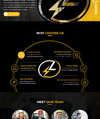
I am working on a Laravel/Vue/Tailwind site and could use some advice from some of you more experienced front end developers on how to tackle a problem such as the one in the image I have attached.
I imagine for this particular project the solution would be to create the arch as a section tag with the arch image as the background (still getting used to not just using div everywhere, so please correct me if wrong) and then each article (licensed experts, 24/7 service available, labour guranteed, etc) as a fixed position component
What if I wanted a more interactive approach however that allowed those circles to keep their relative positions over the arch maintaining a responsive design. Is a responsive image map the way to go via javascript, or is there a clever CSS solution using shape-outside or some other fancy technique that would allow for such precise placement of those little circles being centred on the line of the arch? I have been doing alot of back end work for the last 13 years and man CSS has come a long way!
Hope that all made sense! I'm taking proper coding standards a little more seriously these days, so any articles that show some of these tricks would be fantastic. I am not looking for anybody to write the code for me as nice as that can be, I need to actually understand the what and why=)
Thanks for your time!
I am working on a Laravel/Vue/Tailwind site and could use some advice from some of you more experienced front end developers on how to tackle a problem such as the one in the image I have attached.
I imagine for this particular project the solution would be to create the arch as a section tag with the arch image as the background (still getting used to not just using div everywhere, so please correct me if wrong) and then each article (licensed experts, 24/7 service available, labour guranteed, etc) as a fixed position component
What if I wanted a more interactive approach however that allowed those circles to keep their relative positions over the arch maintaining a responsive design. Is a responsive image map the way to go via javascript, or is there a clever CSS solution using shape-outside or some other fancy technique that would allow for such precise placement of those little circles being centred on the line of the arch? I have been doing alot of back end work for the last 13 years and man CSS has come a long way!
Hope that all made sense! I'm taking proper coding standards a little more seriously these days, so any articles that show some of these tricks would be fantastic. I am not looking for anybody to write the code for me as nice as that can be, I need to actually understand the what and why=)
Thanks for your time!