Welcome to Code Forum!

Join a community that supports you and your coding journey from day one. We strive to be a friendly, supportive community that empowers everyone to be better developers. By registering with us, you'll be able to discuss, share and private message with other members of our community.

SignUp Now!
  • Guest, before posting your code please take these rules into consideration:
    • It is required to use our BBCode feature to display your code. While within the editor click < / > or >_ and place your code within the BB Code prompt. This helps others with finding a solution by making it easier to read and easier to copy.
    • You can also use markdown to share your code. When using markdown your code will be automatically converted to BBCode. For help with markdown check out the markdown guide.
    • Don't share a wall of code. All we want is the problem area, the code related to your issue.

    GIF shows where to locate </> in the thread and or post editor toolbar.
    To learn more about how to use our BBCode feature, review our "How to post your code into threads" here.

    Thank you, Code Forum.

Python Download multplie json is not working

netKen

Coder
What am i missing?
Using Python 3.6

Python:
import json
import csv
import urllib.parse
import requests

start = int(input("Från stryktips omgång : "))
end = int(input("Till stryktips omgång: ")) + 1

for drawNumber in range(start, end):

    url = 'https://api.www.svenskaspel.se/external/1/draw/stryktipset/draws/{0}?accesskey={1}'
    response = requests.get(url.format(drawNumber, apiKey.Strip()))
    draw = json.loads(response.content)

    print(draw)
with open('stryktipset', 'w') as json_file:

    json.dump(draw, json_file)
 
What am i missing?
Using Python 3.6

Python:
import json
import csv
import urllib.parse
import requests

start = int(input("Från stryktips omgång : "))
end = int(input("Till stryktips omgång: ")) + 1

for drawNumber in range(start, end):

    url = 'https://api.www.svenskaspel.se/external/1/draw/stryktipset/draws/{0}?accesskey={1}'
    response = requests.get(url.format(drawNumber, apiKey.Strip()))
    draw = json.loads(response.content)

    print(draw)
with open('stryktipset', 'w') as json_file:

    json.dump(draw, json_file)
It downloads only 1 in range, if i type for example 4700 - 4730, then i get only 4730. I have no idea how to download multiplie files, i have search internet but cant find anything
 
Hey, without your full code this is going to be really hard to help but try this :-

Python:
import json
import csv
import urllib.parse
import requests

start = int(input("Från stryktips omgång : "))
end = int(input("Till stryktips omgång: ")) + 1

for drawNumber in range(start, end):

    url = 'https://api.www.svenskaspel.se/external/1/draw/stryktipset/draws/{0}?accesskey={1}'
    response = requests.get(url.format(drawNumber, apiKey.Strip()))
    draw = json.loads(response.content)

    print(draw)
with open('stryktipset', 'w') as json_file:

    json.dump(draw, json_file)

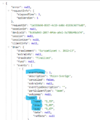
the problem you have is you are opening the json after you have finished rather then one at a time
 
Hey, without your full code this is going to be really hard to help but try this :-

That is my full code but because i have a personal apikey i cant show you the url without people to see my key.

Sorry for my bad understanding in english, i dont understand what you mean?
I have hundreds of files i want to download in 1 textfile, not 1 textfile for each file, they must be in one textfile together, then i will convert them to csv.
 
The API is what i need to be able to test for you 😀 So the issue you have having is this :-

Python:
for drawNumber in range(start, end):

    url = 'https://api.www.svenskaspel.se/external/1/draw/stryktipset/draws/{0}?accesskey={1}'
    response = requests.get(url.format(drawNumber, apiKey.Strip()))
    draw = json.loads(response.content)

    print(draw)

Here you get your JsonFile in a loop but do not store it in any way so all you are doing is getting a new one but erasing the previous,Due to not having your API i do not know what is in there 🙁. What i would then do is make a dict like so and convert that dict into a CSV file. The code i have added should work fine, if possible can yous end me a copy of the json so i can make the dict for you 😀 :-

Python:
import pandas as pd
import json
import csv
import urllib.parse
import requests

start = int(input("Från stryktips omgång : "))
end = int(input("Till stryktips omgång: ")) + 1
draw_list = []

for drawNumber in range(start, end):
    draw = {}
    url = 'https://api.www.svenskaspel.se/external/1/draw/stryktipset/draws/{0}?accesskey={1}'
    response = requests.get(url.format(drawNumber, apiKey.Strip()))
    data = json.loads(response.content)
  
    draw['first'] = data['firstdata']
    draw['second'] = data['second']
    draw['third'] = data['third']
    draw_list.append(draw)

df = pd.DataFrame(draw_list.)
df.to_csv('draw_list.csv',index=False)
pd.read_csv('draw_list.csv')
 
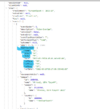
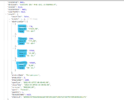
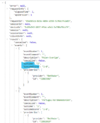
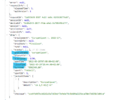
Maybe i ask too much now 😱. The files i attached is called "Draw", i also have another JSON file that belongs to the draw, it called "result". In he "Draw" file there is odds and other things about the matches and the file "result" is the outcome for that game, is it possible to combine 2 jsonfiles and download them into 1? The attached files, first the original "draw", then the "draw2" is what i marked what i need to download, if you open with notepad++ you see what lines they are at. After i can change what order they can be at i hope. Also the closetime looks like this: 2021-10-03T14:59:00+02:00, a little too much but maybe i can format later in the spreadsheets/Excel, its enough with this: 2021-10-03

draw: 'https://api.www.svenskaspel.se/external/1/draw/stryktipset/draws/{0}?accesskey={1}'
result: 'https://api.www.svenskaspel.se/external/1/draw/stryktipset/draws/{0}/result?accesskey={1}'
 

Attachments

All you are asking is possible 😀 best bet is to make a Dict then get both JSONs and store them in the dict but only the data you need then to export the dict to a excel.

If you take a screen shot and mark the bits you need in the files i can make a script to do this for you 😀 i just need the exact data you need and you can make the data the format you would like with python also 😀
 

Buy us a coffee!

Buy me a coffee.
Back
Top Bottom