MrRobotBDR
New Coder
Hi, im sorry in advance as im very new to JS. I've been trying to do this project all day and no luck.
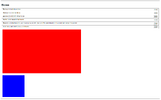
I have 6 buttons that i need to create functions for. I'm concentrating on button 1 which puts the blue box inside the red box only.
The id dimensions in the css are correct and html is correct (as per project) But i cant seem to get the event handlers to change the ID's to the new classes to get rid of the .hidden class.
I have 6 buttons that i need to create functions for. I'm concentrating on button 1 which puts the blue box inside the red box only.
The id dimensions in the css are correct and html is correct (as per project) But i cant seem to get the event handlers to change the ID's to the new classes to get rid of the .hidden class.
HTML:
<!DOCTYPE html>
<html lang="en">
    <head>
        <meta charset="UTF-8" />
        <meta name="viewport" content="width=device-width, initial-scale=1.0" />
        <title>2 Boxes|Event Handling</title>
        <link rel="stylesheet" href="style.css" />
    </head>
    <body>
        <div class="outer">
            <h2>Boxes</h2>
            <form id="myForm">
                <fieldset>
                    <label>Blue box sits inside the red box</label>
                    <button type="button" id="btn1">Click</button>
                </fieldset>

                <fieldset>
                    <label>Blue box sits under the red box</label>
                    <button type="button" id="btn2">Click</button>
                </fieldset>

                <fieldset>
                    <label>Blue box sits to the right of the red box</label>
                    <button type="button" id="btn3">Click</button>
                </fieldset>

                <fieldset>
                    <label>Red box sits to the left of the blue box</label>
                    <button type="button" id="btn4">Click</button>
                </fieldset>

                <fieldset>
                    <label>Blue box sits inside the red box and move the blue box 20px down and 45 pixels to the right of the top left hand corner of the red box</label>
                    <button type="button" id="btn5">Click</button>
                </fieldset>

                <fieldset>
                    <label>Green box around both the blue and red boxes</label>
                    <button type="button" id="btn6">Click</button>
                </fieldset>
            </form>

            <section id="boxes">
                <h2>Boxes</h2>
                <div id="green" class="hidden">
                    <div id="red">
                        <div id="blueIn" class="hidden"></div>
                    </div>
                    <div id="blueBottom" class="hidden"></div>
                </div>
            </section>
        </div>

        <script type="text/javascript" src="js/handling.js"></script>
    </body>
</html>
CSS:
#green {
    background-color: green;
    position: relative;
}

#red {
    width: 600px;
    height: 600px;
    background-color: red;
    position: relative;
}

#blueIn {
    width: 300px;
    height: 300px;
    background-color: blue;
    position: absolute;
    top: 20px;
    left: 45px;
}

.blueBoxIn {
    width: 300px;
    height: 300px;
    background-color: blue;
    position: fixed;
    top: 20px;
    left: 45px;
}

.redBox {
    width: 600px;
    height: 600px;
    background-color: red;
    position: relative;
}

.hidden {
    visibility: hidden;
    display: none;
}
JavaScript:
// function allBoxes() {
//     "use strict";
// }

// function blueBoxInRight() {
//     "use strict";
// }
// function blueBoxLeft() {
//     "use strict";
// }
// function blueBoxRight() {
//     "use strict";
// }
// function blueBoxUnder() {
//     "use strict";
// }

function button1() {
    "use strict";
    document.getElementById("red").className = "redBox";
    document.getElementById("red").classList.remove("hidden"); // Remove 'hidden' class from red element - is this needed??
    document.getElementById("blueIn").className = "blueBoxIn";
    document.getElementById("blueIn").classList.remove("hidden"); // Remove 'hidden' class from blueIn element - - is this needed??
}

function init() {
    "use strict";
    document.getElementById("btn1").addEventListener("click", button1);
    // document.getElementById("btn2").addEventListener("click", blueBoxUnder);
    // document.getElementById("btn3").addEventListener("click", blueBoxRight);
    // document.getElementById("btn4").addEventListener("click", blueBoxLeft);
    // document.getElementById("btn5").addEventListener("click", blueBoxInRight);
    // document.getElementById("btn6").addEventListener("click", allBoxes);
}

window.onload = function () {
    init();
};