Welcome to Code Forum!

Join a community that supports you and your coding journey from day one. We strive to be a friendly, supportive community that empowers everyone to be better developers. By registering with us, you'll be able to discuss, share and private message with other members of our community.

SignUp Now!
  • Guest, before posting your code please take these rules into consideration:
    • It is required to use our BBCode feature to display your code. While within the editor click < / > or >_ and place your code within the BB Code prompt. This helps others with finding a solution by making it easier to read and easier to copy.
    • You can also use markdown to share your code. When using markdown your code will be automatically converted to BBCode. For help with markdown check out the markdown guide.
    • Don't share a wall of code. All we want is the problem area, the code related to your issue.

    GIF shows where to locate </> in the thread and or post editor toolbar.
    To learn more about how to use our BBCode feature, review our "How to post your code into threads" here.

    Thank you, Code Forum.

Help with adding a blank line in a HTML Line Code

Attn HTML Gurus

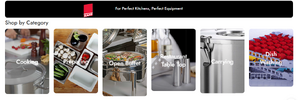
I have added HTML Line code on 6x Banners to display the 'Shop by Type' - screenshot below:

html-1.png

The 'Cooking' Banner has 9 'Shop by Type' Sub Categories - screenshot below:
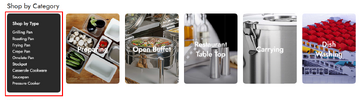
html-2.png

The 'Preparing' Banner has 7 'Shop by Type' Sub Categories - screenshot below:
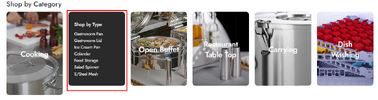
html-3.png
Below is the sample HTML Code to display the Shop by Product Types on the Front End of the Website Page.

Code:
<p style="text-align: left;"><a href="https://www.oshwalwholesalers.com/brand/kapp/?filter_product-type=grilling-pan&amp;query_type_product-type=or"><span style="color: #ffffff;">Grilling Pan</span></a>
<a href="https://www.oshwalwholesalers.com/brand/kapp/?filter_product-type=roasting-pan&amp;query_type_product-type=or"><span style="color: #ffffff;">Roasting Pan</span></a>
<a href="https://www.oshwalwholesalers.com/brand/kapp/?filter_product-type=frying-pan"><span style="color: #ffffff;">Frying Pan</span></a>
<a href="https://www.oshwalwholesalers.com/brand/kapp/?filter_product-type=crepe-pan"><span style="color: #ffffff;">Crepe Pan</span></a>
<a href="https://www.oshwalwholesalers.com/brand/kapp/?filter_product-type=omelete-pan&amp;query_type_product-type=or"><span style="color: #ffffff;">Omelete Pan</span></a>
<a href="https://www.oshwalwholesalers.com/brand/kapp/?filter_product-type=stockpot"><span style="color: #ffffff;">Stockpot</span></a>
<a href="https://www.oshwalwholesalers.com/brand/kapp/?filter_product-type=casserole-cookware"><span style="color: #ffffff;">Casserole Cookware</span></a>
<a href="https://www.oshwalwholesalers.com/brand/kapp/?filter_product-type=saucepan"><span style="color: #ffffff;">Saucepan</span></a>
<a href="https://www.oshwalwholesalers.com/brand/kapp/?filter_product-type=pressure-cooker"><span style="color: #ffffff;">Pressure Cooker</span></a></p>

Since the 6 Banners have different nos of 'Shop by Types', the Banner Height is not consistent.

My hunch is that if I am able to add a blank line to the HTML Code, the 6 Banners will consistent in height.

Anyone care to advise on how I can add a blank Line to the the HTML Code ?

I tried adding the code below, but I'm still getting the same Banner height.

Code:
<p>&nbsp;</p>

I hope I've explained the issue at hand. Anyone care to advise ?

WebSite URL below which displays the 6x banners.

https://www.oshwalwholesalers.com/brand/kapp/

Thanks in Advance.

 

Attachments

  • html-3.png
    html-3.png
    733.1 KB · Views: 0
Attn HTML Gurus

I have added HTML Line code on 6x Banners to display the 'Shop by Type' - screenshot below:

View attachment 2465

The 'Cooking' Banner has 9 'Shop by Type' Sub Categories - screenshot below:

View attachment 2466

The 'Preparing' Banner has 7 'Shop by Type' Sub Categories - screenshot below:

View attachment 2468
Below is the sample HTML Code to display the Shop by Product Types on the Front End of the Website Page.

Code:
<p style="text-align: left;"><a href="https://www.oshwalwholesalers.com/brand/kapp/?filter_product-type=grilling-pan&amp;query_type_product-type=or"><span style="color: #ffffff;">Grilling Pan</span></a>
<a href="https://www.oshwalwholesalers.com/brand/kapp/?filter_product-type=roasting-pan&amp;query_type_product-type=or"><span style="color: #ffffff;">Roasting Pan</span></a>
<a href="https://www.oshwalwholesalers.com/brand/kapp/?filter_product-type=frying-pan"><span style="color: #ffffff;">Frying Pan</span></a>
<a href="https://www.oshwalwholesalers.com/brand/kapp/?filter_product-type=crepe-pan"><span style="color: #ffffff;">Crepe Pan</span></a>
<a href="https://www.oshwalwholesalers.com/brand/kapp/?filter_product-type=omelete-pan&amp;query_type_product-type=or"><span style="color: #ffffff;">Omelete Pan</span></a>
<a href="https://www.oshwalwholesalers.com/brand/kapp/?filter_product-type=stockpot"><span style="color: #ffffff;">Stockpot</span></a>
<a href="https://www.oshwalwholesalers.com/brand/kapp/?filter_product-type=casserole-cookware"><span style="color: #ffffff;">Casserole Cookware</span></a>
<a href="https://www.oshwalwholesalers.com/brand/kapp/?filter_product-type=saucepan"><span style="color: #ffffff;">Saucepan</span></a>
<a href="https://www.oshwalwholesalers.com/brand/kapp/?filter_product-type=pressure-cooker"><span style="color: #ffffff;">Pressure Cooker</span></a></p>

Since the 6 Banners have different nos of 'Shop by Types', the Banner Height is not consistent.

My hunch is that if I am able to add a blank line to the HTML Code, the 6 Banners will consistent in height.

Anyone care to advise on how I can add a blank Line to the the HTML Code ?

I tried adding the code below, but I'm still getting the same Banner height.

Code:
<p>&nbsp;</p>

I hope I've explained the issue at hand. Anyone care to advise ?

WebSite URL below which displays the 6x banners.

https://www.oshwalwholesalers.com/brand/kapp/

Thanks in Advance.
HTML:
<p style="display:flex; align-items:center; text-shadow:3px 3px 2px rgba(0,0,0,0.7);">{a href elements}</p>
 
Last edited:
HTML:
<p style="display:flex; align-items:center; text-shadow:3px 3px 2px rgba(0,0,0,0.7);">{a href elements}</p>

Thanks for the update.

I've added the code above to 5x Banners ( except for the 1st). Unfortunately, the banners are still not equal in height - screenshot below:

Screenshot_171.png

HTML Code for Banner #2
Code:
<p style="text-align: left;"><a href="https://www.oshwalwholesalers.com/brand/kapp/?filter_product-type=gastronorm-pan"><span style="color: #ffffff;">Gastronorm Pan</span></a>
<a href="https://www.oshwalwholesalers.com/brand/kapp/?filter_product-type=gastronorm-lid"><span style="color: #ffffff;">Gastronorm Lid</span></a>
<a href="https://www.oshwalwholesalers.com/brand/kapp/?filter_product-type=ice-cream-pan"><span style="color: #ffffff;">Ice Cream Pan</span></a>
<a href="https://www.oshwalwholesalers.com/brand/kapp/?filter_product-type=colander"><span style="color: #ffffff;">Colander</span></a>
<a href="https://www.oshwalwholesalers.com/brand/kapp/?filter_product-type=food-storage"><span style="color: #ffffff;">Food Storage</span></a>
<a href="https://www.oshwalwholesalers.com/brand/kapp/?filter_product-type=salad-spinner&amp;query_type_product-type=or"><span style="color: #ffffff;">Salad Spinner</span></a>
<a href="https://www.oshwalwholesalers.com/brand/kapp/?filter_product-type=stainless-steel-mesh&amp;query_type_product-type=or"><span style="color: #ffffff;">S/Steel Mesh</span></a></p>
<p style="display: flex; align-items: center; text-shadow: 3px 3px 2px rgba(0,0,0,0.7);">{a href elements}</p>

HTML Code for Banner #3

Code:
<p style="text-align: left;"><a href="https://www.oshwalwholesalers.com/brand/kapp/?filter_product-type=all-purpose-bowl&amp;query_type_product-type=or"><span style="color: #ffffff;">All Purpose Bowl</span></a>
<a href="https://www.oshwalwholesalers.com/brand/kapp/?filter_product-type=snack-bowl&amp;query_type_product-type=or"><span style="color: #ffffff;">Snack Bowl</span></a></p>
<p style="display: flex; align-items: center; text-shadow: 3px 3px 2px rgba(0,0,0,0.7);">{a href elements}</p>

Am I doing something wrong ?

Pls advise.
 
Although what you're attempting to do might solve the problem, the better way to go about it would be to use a CSS Grid or Flexbox layout for the 6 elements.
 
I'm using the WP Bakery Builder 'Flip Box' Element.

What is a CSS Grid or Flexbox layout ? And is it compatible with the WordPress Template I'm using ? Does it function in the same way as a Flip Box ?
 
by all means keep using the WP flip box.

HTML:
<p style="display: flex; align-items: center; text-shadow: 3px 3px 2px rgba(0,0,0,0.7);">
<a href="https://www.oshwalwholesalers.com/brand/kapp/?filter_product-type=all-purpose-bowl&amp;query_type_product-type=or"><span style="color: #ffffff;">All Purpose Bowl</span></a>
<a href="https://www.oshwalwholesalers.com/brand/kapp/?filter_product-type=snack-bowl&amp;query_type_product-type=or"><span style="color: #ffffff;">Snack Bowl</span></a>
</p>
 
Back
Top Bottom