# Imports
import pygame

# Initiate pygame and pygame fonts
pygame.init()
pygame.font.init()

# Define screen size and background color
screen_size = (800, 600)
screen_bg = 'white'

# Set display and window caption
screen = pygame.display.set_mode(screen_size)
pygame.display.set_caption('A Pygame Window')

# Define framerate and clock
frames = 60
clock = pygame.time.Clock()

# Define the button function
def button(*args, text='Default Text', **kwargs):
    # Create and draw the box
    box = pygame.Rect(args[0], args[1], args[2], args[3])
    pygame.draw.rect(kwargs['surface'], kwargs['bgcolor'], box, kwargs['border_width'])

    # Setup the font
    font = pygame.font.SysFont(kwargs['font'], kwargs['fontsize'])
    text = font.render(text, True, kwargs['fontcolor'])

    # Get the text rect and set to box center
    text_rect  = text.get_rect()
    text_rect.center = box.center

    # Blit to the surface
    kwargs['surface'].blit(text, text_rect)

# Set running to True and start the loop
running = True
while running:

    # Set screen background color
    screen.fill(screen_bg)

    # Check for pygame events
    for event in pygame.event.get():

        # If pygame event is quit, set running to false and break out of loop
        if event.type == pygame.QUIT:
            running = False

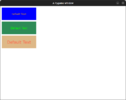
    button(10,10,220,80, surface=screen, bgcolor='blue', border_width=0, font='comicsansms',\
           fontcolor='orange', fontsize=15)

    button(10,100,220,80, surface=screen, bgcolor='seagreen', border_width=0, font='tahoma',\
           fontcolor='lime', fontsize=20)

    button(10,190,220,80, surface=screen, bgcolor='burlywood', border_width=0, font='verdana',\
           fontcolor='tomato', fontsize=25)

    # Update pygame display and set framerate
    pygame.display.update()
    clock.tick(frames)