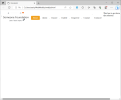
Hi:
I want the second <div> text to go below the logo and my selectors. Thanks for your help.
I want the second <div> text to go below the logo and my selectors. Thanks for your help.
HTML:
<!DOCTYPE html>
<html lang="en">
<head>
    <meta charset="UTF-8">
    <meta name="viewport" content="width=device-width, initial-scale=1.0">
    <title>Document</title>
    <style>
        .floatleft{ float:left;}
        .topBar{width:100%; min-width:1024px;}
        .selec_PG{ color:#fff; background:#f0a120; padding:7px 15px; cursor:pointer; border-radius: 5px;}
        .selec_NPG{ color:#2f3030; text-decoration:none; cursor:pointer; padding:7px 15px; }
        .selec_NPG:hover{ color:#fff; background:#f0a120; padding:7px 15px; cursor:pointer;border-radius: 5px; }
        .selec_SEP{ width: 4px; color: #2f3030; padding: 7px 0px 0 0px;}
        .marginTop{margin-top: 30px;}
        .underline{border-bottom: 1px solid #000; margin-top: 1px;}
    </style>
</head>
<body>
   <Div class="topBar">
      <div class="floatleft logo"><a href="index.php"><img src="Nwlogo1.png"
        title="Foundation Logo" /></a> </div>
        <div class="selectors">
           <a href="index1.html"><div class="selec_PG  floatleft marginTop">Home</div></a>
           <div class="selec_SEP floatleft marginTop">.</div>
           <a href="about.html"><div class="selec_NPG  floatleft marginTop">About</div></a>
           <div class="selec_SEP floatleft marginTop">.</div>
           <a href="encore.html"><div class="selec_NPG  floatleft marginTop">Encore </div></a>
           <div class="selec_SEP floatleft marginTop">.</div>
           <a href="enable.html"><div class="selec_NPG  floatleft marginTop"> Enable</div></a>
           <div class="selec_SEP floatleft marginTop">.</div>
           <a href="empower.html"><div class="selec_NPG  floatleft marginTop">Empower</div></a>
           <div class="selec_SEP floatleft marginTop">.</div>
           <a href="contact.html"><div class="selec_NPG  floatleft marginTop">Contact</div></a>
           <div class="selec_SEP floatleft">.</div>
           <a href="contact.html"><div class="selec_NPG  floatleft marginTop">Contact2</div></a>
        </div>
   </Div>

   <div>
    <p>This has to go down the selectors</p>
   </div>
</body>
</html>