
Welcome to Code Forum!

Join a community that supports you and your coding journey from day one. We strive to be a friendly, supportive community that empowers everyone to be better developers. By registering with us, you'll be able to discuss, share and private message with other members of our community.

SignUp Now!
  • Guest, before posting your code please take these rules into consideration:
    • It is required to use our BBCode feature to display your code. While within the editor click < / > or >_ and place your code within the BB Code prompt. This helps others with finding a solution by making it easier to read and easier to copy.
    • You can also use markdown to share your code. When using markdown your code will be automatically converted to BBCode. For help with markdown check out the markdown guide.
    • Don't share a wall of code. All we want is the problem area, the code related to your issue.

    GIF shows where to locate </> in the thread and or post editor toolbar.
    To learn more about how to use our BBCode feature, review our "How to post your code into threads" here.

    Thank you, Code Forum.

Latest Project - querying steam api

menator01

Gold Coder
Started a python project for game search on steam. It's in no way finished as I still need to finish the detail part, the search bar, and continue working on the bugs I find.
Will probably continue on optimizing the code as well. There are parts that can be done better. Just trying to get everything working right now.
I will post what I have and the complete code when finished.

update.py
Python:
from urllib.request import urlopen
import json

import os

path = os.path.realpath(os.path.dirname(__file__))

class Update:
    def __init__(self):
        self.games = {}

    def update(self):
        link = 'http://api.steampowered.com/ISteamApps/GetAppList/v0002/?key=STEAMKEY&format=json'
        with urlopen(link) as data:
            file = json.load(data)['applist']['apps']
            for data in file:
                if data['name'] != '' and data['name'] not in self.games:
                    self.games[data['appid']] = data['name']


        with open(f'{path}/game.json', 'w', encoding='utf-8') as jfile:
            json.dump(self.games, jfile, ensure_ascii=False, indent=4)

app.py
Python:
import tkinter as tk
from tkinter import ttk
import json
from urllib.request import urlopen
import os
from string import ascii_uppercase
from update import Update

path = os.path.realpath(os.path.dirname(__file__))

class Data:
    def __init__(self):
        try:
            with open(f'{path}/game.json') as file:
                self.games = json.load(file)
        except FileNotFoundError:
            Update().update()
            with open(f'{path}/game.json') as file:
                self.games = json.load(file)


    def get_letter(self, letter='a'):
        listing = []
        for appid, title in self.games.items():
            if title.startswith(letter):
                listing.append((appid, title))
        return listing

    def getcount(self):
        return len(self.games)

    def details(self, appid):
        url = f'http://store.steampowered.com/api/appdetails?appids={appid}'
        with urlopen(url) as info:
            file = json.load(info)
            return file


class Window:
    def __init__(self, parent):
        parent.columnconfigure(0, weight=1)
        parent.rowconfigure(0, weight=1)
        self.parent = parent

        # Main container
        container = tk.Frame(parent)
        container.grid(column=0, row=0, sticky='news', padx=4, pady=4)
        container.grid_columnconfigure(0, weight=3)
        container.grid_rowconfigure(3, weight=3)

        # Make widget containers
        headerframe = tk.Frame(container)
        headerframe.grid(column=0, row=0, sticky='new')
        headerframe.grid_columnconfigure(0, weight=3)

        # Info container
        infoframe = tk.Frame(container)
        infoframe.grid(column=0, row=1, sticky='new', padx=4, pady=4)
        infoframe['highlightbackground'] = '#333333'
        infoframe['highlightcolor'] = '#333333'
        infoframe['highlightthickness'] = 1
        infoframe.grid_columnconfigure(0, weight=2, uniform='frame')
        infoframe.grid_columnconfigure(1, weight=3, uniform='frame')
        infoframe.grid_columnconfigure(2, weight=3)


        # Search container
        searchframe = tk.Frame(infoframe)
        searchframe.grid(column=1, row=0, sticky='new', padx=4, pady=4)
        searchframe.grid_columnconfigure(1, weight=1)

        # Button container
        btnframe = tk.Frame(container)
        btnframe.grid(column=0, row=2, sticky='new', padx=4, pady=4)
        btnframe['highlightbackground'] = '#333333'
        btnframe['highlightcolor'] = '#333333'
        btnframe['highlightthickness'] = 1
        for index, button in enumerate(ascii_uppercase):
            btnframe.grid_columnconfigure(index, weight=3, uniform='buttons')


        # Content container
        contentframe = tk.Frame(container)
        contentframe.grid(column=0, row=3, sticky='news', padx=4, pady=4)
        contentframe.grid_columnconfigure(0, weight=3, uniform='content')
        contentframe.grid_columnconfigure(1, weight=3, uniform='content')
        contentframe.grid_rowconfigure(0, weight=3)

        left = tk.Frame(contentframe)
        left.grid(column=0, row=0, sticky='news', padx=4, pady=4)
        left.grid_columnconfigure(0, weight=3)
        left.grid_rowconfigure(0, weight=3)

        right = tk.Frame(contentframe)
        right.grid(column=1, row=0, sticky='news', padx=4, pady=4)
        right.grid_columnconfigure(0, weight=3)
        right.grid_rowconfigure(0, weight=3)

        # Logo container
        self.logoframe = tk.Frame(container)
        self.logoframe.grid(column=0, row=4, sticky='new', padx=4, pady=4)
        self.logoframe['highlightbackground'] = '#333333'
        self.logoframe['highlightcolor'] = '#333333'
        self.logoframe['highlightthickness'] = 1

        # Make some labels
        header = tk.Label(headerframe, text='Steam Game Library')
        header.grid(column=0, row=0, sticky='news', padx=4, pady=4, ipady=8, ipadx=10)
        header['font'] = 'comic sans ms', 45, 'bold'
        header['bg'] = '#555555'
        header['fg'] = '#fffffe'

        # Label for game count
        self.count_label = tk.Label(infoframe, font=(None, 11, 'normal'), pady=8, anchor='w')
        self.count_label.grid(column=0, row=0, sticky='new', padx=(4,8), pady=4)

        # Search label and field
        label = tk.Label(searchframe, text='Search:', font=(None, 11, 'normal'), pady=5)
        label.grid(column=0, row=0, sticky='new', padx=4, pady=4)

        self.term = tk.Entry(searchframe, font=(None, 10, 'normal'))
        self.term.grid(column=1, row=0, sticky='new', padx=4, pady=8)

        self.searchbtn = tk.Button(searchframe, text='Search', cursor='hand2', font=(None, 11, 'normal'))
        self.searchbtn.grid(column=2, row=0, padx=4, pady=4)

        self.updatebtn = tk.Button(infoframe, text='Update Library', cursor='hand2', font=(None, 11, 'normal'))
        self.updatebtn.grid(column=2, row=0, padx=4, pady=4, sticky='e')
        self.updatebtn.configure(bg='orangered', activebackground='orange')

        exitbtn = tk.Button(infoframe, text='Close', cursor='hand2', command=parent.destroy)
        exitbtn.grid(column=4, row=0, padx=4, pady=4)
        exitbtn.configure(bg='red', activebackground='tomato')

        # Create buttons
        self.buttons = []
        for index, letter in enumerate(ascii_uppercase):
            self.buttons.append(tk.Button(btnframe, text=letter, cursor='hand2'))
            self.buttons[index].grid(column=index, row=0, sticky='news', padx=2, pady=4)

        # Create treeviews and scroll bars
        style = ttk.Style()
        style.configure('Treeview', rowheight=25)
        self.titletree = ttk.Treeview(left, show='headings', column=('title', 'steam ID'), selectmode='browse')
        self.titletree.grid(column=0, row=0, sticky='news', padx=2, pady=2)
        self.titletree.heading('title', text='Title')
        self.titletree.heading('steam ID', text='Steam ID')
        self.titletree.column('title', stretch='yes')
        self.titletree.column('steam ID', stretch='no', width=100)

        left_scrollbar = ttk.Scrollbar(left, orient='vertical')
        left_scrollbar.grid(column=1, row=0, sticky='ns', padx=2, pady=2)
        left_scrollbar.configure(command=self.titletree.yview)

        self.titletree.configure(yscrollcommand=left_scrollbar.set)

        self.detailtree = ttk.Treeview(right, show='tree', selectmode='none')
        self.detailtree.grid(column=0, row=0, sticky='news', padx=4, pady=4)

        right_scrollbar = ttk.Scrollbar(right, orient='vertical')
        right_scrollbar.grid(column=1, row=0, sticky='ns', padx=2, pady=2)
        right_scrollbar.configure(command=self.detailtree.yview)

        self.detailtree.configure(yscrollcommand=right_scrollbar.set)


class Controller:
    def __init__(self, data, window):
        self.data = data
        self.window = window

        # Button commands
        self.window.updatebtn.configure(command=self.update_data)

        # Binds
        self.window.titletree.bind('<<TreeviewSelect>>', self.getitem)

        for index, button in enumerate(self.window.buttons):
            self.window.buttons[index]['command'] = lambda letter=button['text']:self.populate(letter)

        self.refresh()
        self.populate('a')

    def refresh(self):
        # Add game count
        self.window.count_label.config(text=f'Total Games: {self.data.getcount():,}')
       
    def update_data(self):
        Update().update()
        self.refresh()
        self.populate('a')

    def populate(self, letter):
        games = self.data.get_letter(letter)

        self.window.titletree.delete(*self.window.titletree.get_children())

        for index, game in enumerate(games):
            appid, title = game
            try:
                self.window.titletree.insert("","end", values=(title.title(), appid))
            except tk.TclError:
                pass
        else:
            child = self.window.titletree.get_children()[0]
            self.window.titletree.focus_set()
            self.window.titletree.focus(child)
            self.window.titletree.selection_set(child)
            self.window.titletree.see(child)

    def getitem(self, event):    
        item = self.window.titletree.focus()
        steamid = self.window.titletree.item(item)['values'][1]
        ids = []
        ids.append(steamid)

        game = {}
       
        info = self.data.details(ids[0]).items()
        d = [(k,v) for k, v in info][0][1]['data']
       
        wanted = ['name', 'steam_appid', 'short_description', 'platforms',
                'is_free', 'genres', 'release_date', 'supported_language',
                'developers', 'background']

        for item in wanted:
            if item in d:
                if isinstance(d[item], dict):
                    data = ', '.join(d[item]).title()
                elif isinstance(d[item], list):
                    try:
                        data = ', '.join([item['description'] for item in d['genres']])
                    except KeyError:
                        data = 'Unknown'
                elif isinstance(d[item], bool):
                    free = 'Yes' if d[item] else 'No'
                    data = free
                else:
                    data = d[item]
                   
                game[item] = data

        for k,v in game.items():
            print(f'{k}: {v}')

        # game['name'] = d['name']
        # game['steam id'] = d['steam_appid']
        # game['short description'] = d['short_description']
        # game['platforms'] = ", ".join(d['platforms'])
        # game['free'] = free = 'Yes' if d['is_free'] else 'No'
        # if 'genres' in d:
        #     game['genre'] = ', '.join([k['description'] for k in d['genres']])
        # game['release date'] = d['release_date']
        # if 'supported_languages' in d:
        #     game['supported languages'] = d['supported_languages']
        # game['developers'] = ', '.join(d['developers'])
        # game['background'] = d['background']
        # print(game['background'])


if __name__ == '__main__':
    root = tk.Tk()
    root.title('Steam Games')
    controller = Controller(Data(), Window(root))
    root.mainloop()
 

Attachments
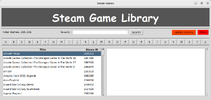
  • Kazam_screenshot_00000.png
    Kazam_screenshot_00000.png
    67.2 KB · Views: 2
Last edited:
Latest update - I have not found a way to search by game name yet. Script still needs a lot of optimization and bugs fixed.
For the most part works. I've found that steam has a lot of games that do not have any data to retrieve.

Python:
import tkinter as tk
from tkinter import ttk
import json
from urllib.request import urlopen
import os
from string import ascii_uppercase
from update import Update
from PIL import Image, ImageTk
import io

# Create a path to folder of executing script
path = os.path.realpath(os.path.dirname(__file__))

class Data:
    ''' Class handles getting data '''
    def __init__(self):
        ''' Get json file '''

        # Using try block in case file doesn't exist
        try:
            with open(f'{path}/game.json') as file:
                self.games = json.load(file)
        except FileNotFoundError:
            Update().update()
            with open(f'{path}/game.json') as file:
                self.games = json.load(file)

    def get_letter(self, letter='a'):
        ''' Method for getting a listing of games for letter '''
        listing = []
        for appid, title in self.games.items():
            if title.startswith(letter):
                listing.append((appid, title))
        return listing

    def getcount(self):
        ''' Get a count of games '''
        return len(self.games)

    def details(self, appid):
        ''' Method for getting game details '''
        url = f'http://store.steampowered.com/api/appdetails?appids={appid}'

        # Try block in case of bad url
        try:
            with urlopen(url) as info:
                file = json.load(info)
                return file
        except:
            pass


class Window:
    def __init__(self, parent):
        parent.columnconfigure(0, weight=1)
        parent.rowconfigure(0, weight=1)
        self.parent = parent

        # Main container
        container = tk.Frame(parent)
        container.grid(column=0, row=0, sticky='news', padx=4, pady=4)
        container.grid_columnconfigure(0, weight=3)
        container.grid_rowconfigure(3, weight=3)

        # Make widget containers
        headerframe = tk.Frame(container)
        headerframe.grid(column=0, row=0, sticky='new')
        headerframe.grid_columnconfigure(0, weight=3)

        # Info container
        infoframe = tk.Frame(container)
        infoframe.grid(column=0, row=1, sticky='new', padx=4, pady=4)
        infoframe['highlightbackground'] = '#333333'
        infoframe['highlightcolor'] = '#333333'
        infoframe['highlightthickness'] = 1
        infoframe.grid_columnconfigure(0, weight=2, uniform='frame')
        infoframe.grid_columnconfigure(1, weight=3, uniform='frame')
        infoframe.grid_columnconfigure(2, weight=3)


        # Search container
        searchframe = tk.Frame(infoframe)
        searchframe.grid(column=1, row=0, sticky='new', padx=4, pady=4)
        searchframe.grid_columnconfigure(1, weight=1)

        # Button container
        btnframe = tk.Frame(container)
        btnframe.grid(column=0, row=2, sticky='new', padx=4, pady=4)
        btnframe['highlightbackground'] = '#333333'
        btnframe['highlightcolor'] = '#333333'
        btnframe['highlightthickness'] = 1
        for index, button in enumerate(ascii_uppercase):
            btnframe.grid_columnconfigure(index, weight=3, uniform='buttons')


        # Content container
        contentframe = tk.Frame(container)
        contentframe.grid(column=0, row=3, sticky='news', padx=4, pady=4)
        contentframe.grid_columnconfigure(0, weight=3, uniform='content')
        contentframe.grid_columnconfigure(1, weight=3, uniform='content')
        contentframe.grid_rowconfigure(0, weight=3)

        left = tk.Frame(contentframe)
        left.grid(column=0, row=0, sticky='news', padx=4, pady=4)
        left.grid_columnconfigure(0, weight=3)
        left.grid_rowconfigure(0, weight=3)

        right = tk.Frame(contentframe)
        right.grid(column=1, row=0, sticky='news', padx=4, pady=4)
        right.grid_columnconfigure(0, weight=3)
        right.grid_rowconfigure(0, weight=3)

        # Logo container
        self.logoframe = tk.Frame(container)
        self.logoframe.grid(column=0, row=4, sticky='new', padx=4, pady=4)
        self.logoframe['highlightbackground'] = '#333333'
        self.logoframe['highlightcolor'] = '#333333'
        self.logoframe['highlightthickness'] = 1

        # Make some labels
        header = tk.Label(headerframe, text='Steam Game Library')
        header.grid(column=0, row=0, sticky='news', padx=4, pady=4, ipady=8, ipadx=10)
        header['font'] = 'comic sans ms', 45, 'bold'
        header['bg'] = '#555555'
        header['fg'] = '#fffffe'

        # Label for game count
        self.count_label = tk.Label(infoframe, font=(None, 11, 'normal'), pady=8, anchor='w')
        self.count_label.grid(column=0, row=0, sticky='new', padx=(4,8), pady=4)

        # Search label and field
        label = tk.Label(searchframe, text='Search:', font=(None, 11, 'normal'), pady=5)
        label.grid(column=0, row=0, sticky='new', padx=4, pady=4)

        self.term = tk.Entry(searchframe, font=(None, 10, 'normal'))
        self.term.grid(column=1, row=0, sticky='new', padx=4, pady=8)

        self.searchbtn = tk.Button(searchframe, text='Search', cursor='hand2', font=(None, 11, 'normal'))
        self.searchbtn.grid(column=2, row=0, padx=4, pady=4)

        self.updatebtn = tk.Button(infoframe, text='Update Library', cursor='hand2', font=(None, 11, 'normal'))
        self.updatebtn.grid(column=2, row=0, padx=4, pady=4, sticky='e')
        self.updatebtn.configure(bg='orangered', activebackground='orange')

        exitbtn = tk.Button(infoframe, text='Close', cursor='hand2', command=parent.destroy)
        exitbtn.grid(column=4, row=0, padx=4, pady=4)
        exitbtn.configure(bg='red', activebackground='tomato')

        # Create buttons
        self.buttons = []
        for index, letter in enumerate(ascii_uppercase):
            self.buttons.append(tk.Button(btnframe, text=letter, cursor='hand2'))
            self.buttons[index].grid(column=index, row=0, sticky='news', padx=2, pady=4)

        # Create treeviews and scroll bars
        style = ttk.Style()
        style.configure('Treeview', rowheight=25)
        self.titletree = ttk.Treeview(left, show='headings', column=('title', 'steam ID'), selectmode='browse')
        self.titletree.grid(column=0, row=0, sticky='news', padx=2, pady=2)
        self.titletree.heading('title', text='Title')
        self.titletree.heading('steam ID', text='Steam ID')
        self.titletree.column('title', stretch='yes')
        self.titletree.column('steam ID', stretch='no', width=100)

        left_scrollbar = ttk.Scrollbar(left, orient='vertical')
        left_scrollbar.grid(column=1, row=0, sticky='ns', padx=2, pady=2)
        left_scrollbar.configure(command=self.titletree.yview)

        self.titletree.configure(yscrollcommand=left_scrollbar.set)

        self.detailtree = tk.Text(right, wrap=tk.WORD, padx=20, pady=10)
        self.detailtree.grid(column=0, row=0, sticky='news', padx=4, pady=4)

        right_scrollbar = ttk.Scrollbar(right, orient='vertical')
        right_scrollbar.grid(column=1, row=0, sticky='ns', padx=2, pady=2)
        right_scrollbar.configure(command=self.detailtree.yview)

        self.detailtree.configure(yscrollcommand=right_scrollbar.set)


class Controller:
    def __init__(self, data, window):
        self.data = data
        self.window = window

        # Button commands
        self.window.updatebtn.configure(command=self.update_data)

        # Binds
        self.window.titletree.bind('<<TreeviewSelect>>', self.getitem)

        for index, button in enumerate(self.window.buttons):
            self.window.buttons[index]['command'] = lambda letter=button['text']:self.populate(letter)

        self.refresh()
        self.populate('a')

    def refresh(self):
        # Add game count
        self.window.count_label.config(text=f'Total Games: {self.data.getcount():,}')
        
    def update_data(self):
        Update().update()
        self.refresh()
        self.populate('a')

    def populate(self, letter):
        games = self.data.get_letter(letter)

        self.window.titletree.delete(*self.window.titletree.get_children())

        for index, game in enumerate(games):
            appid, title = game
            try:
                self.window.titletree.insert("","end", values=(title.title(), appid))
            except tk.TclError:
                pass
        else:
            child = self.window.titletree.get_children()[0]
            self.window.titletree.focus_set()
            self.window.titletree.focus(child)
            self.window.titletree.selection_set(child)
            self.window.titletree.see(child)

    def getitem(self, event):
        # Clear the text in the right side
        self.window.detailtree.configure(state='normal')
        self.window.detailtree.delete('1.0', tk.END)

        # Focus and get id of selected item on left side list
        item = self.window.titletree.focus()
        steamid = self.window.titletree.item(item)['values'][1]

        # Having to use a list / needs fixing (should be able to get and keep id for each call)
        ids = []
        ids.append(steamid)

        # Create a dict to store vales
        game = {}
        
        # Used try block because of errors / need to fix
        try:
            # Grab the all data
            info = self.data.details(ids[0]).items()
            d = [(k,v) for k, v in info][0][1]['data']
                    
            # A list of details we want to display
            wanted = ['background', 'name', 'steam_appid', 'short_description', 'platforms',
                    'is_free', 'price_overview', 'genres', 'release_date', 'supported_language',
                    'developers', 'publishers', 'website']

            # Loop through wanted list and compare to retreived data
            for item in wanted:
                if item in d:
                    if isinstance(d[item], dict): # If the value is a list join
                        data = ', '.join(d[item]).title()
                        keys = [key for key in d[item].keys()]
                        if 'final_formatted' in keys:
                            for dt in keys:
                                if dt == 'final_formatted':
                                    data = d[item][dt]
                        
                    elif isinstance(d[item], list):
                        try: # Use a try block to get value from inner dict and join
                            data = ', '.join([item['description'] for item in d['genres']])
                        except KeyError: # Error handing for a KeyError
                            data = 'Unknown'
                    elif isinstance(d[item], bool): # For the bood in the returned data
                        free = 'Yes' if d[item] else 'No'
                        data = free
                    else:
                        data = d[item]
                    if item == 'price_overview':
                        item = 'Price'
                    game[item] = data # Put everything in the dict we created earlier

            # Put a try block because of getting a key error / Nedd to fix this
            try:
                game['developers'] = d['developers'][0]
                game['publishers'] = d['publishers'][0]
            except KeyError:
                pass
                    
            
            # Insert our data into the tk.Text in the right view window
            index = 3

            # text is a varible used to format words in the text
            text = self.window.detailtree

            for key, value in game.items():

                # Used to get, resize and insert the image
                if key == 'background':
                    url = urlopen(value).read()
                    img = Image.open(io.BytesIO(url))
                    width, height = img.size
                    img = img.resize((width//3, height//3))
                    image = ImageTk.PhotoImage(img)
                    image.bak = image
                    self.window.detailtree.image_create(f'1.0', image=image)
                    
                else:
                    # It's not the image added it
                    self.window.detailtree.insert(f'end', f'\n\n{key.upper().replace('_', ' ')}:\n{value}')
                    
                    # text.tag_add is for formatting the text
                    # increase index by 3 because of the position of the selected text
                    text.tag_add('bold', f'{index}.0', f'{index}.{len(key)}')
                    text.tag_configure('bold', font=(None, 9, 'bold'))
                    index += 3
                
            # Disable the widget       
            self.window.detailtree.configure(state='disable')
        except:
            
            self.window.detailtree.insert('end', f'Sorry can not find anything for SteamID: {ids[0]}')
            self.window.detailtree.configure(state='disabled')
            

if __name__ == '__main__':
    root = tk.Tk()
    root.title('Steam Games')
    controller = Controller(Data(), Window(root))
    root.mainloop()
 

Latest posts

Buy us a coffee!

Buy me a coffee.
Back
Top Bottom


