Welcome to Code Forum!

Join a community that supports you and your coding journey from day one. We strive to be a friendly, supportive community that empowers everyone to be better developers. By registering with us, you'll be able to discuss, share and private message with other members of our community.

SignUp Now!
  • Guest, before posting your code please take these rules into consideration:
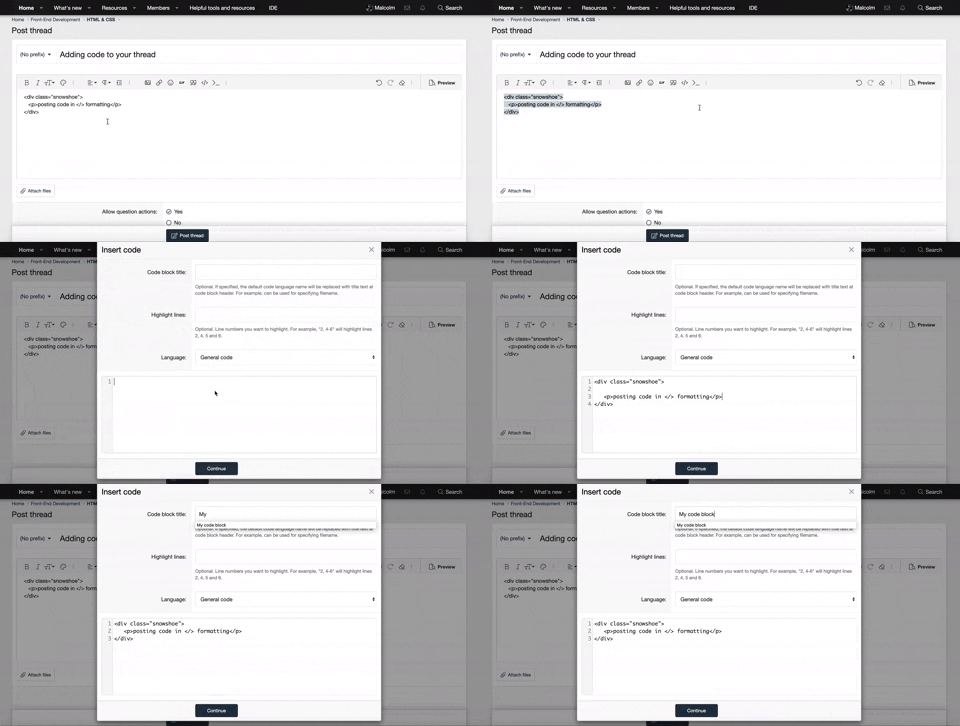
    • It is required to use our BBCode feature to display your code. While within the editor click < / > or >_ and place your code within the BB Code prompt. This helps others with finding a solution by making it easier to read and easier to copy.
    • You can also use markdown to share your code. When using markdown your code will be automatically converted to BBCode. For help with markdown check out the markdown guide.
    • Don't share a wall of code. All we want is the problem area, the code related to your issue.

    GIF shows where to locate </> in the thread and or post editor toolbar.
    To learn more about how to use our BBCode feature, review our "How to post your code into threads" here.

    Thank you, Code Forum.

zoom on hover

Dennis

New Coder
i can't for the life of me get my social media icons to 'zoom on hover'. I've tried every combination of things, went to W3Schools etc etc

Here is what i currently have:
Code:
/* social media icons - home page */

.socials {
    transition: transform .2s;
}
.socials img {
    width: auto;
}
.socials img:hover {
  transform: scale(1.5);
}

/* end social media icons - home page */

Can someone help out with, what seems to be a pretty basic animation?

Thanks.
 
Hello @Dennis,

The issue is that the transition property is being applied to .socials, whereas the transform property is being applied to .socials img:hover.

To fix this, you need to apply the transition to the element being transformed.

CSS:
.socials img {
   width: auto;
   transition: transform 0.2s ease-in-out;
}

.socials img:hover {
   transform: scale(1.5);
}

This should allow the image to smoothly scale up when hovered over and return to its original size when the mouse moves away.
 
Back
Top Bottom