

mgysgtdev
New Coder
hi,
i am working on a RPM gauge that uses html, javascript and css. the gauge gets it data from a game plugin. the data it recieves is the true rpm. so if the rpm needle is at 5 the data it recieves is 500 (example). now is my problem that i have a rpm gauge that isn't linear. so the distance from 0 to 5 (on the gauge) is smaller than 5 - 10, 10 - 15, 15 -20. 20 to 25 is smaller aswell, but bigger than 0 - 5.
the code i have in the html file is linear. it has a data-min and data-max with its angles.
(example ->) if the rpm data is 500 the needle is on 700 cause of this non linear gauge.
is there a code to set angles to a fixed data variable?
let's say i know rpm 500 is at angle -90 but the needle with this data points at an angle of -70.
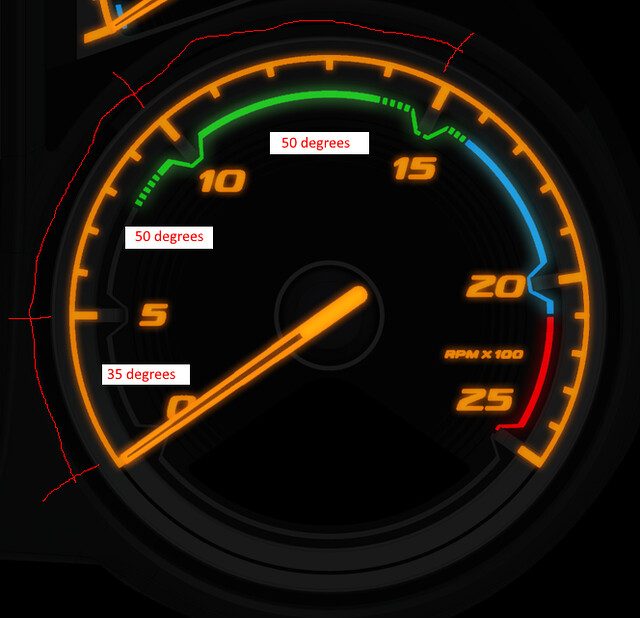
the code i have in html is:
[CODE lang="HTML" title="HTML"]<div class="truck-engineRpm gauges" data-type="meter" data-min="0" data-max="2500" data-min-angle="-125" data-max-angle="125"></div>[/CODE]
and the code i have in css is:
[CODE lang="CSS" title="CSS"].dashboard {
z-index: 0;
background-image: url("images/background.jpg");
opacity: 0.1;
filter: grayscale(100%);
}
.game-connected.yes .dashboard {
opacity: 1;
filter: grayscale(0%);
}
.truck-engineRpm {
z-index: 1;
visibility: visible;
position: absolute;
left: 1816px;
top: 391px;
width: 40px;
height: 391px;
background-image: url("images/needle.png");
transform: rotate(-125deg);
transform-origin: 50% 322px;
transition: 300ms linear;
}[/CODE]
the dashboard part is just the background. it has nothing to do with the gauge (the dashboard jpg only has the gauge on it) and the engineRpm is the the needle.
i have no code in javascript.
i am working on a RPM gauge that uses html, javascript and css. the gauge gets it data from a game plugin. the data it recieves is the true rpm. so if the rpm needle is at 5 the data it recieves is 500 (example). now is my problem that i have a rpm gauge that isn't linear. so the distance from 0 to 5 (on the gauge) is smaller than 5 - 10, 10 - 15, 15 -20. 20 to 25 is smaller aswell, but bigger than 0 - 5.
the code i have in the html file is linear. it has a data-min and data-max with its angles.
(example ->) if the rpm data is 500 the needle is on 700 cause of this non linear gauge.
is there a code to set angles to a fixed data variable?
let's say i know rpm 500 is at angle -90 but the needle with this data points at an angle of -70.
the code i have in html is:
[CODE lang="HTML" title="HTML"]<div class="truck-engineRpm gauges" data-type="meter" data-min="0" data-max="2500" data-min-angle="-125" data-max-angle="125"></div>[/CODE]
and the code i have in css is:
[CODE lang="CSS" title="CSS"].dashboard {
z-index: 0;
background-image: url("images/background.jpg");
opacity: 0.1;
filter: grayscale(100%);
}
.game-connected.yes .dashboard {
opacity: 1;
filter: grayscale(0%);
}
.truck-engineRpm {
z-index: 1;
visibility: visible;
position: absolute;
left: 1816px;
top: 391px;
width: 40px;
height: 391px;
background-image: url("images/needle.png");
transform: rotate(-125deg);
transform-origin: 50% 322px;
transition: 300ms linear;
}[/CODE]
the dashboard part is just the background. it has nothing to do with the gauge (the dashboard jpg only has the gauge on it) and the engineRpm is the the needle.
i have no code in javascript.





