<!DOCTYPE html>
<html lang="en">
<head>
<meta name="viewport" content="width=device-width, initial-scale=1.0">
<title>University Website Design - Easy Tutorials</title>
<link rel="stylesheet" href="style.css">
<link rel="preconnect" href="https://fonts.googleapis.com">
<link rel="preconnect" href="https://fonts.gstatic.com" crossorigin>
<link href="https://fonts.googleapis.com/css2?f...ht@0,400;0,600;1,100;1,200;1,700&display=swap" rel="stylesheet">
<link rel="stylesheet" href="https://stackpath.bootstrapcdn.com/font-awesome/4.7.0/css/font-awesome.min.css">
</head>
<body>
<section class="header">
<nav>
<a href="index.html"><img src="images/logo.png" alt="logo"></a>
<div class="nav-links" id="navLinks">
<i class="fa fa-times" onclick="hideMenu()"></i>
<ul>
<li><a href="">HOME</a></li>
<li><a href="">ABOUT</a></li>
<li><a href="">COURSE</a></li>
<li><a href="">BLOG</a></li>
<li><a href="">CONTACT</a></li>
</ul>
</div>
<i class="fa fa-bars" onclick="showMenu()"></i>
</nav>
<div class="text-box">
<h1>World's Biggest University</h1>
<p>Making a Website is one of the easiest thing in the world.You just need to learn HTML, CSS,<br> Javascript and you are good to go.
</p>
<a href="" class="hero-btn">Visit Us To know More</a>
</div>
</section>
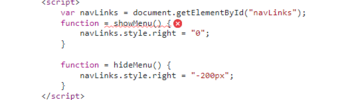
<script>
var navLinks = document.getElementById("navLinks");
function = showMenu() {
navLinks.style.right = "0";
}
function = hideMenu() {
navLinks.style.right = "-200px";
}
</script>
</body>
</html>
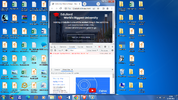
The above is the code for index.html file.The script tag is not working in chrome browser when developer option is enabled. The styles.css file is zipped for reference.kindly point out therror in my code why the script tag is not working in chrome browser with developer tools enabled for responsive design.
<html lang="en">
<head>
<meta name="viewport" content="width=device-width, initial-scale=1.0">
<title>University Website Design - Easy Tutorials</title>
<link rel="stylesheet" href="style.css">
<link rel="preconnect" href="https://fonts.googleapis.com">
<link rel="preconnect" href="https://fonts.gstatic.com" crossorigin>
<link href="https://fonts.googleapis.com/css2?f...ht@0,400;0,600;1,100;1,200;1,700&display=swap" rel="stylesheet">
<link rel="stylesheet" href="https://stackpath.bootstrapcdn.com/font-awesome/4.7.0/css/font-awesome.min.css">
</head>
<body>
<section class="header">
<nav>
<a href="index.html"><img src="images/logo.png" alt="logo"></a>
<div class="nav-links" id="navLinks">
<i class="fa fa-times" onclick="hideMenu()"></i>
<ul>
<li><a href="">HOME</a></li>
<li><a href="">ABOUT</a></li>
<li><a href="">COURSE</a></li>
<li><a href="">BLOG</a></li>
<li><a href="">CONTACT</a></li>
</ul>
</div>
<i class="fa fa-bars" onclick="showMenu()"></i>
</nav>
<div class="text-box">
<h1>World's Biggest University</h1>
<p>Making a Website is one of the easiest thing in the world.You just need to learn HTML, CSS,<br> Javascript and you are good to go.
</p>
<a href="" class="hero-btn">Visit Us To know More</a>
</div>
</section>
<script>
var navLinks = document.getElementById("navLinks");
function = showMenu() {
navLinks.style.right = "0";
}
function = hideMenu() {
navLinks.style.right = "-200px";
}
</script>
</body>
</html>
The above is the code for index.html file.The script tag is not working in chrome browser when developer option is enabled. The styles.css file is zipped for reference.kindly point out therror in my code why the script tag is not working in chrome browser with developer tools enabled for responsive design.