

Nero
New Coder
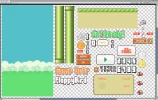
I have a problem. I seem to have written everything correctly, but during the game, the lower columns go higher and higher and I can't figure out how to set a limit on my output to the picture, that is, so that the photo of the column does not go beyond its limits.
Python:
import pygame

from random import randint


pygame.init()


WIDTH, HEIGHT = 1000, 800

FPS = 60


screen = pygame.display.set_mode((WIDTH, HEIGHT))

clock = pygame.time.Clock()


pygame.display.set_caption("Flappy bird")

pygame.display.set_icon(pygame.image.load("images/icon.png"))


font1 = pygame.font.Font(None, 35)

font2 = pygame.font.Font(None, 80)

imageBG = pygame.image.load("images/background.png")

imageBird = pygame.image.load("images/bird.png")

imagePT = pygame.image.load("images/pipe_top.png")

imagePB = pygame.image.load("images/pipe_bottom.png")


pygame.mixer.music.load("sounds/music.mp3")

pygame.mixer.music.set_volume(0.3)

pygame.mixer.music.play(-1)


sndFall = pygame.mixer.Sound("sounds/die.mp3")

sndPoint = pygame.mixer.Sound("sounds/point.mp3")


py, sy, ay = HEIGHT // 2, 0, 0

player = pygame.Rect(WIDTH // 2, py, 68, 47)

frame = 0


state = 'start'

timer = 90


pipes = []

bges = []

pipesScores = []


pipeSpeed = 20

pipeGateSize = 200

pipeGatePos = HEIGHT // 2


bges.append(pygame.Rect(0, 0, 469, 835))


scores = 0


play = True

while play:

for event in pygame.event.get():

 if event.type == pygame.QUIT:

play = False


    press = pygame.mouse.get_pressed()

    keys = pygame.key.get_pressed()

click = press[0] or keys[pygame.K_SPACE]


 if timer:

timer -= 1


    frame = (frame + 0.2) % 3


    for i in range(len(bges) - 1, -1, -1):

        bg = bges

bg.x -= 1


        if bg.right < 0:

            bges.remove(bg)


if bges[len(bges) - 1].right <= WIDTH:

bges.append(pygame.Rect(bges[len(bges) - 1].right, 0, 469, 835))


for i in range(len(pipes) - 1, -1, -1):

        pipe = pipes

pipe.x -= pipeSpeed // 2


        if pipe.right < 0:

            pipes.remove(pipe)

if pipe in pipesScores:

                pipesScores.remove(pipe)


if state == 'start':

if click and not timer and not len(pipes): state = "play"


        py += (HEIGHT // 2 - py) * 0.1

        player.y = py

elif state == 'play':

 if click:

ay = -2

        else:

ay = 0


        py += sy

sy = (sy + ay + 1) * 0.98

        player.y = py


if not len(pipes) or pipes[len(pipes) - 1].x < WIDTH - 250:

pipes.append(pygame.Rect(WIDTH, 0, 79, pipeGatePos - pipeGateSize // 1))

            pipes.append(

pygame.Rect(WIDTH, pipeGatePos + pipeGateSize // 2, 79, HEIGHT - pipeGatePos + pipeGateSize // 1))


pipeGatePos += randint(-100, 100)

 if pipeGatePos < pipeGateSize:

                pipeGatePos < pipeGateSize

 elif pipeGatePos > HEIGHT - pipeGateSize:

                pipeGatePos = HEIGHT - pipeGateSize


if player.top < 0 or player.bottom > HEIGHT:

state = 'fall'


        for pipe in pipes:

if player.colliderect(pipe): state = "fall"


            if pipe.right < player.left and pipe not in pipesScores:

                pipesScores.append(pipe)

scores += 1

                pipeSpeed = 20 + scores // 20

    elif state == 'fall':

        sndFall.play()

sy, ay = 0, 0

        state = "start"

        timer = 60

    else:

pass


    # Отрисовка

    for bg in bges: screen.blit(imageBG, bg)


for pipe in pipes:

 if not pipe.y:

rect = imagePT.get_rect(bottomleft=pipe.bottomleft)

            screen.blit(imagePT, rect)

 else:

rect = imagePB.get_rect(topleft=pipe.topleft)

            screen.blit(imagePB, rect)


image = imageBird.subsurface(68 * int(frame), 0, 68, 47)

image = pygame.transform.rotate(image, -sy * 2)

    screen.blit(image, player)


text = font1.render("Очки: " + str(scores), 0, pygame.Color("black"))

screen.blit(text, (10, 10))


    pygame.display.update()

    clock.tick(FPS)


pygame.quit()
Attachments





Last edited by a moderator:





