
JamesCobban_net
New Coder
i have set up a number of URL links using CSS so they look like buttons. Most of the time this works, but I have a couple of web pages where the alignment doesn't work, reducing the readability of the page.
First I have a style:
Then I reference it from HTML:
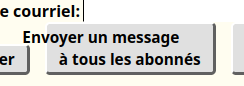
$TOLIST and $BCCLIST are replaced by a template engine. What I do not understand is why the first line of the text is not aligned according to "text-align: center". The second line is, but French is such a wordy language that I need to break the long line of text, whereas I do not with English "Send mail to all Users"
First I have a style:
CSS:
    .button    {
                font-family:        sans-serif;
                font-weight:        bold;
                font-size:          80%;
                text-align:         center;
                text-decoration:    none;
                background-color:   #E0E0E0;
                color:              #000000;
                border-top:         2px solid white;
                border-left:        2px solid white;
                border-bottom:      3px solid #606060;
                border-right:       3px solid #606060;
                border-radius:      5px;
                padding:            2px 12px 2px 12px;
                display:            inline-block;
                }
Then I reference it from HTML:
HTML:
<a href="mailto:?to=$TOLIST&bcc=$BCCLIST&subject=[JamesCobban.net]%20General%20Notice"
class="button" id="bulkMail">
Envoyer un message<br>à tous les abonnés
</a>$TOLIST and $BCCLIST are replaced by a template engine. What I do not understand is why the first line of the text is not aligned according to "text-align: center". The second line is, but French is such a wordy language that I need to break the long line of text, whereas I do not with English "Send mail to all Users"





