

Edrol97
Silver Coder
Hi all, not sure what's up with my code here. The code is to click an image and then a gallery appears. It's not currently scrolling as it should. How do I change this? I had it right and not sure what I did wrong to make it not work. Currently, it's just showing one image and then when the arrows are pushed within the code, they produce nothing. Only one image of my entire image_slide class shows up. The only error that the Console shows is:
VM73:1 Uncaught TypeError: slides is not a function
at <anonymous>:1:1
HTML is as follows
JS is below:
VM73:1 Uncaught TypeError: slides is not a function
at <anonymous>:1:1
HTML is as follows
HTML:
<!DOCTYPE html>
<html lang="en">
<head>
<meta charset="UTF-8">
<meta name="viewport" content="width=device-width, initial-scale=1.0">
<meta http-equiv="X-UA-Compatible" content="ie=edge">
<title>Image carousel</title>
<link rel="stylesheet" href="style.css">
</head>
<body>
<div class="container">
<img src="img/A%20Bit%20Of%20A%20Mix%20Up.png" alt=" "width="300px" onclick="LaunchLightbox()">
</div>
<div class="slide-show_container">
<div class="next_button" onclick="NextImage()">→</div>
<div class="previous_button" onclick="PreviousImage()">←</div>
<div class="close_button" onclick="CloseLightbox()">X</div>
<div class="image_slide" onclick="slides()"></div>
<div class="image_slide">
<img src="img/A%20Bit%20Of%20A%20Mix%20Up.png" alt=" "width="300px">
<div class="caption_text">Rishi's getting a bit mixed up</div>
<div class="image_slide">
<img src="img/Culture%20War%20On%20Woke.png" alt=" "width="300px">
<div class="caption_text">The Tories are looking for an election strategy</div>
</div>
<div class="image_slide">
<img src="img/Nothing to see here.png" alt=" "width="300px">
<div class="caption_text">The Tories are looking for an election strategy</div>
</div>
<div class="image_slide">
<img src="img/Out of Tune ideas.png" alt="" width="300px">
<div class="caption_text">No ideas incoming</div>
</div>
<div class="image_slide">
<img src="img/Budget Fare.png" alt="" width="300 px">
<div class="caption_text">One way ticket to nowhere for the Tories
</div>
<div class="image_slide">
<img src="img/Bad Times logo Colourised W.png" alt="" width="300px">
<div class="caption_text">Bad Times continue with the Tories
</div>
<div class="image_slide">
<img src="img/That's Racist.png" alt="" width="500px"
div class="caption_text">The Frank Hester row wages on, as the Tories are embroiled in a racism row</div>
</div>
</div>
</div>
<script src="script.js"></script>
</body>
</html>JS is below:
JavaScript:
let slides = document.getElementsByClassName("image_slide");

let counter=0;
slides[counter].style.display="block";
setTimeout("slides()", 2000);
function NextImage(){
    slides[0].style.display="none";
    slides[1].style.display="none";
    slides[2].style.display="none";
    slides[3].style.display="none";
    slides[4].style.display="none";
    slides[5].style.display="none";
    counter=counter+1;
    if (counter > 6){
        counter=0;

    }
    slides[counter].style.display="block";
}


function PreviousImage(){
    slides[0].style.display="none";
    slides[1].style.display="none";
    slides[2].style.display="none";
    slides[3].style.display="none";
    slides[4].style.display="none";
    slides[5].style.display="none";
    counter=counter-1;
    if (counter < 0){
        counter=6;
    }
    slides[counter].style.display="block";

}

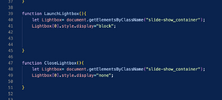
function LaunchLightbox(){
    let Lightbox= document.getElementsByClassName("slide-show_container");
    Lightbox[0].style.display="block";


}

function CloseLightbox(){
    let Lightbox= document.getElementsByClassName("slide-show_container");
    Lightbox[0].style.display="none";

}
Attachments

Last edited:





