Welcome to Code Forum!

Join a community that supports you and your coding journey from day one. We strive to be a friendly, supportive community that empowers everyone to be better developers. By registering with us, you'll be able to discuss, share and private message with other members of our community.

SignUp Now!
  • Guest, before posting your code please take these rules into consideration:
    • It is required to use our BBCode feature to display your code. While within the editor click < / > or >_ and place your code within the BB Code prompt. This helps others with finding a solution by making it easier to read and easier to copy.
    • You can also use markdown to share your code. When using markdown your code will be automatically converted to BBCode. For help with markdown check out the markdown guide.
    • Don't share a wall of code. All we want is the problem area, the code related to your issue.

    GIF shows where to locate </> in the thread and or post editor toolbar.
    To learn more about how to use our BBCode feature, review our "How to post your code into threads" here.

    Thank you, Code Forum.

PHP The most basic PHP program is not working correctly

Kaworu

Active Coder
Hi!

I have written the most basic PHP program and the output is not as it should be 🙁 Can somebody help me?

I am using XAMPP v 3.2.4

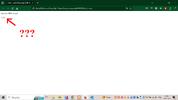
Source code and the output below:
PHP:
<!DOCTYPE html>
<html>
    <body>
        <?php
        echo "<p>My first PHP script!</p>";
        ?> 
    </body>
</html>

1.png

I mean, I really do not get why what is printed is printed...? Any help? ;-)
 
Hi!

I have written the most basic PHP program and the output is not as it should be 🙁 Can somebody help me?

I am using XAMPP v 3.2.4

Source code and the output below:

PHP:
<!DOCTYPE html>
<html>
    <body>
        <?php
        echo "<p>My first PHP script!</p>";
        ?>
    </body>
</html>


I mean, I really do not get why what is printed is printed...? Any help? ;-)
Hi there,

So for the laughs and giggles, try removing the html inside of that string.
 
Okay, so:

@Antero: I do not know what you mean. Are you talking about <p>? When I tried to just echo "text to print" it was not working at all. Or maybe you mean something else? I'm sorrry, but I do not understand what you are trying to tell me.

@cbreemer: The file is in .php format.

EDIT:

I changed a little bit the source code and it is even worse now:

PHP:
<!DOCTYPE html>
<html>

    <body>

        <?php

        echo "My first PHP script!";

        ?>

    </body>

</html>

2.png
 
Have you actually configured your webserver for php ? It needs to know that an URL with php extension is to be handled by PHP. Your file is apparently being processed as HTML, because you get the exact same output when you open the file locally, without using an URL. Consult the documentation of your webserver a bout how to configure for PHP.
 
Okay, my current source code is this:

PHP:
<?php

    echo "<p>My first PHP script!</p>";

?>

I still see the weird ending. It's the same with HTML tags and with BODY tags.

I'm starting to suppose something is wrong with my very Apache installation... Is that possible?

EDIT: If you are talking about <p> tags inside the string, I see literally nothing once I remove them.
 
Okay, my current source code is this:

PHP:
<?php

    echo "<p>My first PHP script!</p>";

?>

I still see the weird ending. It's the same with HTML tags and with BODY tags.
The source code if fine. You see the "weird ending" when the file is being interpreted as HTML. Not sure why, but it doesn't really matter.

I'm starting to suppose something is wrong with my very Apache installation... Is that possible?
Yes it certainly is. Let me ask you again, have you actually configured your webserver for PHP ? There are plenty tutorials and documents about how to do this.

EDIT: If you are talking about <p> tags inside the string, I see literally nothing once I remove them.
I noticed this as well, and I don't understand it either. But again, it doesn't really matter.
 
Okay, my current source code is this:

PHP:
<?php

    echo "<p>My first PHP script!</p>";

?>

I still see the weird ending. It's the same with HTML tags and with BODY tags.

I'm starting to suppose something is wrong with my very Apache installation... Is that possible?

EDIT: If you are talking about <p> tags inside the string, I see literally nothing once I remove them.
I was indeed referring to the ones in the string itself.. you definitely need the <?php ?>
 
Oh, silly me. The script should be in htdocs file.
I guess you mean the htdocs folder ?

But the script did work, albeit incorrectly, so it seems it was in the right place (whatever that is) and there should be no need to move it anywhere else. Make sure that you know and understand the correct location, and that you have only one version of the script.
 
Hm.... people on StackOverflow claim that XAMPP should be working "right out of the box"? So are claiming people here.

But you know? I think my installation of XAMPP is from 2019 - I will try to reinstall and install a fresh one, maybe then it will fix the issue? Then I can ask you for help if things still will not work.
 
Oh, XAMPP. I had to look that up 😁 They might well be right. But perhaps you missed some configuration option during installation. It can't harm to remove it and install a recent version it and be on the lookout for anything related to PHP. If it's all installed and configured correctly there is absolutely no reason why your php code should not work.
 
XAMPP is nice ! Great to have everything in one folder, and managed from one console. I just installed version 8.1.2 and can confirm that your PHP (copied from your initial post) works fine, with or without the <p>. So these folks are right, it works out of the box. I can only assume that something was wrong with your previous installation.
 
Okey, I know where the problem appeared from! (xD)

I should enter the address of the PHP file using localhost/address/to/the/script.php. Instead, I was just double clicking the script. Oops?

I feel like an idiot... But everything is working now! 😀
 
Okey, I know where the problem appeared from! 🙂laugh🙂

I should enter the address of the PHP file using localhost/address/to/the/script.php. Instead, I was just double clicking the script. Oops?

I feel like an idiot... But everything is working now! 😀
Haha ... that is a bit embarrassing 🤣 Actually I (or anyone else) should have seen that right away in your screenshot. Guess I was too focused on the output to even notice the environment 🙄
Don't forget to mark your last comment as the solution so that the issue gets the Solved status.
 
Back
Top Bottom