
Welcome to Code Forum!

Join a community that supports you and your coding journey from day one. We strive to be a friendly, supportive community that empowers everyone to be better developers. By registering with us, you'll be able to discuss, share and private message with other members of our community.

SignUp Now!
  • Guest, before posting your code please take these rules into consideration:
    • It is required to use our BBCode feature to display your code. While within the editor click < / > or >_ and place your code within the BB Code prompt. This helps others with finding a solution by making it easier to read and easier to copy.
    • You can also use markdown to share your code. When using markdown your code will be automatically converted to BBCode. For help with markdown check out the markdown guide.
    • Don't share a wall of code. All we want is the problem area, the code related to your issue.

    GIF shows where to locate </> in the thread and or post editor toolbar.
    To learn more about how to use our BBCode feature, review our "How to post your code into threads" here.

    Thank you, Code Forum.

Dynamic load of CSS file

cbreemer

Bronze Coder
Just wondering is anyone here has experience with dynamic loading of stylesheets.
I am doing this and it works well, just not the first time. I fail to see what difference there is between the
first time and the second. Either I am overlooking something obvious, or there is more to it than meets the eye.
Here the HTML and CSS files:

HTML:
<!DOCTYPE html>
<html>
<head>
<xxlink   rel="stylesheet" href="./test.css">

<script>
function loadCss ()
{
    for ( let link of document.getElementsByTagName("link") )
    if ( link.rel == "stylesheet" && link.href.includes("test.css") )
        return;

    var styles   = document.createElement("link");
    styles.rel   = "stylesheet";
    styles.href  = "./test.css";
    document.head.appendChild(styles);
    }

function showPopup ()
{
    loadCss();
    var popup = document.createElement("div");
    popup.classList.add("popup");
    document.body.appendChild(popup);

    console.log(`popup offsetWidth:${popup.offsetWidth} offsetHeight:${popup.offsetHeight}`);
    popup.style.left = `${div1.offsetLeft + div1.offsetWidth  - popup.offsetWidth }px`;
    popup.style.top  = `${div1.offsetTop  + div1.offsetHeight - popup.offsetHeight}px`;

    setTimeout( function() { document.body.removeChild(popup); }, 5000);
}
</script>
</head>
<body>
<div id="div1" style="width:300px; height:200px;background-color:wheat; border:1px solid black;">div1</div>
<br>
<button onclick="showPopup()">On div1</button>
</body>
</html>

.
CSS:
popup
{
    position            : absolute;
    width               : 200px;
    height              : 50px;
    background-color    : aliceblue;
    border              : 1px solid black;
}

When I click the button, function showPopup() will show a popup for 5 seconds, positioned in the lower right corner of the <div>.
The CSS just specifies the size and color of the popup, the position is calculated at runtime.
The first time, the popup is positioned incorrectly, because the calculated coordinates are wrong. The value 476 I see printed
happens to be the current width of the viewport minus 18 pixels (reserve for a scrollbar ?).
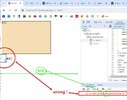
p1.jpg

The second time, and subsequent times) the positioning and dimensions are correct:
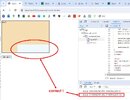
p2.jpg

When instead of loading it dynamically I specify the CSS file in the document :

HTML:
<link   rel="stylesheet" href="./test.css">

it works fine from the start. What am I not seeing ?
Thanks for any ideas.
 

Attachments
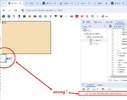
  • p1.jpg
    p1.jpg
    50.8 KB · Views: 4
Last edited:
Solution
Just a bit of a guess here but seems like there is no css on the page the first time but gets cached and is there subsequent tries.
I get that you think that. But yes the CSS is already there, otherwise the color of the popup would not be "aliceblue" and the height would not be 50px. It just does not have the correct position yet.

Not sure what you are doing so as to need the css loading onclick, but even with script it seems you need to load it on page load?
I have my reasons 😊 Anyway I have worked around the issue now. It occurred to me that if I create all content dynamically I might as well add the styling dynamically instead of using a CSS file.
Just a bit of a guess here but seems like there is no css on the page the first time but gets cached and is there subsequent tries.

Not sure what you are doing so as to need the css loading onclick, but even with script it seems you need to load it on page load?
 
Just a bit of a guess here but seems like there is no css on the page the first time but gets cached and is there subsequent tries.
I get that you think that. But yes the CSS is already there, otherwise the color of the popup would not be "aliceblue" and the height would not be 50px. It just does not have the correct position yet.

Not sure what you are doing so as to need the css loading onclick, but even with script it seems you need to load it on page load?
I have my reasons 😊 Anyway I have worked around the issue now. It occurred to me that if I create all content dynamically I might as well add the styling dynamically instead of using a CSS file.
 
Solution
I get that you think that. But yes the CSS is already there, otherwise the color of the popup would not be "aliceblue" and the height would not be 50px. It just does not have the correct position yet.


I have my reasons 😊 Anyway I have worked around the issue now. It occurred to me that if I create all content dynamically I might as well add the styling dynamically instead of using a CSS file.

Fair enough.

Is the larger div position:relative?

Dynamically loading CSS seem to undermine some aspects of CSS, like caching and possibly the cascade, depending on what else is going on.

But then again, it's your thing and you have your reasons ;-)
 
Is the larger div position:relative?
Yes I think so. It's the default, right ? and there is no styling there to change it. But now I start to wonder why I made the popup absolute. May have to rethink that,

Dynamically loading CSS seem to undermine some aspects of CSS, like caching and possibly the cascade, depending on what else is going on.
I don't care about caching, these styles are only used for a bundle of dialogs that are created on-the-fly.
But yes I DO miss the cascading aspect of CSS in my current implementation. There's quite some redundancy now which I'm not happy about. I'll have to refine that solution.
 
Yes I think so. It's the default, right ? and there is no styling there to change it. But now I start to wonder why I made the popup absolute. May have to rethink that,


I don't care about caching, these styles are only used for a bundle of dialogs that are created on-the-fly.
But yes I DO miss the cascading aspect of CSS in my current implementation. There's quite some redundancy now which I'm not happy about. I'll have to refine that solution.

The default position of a div is 'static', not 'relative'. Try setting position:relative on the parent div. If any other ancestor has positioning set, that becomes the basis for the positioning of any position:absolute child element, which may not be what you want.
 
The default position of a div is 'static', not 'relative'. Try setting position:relative on the parent div. If any other ancestor has positioning set, that becomes the basis for the positioning of any position:absolute child element, which may not be what you want.
Thanks. There is much about positioning that I don't know or understand, having only ever used absolute and relative. Anyway I have moved on from this issue, having marked it as solved. My implementation isn't perfect but it works and solved the need.
 
Back
Top Bottom



