

cbreemer
Bronze Coder
Just wondering is anyone here has experience with dynamic loading of stylesheets.
I am doing this and it works well, just not the first time. I fail to see what difference there is between the
first time and the second. Either I am overlooking something obvious, or there is more to it than meets the eye.
Here the HTML and CSS files:
.
When I click the button, function
The CSS just specifies the size and color of the popup, the position is calculated at runtime.
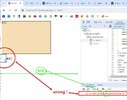
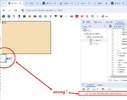
The first time, the popup is positioned incorrectly, because the calculated coordinates are wrong. The value 476 I see printed
happens to be the current width of the viewport minus 18 pixels (reserve for a scrollbar ?).
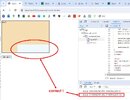
The second time, and subsequent times) the positioning and dimensions are correct:
When instead of loading it dynamically I specify the CSS file in the document :
it works fine from the start. What am I not seeing ?
Thanks for any ideas.
I am doing this and it works well, just not the first time. I fail to see what difference there is between the
first time and the second. Either I am overlooking something obvious, or there is more to it than meets the eye.
Here the HTML and CSS files:
HTML:
<!DOCTYPE html>
<html>
<head>
<xxlink   rel="stylesheet" href="./test.css">

<script>
function loadCss ()
{
    for ( let link of document.getElementsByTagName("link") )
    if ( link.rel == "stylesheet" && link.href.includes("test.css") )
        return;

    var styles   = document.createElement("link");
    styles.rel   = "stylesheet";
    styles.href  = "./test.css";
    document.head.appendChild(styles);
    }

function showPopup ()
{
    loadCss();
    var popup = document.createElement("div");
    popup.classList.add("popup");
    document.body.appendChild(popup);

    console.log(`popup offsetWidth:${popup.offsetWidth} offsetHeight:${popup.offsetHeight}`);
    popup.style.left = `${div1.offsetLeft + div1.offsetWidth  - popup.offsetWidth }px`;
    popup.style.top  = `${div1.offsetTop  + div1.offsetHeight - popup.offsetHeight}px`;

    setTimeout( function() { document.body.removeChild(popup); }, 5000);
}
</script>
</head>
<body>
<div id="div1" style="width:300px; height:200px;background-color:wheat; border:1px solid black;">div1</div>
<br>
<button onclick="showPopup()">On div1</button>
</body>
</html>
.
CSS:
popup
{
    position            : absolute;
    width               : 200px;
    height              : 50px;
    background-color    : aliceblue;
    border              : 1px solid black;
}
When I click the button, function
showPopup() will show a popup for 5 seconds, positioned in the lower right corner of the <div>.The CSS just specifies the size and color of the popup, the position is calculated at runtime.
The first time, the popup is positioned incorrectly, because the calculated coordinates are wrong. The value 476 I see printed
happens to be the current width of the viewport minus 18 pixels (reserve for a scrollbar ?).
The second time, and subsequent times) the positioning and dimensions are correct:
When instead of loading it dynamically I specify the CSS file in the document :
HTML:
<link rel="stylesheet" href="./test.css">it works fine from the start. What am I not seeing ?
Thanks for any ideas.
Attachments
Last edited:





