I made a copy of an invitation to be sent automatically to a group of participants. a sample code follows:
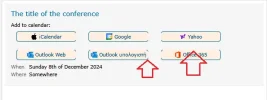
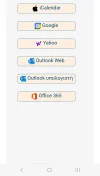
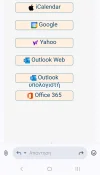
The point is that in mobile phones and tablets with small screen, the buttons do not show correctly, the border seems to be cut vertically or horizontally like in the image I post.
HTML:
<!DOCTYPE html>
<html>
  <head>
      <meta http-equiv="Content-Type" content="text/html; charset=UTF-8">
    <title>Untitled</title>
    <style>
        body {
        font-family: Verdana;
        font-size: 20px;
        }
    .init {
        line-height: 18px;
        font-size: 1.1rem;
        }
    .init_table {
        border-collapse: separate;
        border: 1px solid #e5e5e5;
        border-radius: 8px;
          table-layout: fixed;
          width: 100%;

        }
    .col2 {
        width: 100%;
        padding: 21px;
        vertical-align: top;
        background-color: #f5f5f5;
        }
    .col2div1 {
        color: #069;
          font-size: 140%;
          word-wrap: break-word;
        margin-bottom: 16px;
        line-height: 34px;
        }
    .col2table {
        border-collapse: collapse;
        table-layout: fixed;
          width: auto;
          word-break: break-word;
        }
    .col2tablecol1 {
        color: #666666;
        padding-right: 10px;
          min-width: 48px;
          white-space: nowrap;
        padding-bottom: 8px;
        padding-left: 0;
          padding-top: 2px;
          vertical-align: top;
          word-wrap: break-word;
        }
    .col2tablecol2 {
        padding-left: 0;
          padding-top: 2px;
          vertical-align: top;
          word-wrap: break-word;
        }
    .col2div2 {
        color: #222222;
          font-size: 120%;
          margin-bottom: 2px;
          word-wrap: break-word;
        margin-top: 10px;
        }
    .col3 {
        border-left: 1px solid #e5e5e5;
          padding: 21px 21px 21px 0;
          vertical-align: top;
          overflow: hidden;
        padding: 21px;
        vertical-align: top;
        }
    .col3outdiv {
        padding-left: 21px;
        }
    .col3div1 {
        color: #222222;
          font-size: 140%;
          margin-bottom: 2px;
          word-wrap: break-word;
        }
    .col3div2 {
        margin-bottom: 14px;
        margin-top: 14px;
        }
    ul {
        list-style: none;
        }
    .button {
        font-size: 1.1rem;
        width: 220px;
        height:36px;
        margin: 15px 20px;
        border: 1px solid #069;
          border-radius: 7px;
        background-color: #ffefdf;
        color: #047;
        display:inline-block;
        text-decoration:none;
        text-align: center;
        vertical-align: middle;
        }

    .button > img,
    .button > span {
        vertical-align: middle;
        padding-top: 6px;
        }
    .button:hover,
    .button > img:hover,
    .button > span:hover {
          background-color: #ffd3aa;
        }
    .even {background-color: #e0e0e0;}
    .odd {background-color: #f5f5f5;}
    .data {
        background-color:#f5f5f5;
        border-collapse: separate;
        border: 1px solid #e5e5e5;
        border-radius: 8px;
        margin-left: 10px;
        }
    .col1data {
        border-left-color: coral;
        color: #666666;
        padding-right: 10px;
          min-width: 48px;
          white-space: nowrap;
        padding-bottom: 8px;
        padding-left: 3px;
          padding-top: 2px;
          vertical-align: top;
          word-wrap: break-word;
        font-size:1.1rem;
        }
    .col2data {
        padding-left: 3px;
        padding-right: 3px;
          word-wrap: break-word;
        vertical-align: center;
        font-size:1.2rem;
        }
    </style>
  </head>
  <body>
    <div class="init">
    <table class="init_table" cellpadding="0">
    <tr><td class="col2"><div class="col2div1">The title of the conference</div>
            <div>Add to calendar:<br>
                <a class="button" href="https://synthesi.mysch.gr/Calendar/ΔΙΚΑΙΟΣΥΝΗ.ics"><img src="https://synthesi.mysch.gr/Calendar/images/apple_24.png"> <span>iCalendar</span></a>
                <a class="button" href="https://calendar.google.com/" target="_blank"><img src="https://synthesi.mysch.gr/Calendar/images/google_calendar_24.png"><span> Google</span></a>
                <a class="button" href="https://calendar.yahoo.com/" target="_blank"><img src="https://synthesi.mysch.gr/Calendar/images/yahoo2.png"><span> Yahoo</span></a>
                <a class="button" href="https://outlook.live.com/calendar/0/action/compose" target="_blank"><img src="https://synthesi.mysch.gr/Calendar/images/outlook_24.png"><span> Outlook Web</span></a>
                <a class="button" href="https://synthesi.mysch.gr/Calendar/ΔΙΚΑΙΟΣΥΝΗ.ics"><img src="https://synthesi.mysch.gr/Calendar/images/outlook_24.png"><span> Outlook υπολογιστή</span></a>
                <a class="button" href="https://outlook.office.com/calendar/0/action/compose" target="_blank"><img src="https://synthesi.mysch.gr/Calendar/images/office_24.png"><span> Office 365</span></a>
                </div>
            <table class="col2table">
                <tr><td class="col2tablecol1">When</td>
                    <td class="col2tablecol2">Sunday 8th of December 2024</td></tr>
                <tr><td class="col2tablecol1">Where</td>
                    <td class="col2tablecol2">Somewhere</td></tr>
            </table>
        </td>
    </tr>
    </table>
      </div>
  </body>
</html>