

Aleksi
New Coder
I am implementing a photo editor, where the image can be zoomed in, rotated and cropped. I am having trouble rotating a rectangular image 90° to the right and to the left. When rotating, the image does not maintain its aspect ratio and does not fill the canvas.
The crop area is square shaped. Upon loading, the image looks like this:
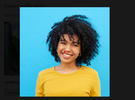
When I rotate the image 90° to the right, it looks like this:
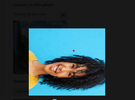
The image is now out of the cropped area bounds and the aspect ratio is off. I can't figure it out.
This is my code.
The crop area is square shaped. Upon loading, the image looks like this:
When I rotate the image 90° to the right, it looks like this:
The image is now out of the cropped area bounds and the aspect ratio is off. I can't figure it out.
This is my code.
JavaScript:
function rotate (img) {

  var imageCropper    = document.querySelector ('.imageCropper');

  var cropArea        = imageCropper.querySelector ('.cropArea');

  var originalCanvas  = imageCropper.querySelector ('canvas.original');
  var resizedCanvas   = imageCropper.querySelector ('canvas.resized');

  var cropAreaRect    = cropArea.getBoundingClientRect();

  var resizedCtx      = resizedCanvas.getContext ('2d');

  rotationAngle       = img.getAttribute ('data-rotation-angle');


  if (Math.abs(rotationAngle) == 90 || Math.abs(rotationAngle == 270)) {

    resizedCanvas.width  = img.height;
    resizedCanvas.height = img.width;

  } else {

    resizedCanvas.width  = img.width;
    resizedCanvas.height = img.height;
  }


  if (img.matches('canvas')) { // canvas element as opposed to Image object

    // The source image is the resized canvas itself, and drawing it onto itself won't work.
    // Set the original canvas as source so that we can draw it on the resized canvas.

    img = originalCanvas;
  }

//######################################################### --- ROTATE

  resizedCtx.translate(resizedCanvas.width / 2, resizedCanvas.height / 2);

  resizedCtx.rotate(rotationAngle * Math.PI / 180);

  resizedCtx.translate(-resizedCanvas.width / 2, -resizedCanvas.height / 2);

  resizedCtx.drawImage (

    img,

    0, 0,
    img.width, img.height,

    0, 0,
    resizedCanvas.width, resizedCanvas.height
  );
}


if (node.matches ('.imageCropper button.rotateRight')) {

  node.addEventListener ('click', function () {

    var imageCropper  = node.closest ('.imageCropper');
    var cropArea      = imageCropper.querySelector ('.cropArea');
    var resizedCanvas = imageCropper.querySelector ('canvas.resized');

    // Get the rotation angle value in the data-rotation-angle attribute

    var rotationAngle = parseFloat(resizedCanvas.getAttribute ('data-rotation-angle'));

    // If a rotation angle value does not exist, it means the image is in the original position
    // and this will be the first rotation, so we set the rotationAngle as 0.

    if (! rotationAngle) {

      var rotationAngle = 0;
    }

    // We increment the rotation angle by 90 degrees, which will rotate the image in a clockwise direction

    rotationAngle += 90;

    // When the rotation angle reaches 270 and the next decrementation would take it to 360,
    // that means the image has done a full rotation and is back to its original position,
    // so we set it to 0.

    // We don't want values bigger than 360.

    if (rotationAngle > 270) {

      rotationAngle = 0;
    }

    // We set the data-rotation-angle with the new rotation angle value

    resizedCanvas.setAttribute('data-rotation-angle', rotationAngle);

    // Call the rotate() function

    rotate (resizedCanvas);

  }, false);
}



