
tbell_woG
New Coder
I am fairly new to react native, but I have some experience. I am creating my own app for both iOS and Android by following along with a tutorial course that I had already completed and making my own modifications. I am having an issue with displaying my custom header on the pages besides the Home screen. The header only shows on the Home screen within the pages on the BottomTabNavigator.
I had this same issue with the pages in the left menu tab inside of the DrawerNagivator. However, I fixed that issue by creating a stack navigator for each page. But I haven't had the same outcome with the bottom menu in the BottomTabNavigator. After struggling with this for several days, I'm desperate, so I decided to ask my question here.
Please someone, help me out!😭😭😩😩🙏🙏 Any suggestions would definitely help. Thanks so much! God bless!
P.S. I am also using React Navigation v.4 to follow along with the tutorial. I'll update it later lol.
Here is my code snippet:
Here is the code for my header that I have on each screen:
Here are my images:
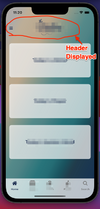
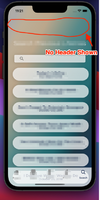
I had this same issue with the pages in the left menu tab inside of the DrawerNagivator. However, I fixed that issue by creating a stack navigator for each page. But I haven't had the same outcome with the bottom menu in the BottomTabNavigator. After struggling with this for several days, I'm desperate, so I decided to ask my question here.
Please someone, help me out!😭😭😩😩🙏🙏 Any suggestions would definitely help. Thanks so much! God bless!
P.S. I am also using React Navigation v.4 to follow along with the tutorial. I'll update it later lol.
Here is my code snippet:
Code:
import React from "react";
    import {
      View,
      BlurView,
      StyleSheet,
      Image,
      TouchableOpacity,
    } from "react-native";
    import {
      createStackNavigator,
      TransitionPresets,
    } from "react-navigation-stack";
    import { createAppContainer } from "react-navigation";
    import { createBottomTabNavigator } from "react-navigation-tabs";
    import { createDrawerNavigator } from "react-navigation-drawer";
    import { Ionicons } from "@expo/vector-icons";
    import {
      FontAwesome,
      FontAwesome5,
      SimpleLineIcons,
    } from "@expo/vector-icons";

    import HomeScreen from "../screens/app/HomeScreen/HomeScreen";
    import ReadScreen from "../screens/app/ReadScreen/ReadScreen";
    import PrayerScreen from "../screens/app/PrayerScreen/PrayerScreen";
    import ListenScreen from "../screens/app/ListenScreen/ListenScreen";
    import SearchScreen from "../screens/app/SearchScreen/SearchScreen";

const defaultStackNavOptions = {
  ...TransitionPresets.SlideFromRightIOS,
  cardStyle: { backgroundColor: "transparent" },
  headerShown: true,
  headerTransparent: true,
};

const LifelineNavigator = createStackNavigator(
  {
    Home: HomeScreen,
    Read: ReadScreen,
    Prayer: PrayerScreen,
    Listen: ListenScreen,
    Search: SearchScreen,
  },
  {
    defaultNavigationOptions: defaultStackNavOptions,
  }
);

const TodaysLifelineNavigator = createStackNavigator({
  TodaysLifeline: TodaysLifelineScreen,
});

const LifelineTabNavigator = createBottomTabNavigator(
  {
    Home: {
      screen: LifelineNavigator,
      navigationOptions: {
        tabBarIcon: (tabInfo) => {
          return (
            <FontAwesome name="home" size={24} color={tabInfo.tintColor} />
          );
        },
      },
    },
    Read: {
      screen: ReadScreen,
      navigationOptions: {
        tabBarIcon: (tabInfo) => {
          return (
            <FontAwesome5 name="bible" size={24} color={tabInfo.tintColor} />
          );
        },
      },
    },
    Listen: {
      screen: ListenScreen,
      navigationOptions: {
        tabBarIcon: (tabInfo) => {
          return (
            <Ionicons name="ios-ear" size={24} color={tabInfo.tintColor} />
          );
        },
      },
    },
    Prayer: {
      screen: PrayerScreen,
      navigationOptions: {
        tabBarIcon: (tabInfo) => {
          return (
            <FontAwesome5 name="pray" size={24} color={tabInfo.tintColor} />
          );
        },
      },
    },
    Search: {
      screen: SearchScreen,
      navigationOptions: {
        tabBarIcon: (tabInfo) => {
          return (
            <Ionicons name="md-search" size={24} color={tabInfo.tintColor} />
          );
        },
      },
    },
  },
  {
    tabBarOptions: {
      activeTintColor: Colors.blue,
      inactiveTintColor: Colors.midGray,
      labelStyle: {
        fontFamily: "Gotham-Medium",
      },
      style: {
        position: "absolute",
        height: 55,
        backgroundColor: Colors.transparent,
      },
    },
  }
);

......Other Code for Navigation.....

export default createAppContainer(MainNavigator);
Here is the code for my header that I have on each screen:
Code:
HomeScreen.navigationOptions = (navData) => {
  return {
    headerTitle: () => (
      <View>
        <Image
          style={{
            width: 175,
            height: 175,
            alignSelf: "center",
            marginBottom: 5,
            resizeMode: "contain",
          }}
          source={require("/Users/tamirab2/Desktop/The Lifeline Code/the-lifeline-app/src/assets/images/lifeline-logo-bold-dark-blue.png")}
        />
      </View>
    ),
    headerLeft: () => (
      <HeaderButtons HeaderButtonComponent={CustomHeaderButton}>
        <Item
          title="Menu"
          iconName="ios-menu"
          onPress={() => {
            navData.navigation.toggleDrawer();
          }}
        />
      </HeaderButtons>
    ),
    headerStyle: { height: 140 },
  };
};
Here are my images:




