Welcome to Code Forum!

Join a community that supports you and your coding journey from day one. We strive to be a friendly, supportive community that empowers everyone to be better developers. By registering with us, you'll be able to discuss, share and private message with other members of our community.

SignUp Now!
  • Guest, before posting your code please take these rules into consideration:
    • It is required to use our BBCode feature to display your code. While within the editor click < / > or >_ and place your code within the BB Code prompt. This helps others with finding a solution by making it easier to read and easier to copy.
    • You can also use markdown to share your code. When using markdown your code will be automatically converted to BBCode. For help with markdown check out the markdown guide.
    • Don't share a wall of code. All we want is the problem area, the code related to your issue.

    GIF shows where to locate </> in the thread and or post editor toolbar.
    To learn more about how to use our BBCode feature, review our "How to post your code into threads" here.

    Thank you, Code Forum.

Help with Setting Up Environment

RHH

Coder
I have a domain name, a hosting site, Filezilla, Sublime Text (which I'm learning to use), Notepad++. I work on an older HP laptop running Windows 10. I have a very basic page hosted, but I need to know more about what I'm doing; so I'll ask some questions here.

1. Filezilla: I've used it before but I've slept too many times since then. Can someone tell me what the upper right quadrant of Filezilla is for? . . . what it displays? Can you point me to a good tutorial on Filezilla?
2. Do you have any pointers for setting things up at my hosting site? What should be there? What should not be there? What must be there?
3. I also need the same pointers for the development on my system. I have created a separate partition on my HDD but I seem to want to clutter it up. If you have suggestions for what to put in this partition (ie, what folders and sub-folders might be useful) and what to keep out of it, I'm all ears.
4. HTML is still giving me fits. Does any reference exist that tells what attributes and qualifiers can be used with what tags that also provides syntax and examples?
5. Any pointers on version control? My goal is to make one successful change to my web site per day. This might include new content or just better structured HTML, CSS . . . In any case, I'd like to have a simple means of keeping the currently hosted page on my HDD. I added a couple of comment lines in my code that have version number and date and the path to the folder on my local machine where it resides. If there is a better way to do this, I'm open to learning new things.

That's enough for now. I'm going back to my Sublime tutorial and HTML tutorials.
 
Last edited:
Thanks, menator01.

I got the reference card that Antero360 pointed to. I have only scanned it a couple of times; so I might have missed it. Can you point me to a specific part of that card that addresses how best to set up your host folders structure and your local folders structure?

TIA
 
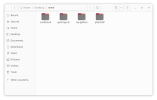
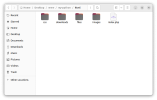
I think that would depend on what you want. As for me my structure is usually
root folder
- images
- css
- js
- index.php

Just a basic example

This is on my pc for when I want to work on one of the sites.
Folder setup and my-python folder
 

Attachments

  • main.png
    main.png
    32.2 KB · Views: 1
  • my-python.png
    my-python.png
    37.2 KB · Views: 1
Last edited:
Thank you, that's what I needed to know. It looks like you have a folder for HTML, CSS, javascript and images.

Why does your index entry have a php extension? At present I have no need for php and simply use the HTML extension.
 
Follow Up Question:

Please comment on my scheme as described in the following paragraph.

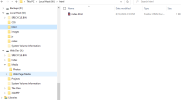
On my local machine, I have created a partition on my HDD for Web Development and a partition for Local Host. In the development partition I have folders and files that I use to create my web page. I will have repositories for code snippets and other useful things here and I will have the files I'm writing or changing here. It will be the only place I write and modify files. When I wish to test the code written, I will move it to the Local Host partition where I will mirror the structure that I want to have at my web host service. I will test using the Local Host partition. When I'm satisfied with the result as viewed in my browser pointing to local files, I will move the entire Local Host partition folders and files using Filezilla to my hosting service replacing all files already there. This should insure against cluttering the hosted space.

I hope that made sense. The screenshot should help.
 

Attachments

  • code 1 2023-08-13_14h17_13.png
    code 1 2023-08-13_14h17_13.png
    26.3 KB · Views: 1
I see no problems with your setup. I don't understand setting up a partition just for creating web documents. I just create a project folder on the desktop. As for the php extension it's just habit. Unless I'm using django or flask, I prefer to use php.
 
Thanks, menator01. The reason I set up separate partitions is that my brain needs to keep things separate in order to stay tracked on the immediate task at hand. I'm also mirroring techniques used to control software changes in my days as a mainframe programmer. We were given space for writing code and job control language. When it was complete to our satisfaction including testing it in a test partition on the mainframe, we moved our code to the staging partition where it could be tested by QA testers. When they were satisfied, they moved it to the production environment on the mainframe. My "x" partition is my development space for writing code. My "w" partition is where I put it to test it. I have a bookmark that will point my browsers to that area where I can see what the browsers do with the code in the full context of my whole web page. When I'm satisfied that new code works and/or works with existing code, I use Filezilla to upload the entire web site again to my host. I'm accustomed to this approach even though it might seem overkill it keeps me from uploading bad code too easily.

Again, thanks for the comment.
 
Back
Top Bottom