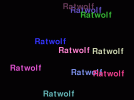
import pygame
import random
import imageio
import os

# Initialize pygame
pygame.init()

# Set up display
WIDTH, HEIGHT = 800, 600
screen = pygame.display.set_mode((WIDTH, HEIGHT))
pygame.display.set_caption("Creative Name Display")

# Define colors
def random_color():
    return (random.randint(50, 255), random.randint(50, 255), random.randint(50, 255))

# Set up font
font = pygame.font.Font(None, 72)
clock = pygame.time.Clock()

# Create a folder for frames
os.makedirs("frames", exist_ok=True)
frames = []
frame_count = 20  # Number of frames to capture

running = True
for frame_num in range(frame_count):
    screen.fill((0, 0, 0))  # Clear screen with black background

    # Draw name multiple times with random properties
    for _ in range(10):
        text_surface = font.render("Ratwolf", True, random_color())
        x = random.randint(0, WIDTH - text_surface.get_width())
        y = random.randint(0, HEIGHT - text_surface.get_height())
        screen.blit(text_surface, (x, y))

    pygame.display.flip()  # Update the screen

    # Save frame as an image
    frame_path = f"frames/frame_{frame_num:03d}.png"
    pygame.image.save(screen, frame_path)
    frames.append(frame_path)

    for event in pygame.event.get():
        if event.type == pygame.QUIT:
            running = False

    clock.tick(2)  # Control frame rate (slow refresh for effect)
    if not running:
        break

pygame.quit()

# Create GIF from saved frames
gif_path = "ratwolf_animation.gif"
with imageio.get_writer(gif_path, mode="I", duration=0.5) as writer:
    for frame in frames:
        image = imageio.imread(frame)
        writer.append_data(image)

# Cleanup frames
for frame in frames:
    os.remove(frame)

print(f"GIF saved as {gif_path}")