dstromberg
Coder
Hello people.
I'm attempting to add a few radio buttons to a large HTML+CSS+Javascript (and Python on the backend) project.
Something, somewhere in the stack is changing radio buttons to be just their lablels, and no actual visible circles. In factd, they aren't just invisible: if I click where the circle would be by default, nothing happens. But if I click the labels, I get a test popup.
How can I reset a specific group of radio buttons, to CSS defaults?
I've tried more things than I can count, but most recently, I tried:
CSS:
And that's paired with this HTML:
But the web interface just looks like:

I'd share a URL, but this is an internal-only project.
What I want is something more like:
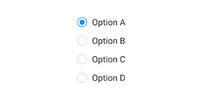
I don't really care much about the colors at this point. Not yet anyway. But I do want the circles.
Any suggestions? How can get (back) the little, fillable circles on the left of those labels?
Thanks!
I'm attempting to add a few radio buttons to a large HTML+CSS+Javascript (and Python on the backend) project.
Something, somewhere in the stack is changing radio buttons to be just their lablels, and no actual visible circles. In factd, they aren't just invisible: if I click where the circle would be by default, nothing happens. But if I click the labels, I get a test popup.
How can I reset a specific group of radio buttons, to CSS defaults?
I've tried more things than I can count, but most recently, I tried:
CSS:
CSS:
/* .un_preserve_radio input[type="radio"] { */
  .un_preserve_radio {
  /* opacity: 1;
  ** position: fixed;
  ** width: 100%;
  ** -webkit-appearance: radio;
  ** -moz-appearance: radio;
  ** -O-appearance: radio;
  ** appearance: radio;
  */
  all: initial;
  }
And that's paired with this HTML:
HTML:
<label>
    <input type="radio" name="un_preserved" onclick="preserved_button_click()" style="un_preserve_radio" />
    Preserved
</label>
<label>
    <input type="radio" name="un_preserved" onclick="unpreserved_button_click()" style="un_preserve_radio" />
    Unpreserved
</label>
But the web interface just looks like:
I'd share a URL, but this is an internal-only project.
What I want is something more like:
I don't really care much about the colors at this point. Not yet anyway. But I do want the circles.
Any suggestions? How can get (back) the little, fillable circles on the left of those labels?
Thanks!