LilyTalmers
Coder
I'm trying to create a form and in my text input field I'm using glassmorphism. But when someone autofill the glassmorphism effect disappears.
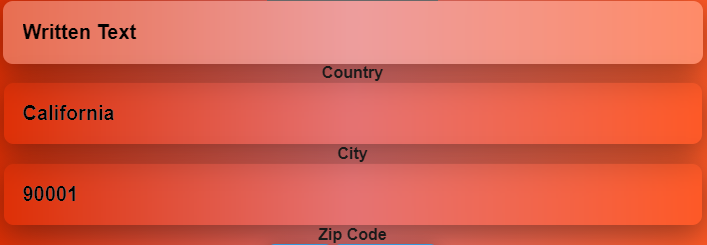
In this picture the first field is manually typed but the last two field are autofilled. As you can see in the first field the glassmorphism effect is visible but in the last two it isn't.
I've been stuck with this problem for more than two days. Can't find a solution.
In this picture the first field is manually typed but the last two field are autofilled. As you can see in the first field the glassmorphism effect is visible but in the last two it isn't.
.Text_Input {
    background: rgba(255, 255, 255, 0.3);
    box-shadow: 0 8px 32px 0 rgba(0, 0, 0, 0.4);
    backdrop-filter: blur( 7.0px );
    -webkit-backdrop-filter: blur( 7.0px );
    top: 0px;
    left: 0px;
    width: calc(100% - 40px);
    height: 100%;
    border: none;
    border-radius: 10px;
    outline: none;
    padding: 20px;
    font-weight: bold;
    font-size: 20px;
}

.Text_Input:-webkit-autofill {
    background-clip: text;
    -webkit-background-clip: text;
}

<input class="input__field" type="text" />
<label class="input">
{label}
</label>
I've been stuck with this problem for more than two days. Can't find a solution.